
Programming Guide

     Previous  Next    Open TOC in new window  Open Index in new window  View as PDF - New Window  Get Adobe Reader - New Window
Content starts here

Oracle SALT SCA Programming

This chapter contains the following topics:


Overview

One important aspect of Service Component Architecture (SCA) is the introduction of a new programming model. As part of the Tuxedo architecture, SCA allows you to better blend high-output, high-availability and scalable applications in an SOA environment.

SCA components run on top of the Tuxedo infrastructure using ATMI binding. The ATMI binding implementation provides native Tuxedo communications between SCA components, as well as SCA components and Tuxedo programs (clients and servers).

In addition to the programming model, the Service Component Definition Language (SCDL) describes what components can perform in terms of interactions between each other, and instructs the framework to set-up necessary links (wires).


SCA Utilities

The following utilities are used in conjunction with Oracle SALT SCA programming:

For more information, see the Oracle SALT Command Reference.


SCA Client Programming

The runtime reference binding extension is the implementation of the client-side aspect of the SCA container. It encapsulates the necessary code used to call other services, SCA components, Tuxedo servers or even Web services, transparently from an SCA-based component.

SCA Client Programming Steps

Developing SCA client programs requires the following steps:

  1. Setting Up the Client Directory Structure
  2. Developing the Client Application
  3. Composing the SCDL Descriptor
  4. Building the Client Application
  5. Running the Client Application
  6. Handling TPFAIL Data

Setting Up the Client Directory Structure

You must define the applications physical representation. Strict SCA client applications are SCA component types. Listing 6-1shows the directory structure used to place SCA components in an application.

Listing 6-1 SCA Component Directory Structure
myApplication/ (top-level directory, designated by the APPDIR environment variable)
    root.composite (SCDL top-level composite, contains the list of components in this application)
    myClient/ (directory containing actual client component described in this section)
        myClient.composite (SCDL for the client component)
        myClient.cpp (client program source file)
        TuxService.h (interface of component called by client program)

Listing 6-2 shows an example of typical root.composite content.

Listing 6-2 root.composite Content
<composite xmlns="http://www.osoa.org/xmlns/sca/1.0"
       name="simple.app">
       <component name="myClientComponent">
              <implementation.composite name="myClient"/>
       </component>
</composite>

The implementation.composite@name parameter references the directory that contains the component named 'myClientComponent'. This value is required at runtime. For more information, see Running the Client Application.

Developing the Client Application

Client programs are required to implement a call to a single API. This following call is required in order to set up the SCA runtime:

...
       CompositeContext theContext = CompositeContext::getCurrent();
...
Actual calls are based on an interface. This interface is usually developed along with the component being called. In the case of existing Tuxedo ATMI services, this interface can be generated by accessing the Tuxedo METADATA repository. For more information, see the Oracle SALT Administration Guide and tuxscagen, scatuxgen in the Oracle SALT Reference Guide.

In the case of calling external Web services, an interface matching the service WSDL must be provided. For more information, see SCA Data Type Mapping for the correspondence between WSDL types and C++ types.

Listing 6-3 shows an interface example.

Listing 6-3 Interface Example
#include <string> 
/**
       * Tuxedo service business interface
       */
       class TuxService
       {
       public:
       virtual std::string TOUPPER(const std::string inputString) = 0;
       };

In the interface shown in Listing 6-3, a single method TOUPPER is defined. It takes a single parameter of type std::string, and returns a value of type std::string. This interface needs to be located in its own .h file, and is referenced by the client program by including the .h file.

Listing 6-4 shows an example of a succession of calls required to perform an invocation.

Listing 6-4 Invocation Call Example
// SCA definitions
// These also include a Tuxedo-specific exception definition: ATMIBindingException
#include "tuxsca.h"
// Include interface
#include "TuxService.h"
...
       // A client program uses the CompositeContext class
       CompositeContext theContext = CompositeContext::getCurrent();
...
       // Locate Service
       TuxService* toupperService =
              (TuxService *)theContext.locateService("TOUPPER");
...
       // Perform invocation
       const std::string result = toupperService->TOUPPER("somestring");
...
Notes: The invocation itself is equivalent to making a local call (as if the class were in another file linked in the program itself).
Note: For detailed code examples, see the SCA samples located in following directories:

Composing the SCDL Descriptor

The link between the local call and the actual component is made by defining a binding in the SCDL side-file. For example, Listing 6-4 shows a call to an existing Tuxedo ATMI service, the SCDL descriptor shown in Listing 6-5 should be used. This SCDL is contained in a file called <componentname>.composite.

Listing 6-5 SCDL Descriptor
<composite xmlns="http://www.osoa.org/xmlns/sca/1.0" 
          name="simpapp.client">
     <reference name="TOUPPER">
        <interface.cpp header="TuxService.h"/>
        <binding.atmi requires="legacy">
           <inputBufferType target="TOUPPER">STRING</inputBufferType>
           <outputBufferType target="TOUPPER">STRING</outputBufferType>
        </binding.atmi>
    </reference>
</composite>

This composite file indicates that a client component may perform a call to the TOUPPER reference, and that this call is performed using the ATMI binding. In effect, this results in a tpcall() to the "TOUPPER" Tuxedo service. This Tuxedo service may be an actual existing Tuxedo ATMI service, or another SCA component exposed using the ATMI binding. For more information, see SCA Component Programming.

The inputBufferType and outputBufferType elements are used to determine the type of Tuxedo buffer used to exchange data. For more information, see SCA Data Type Mapping and the ATMI Binding Element Reference for a description of all possible values that can be used in the binding.atmi element.

Building the Client Application

Once all the elements are in place, the client program is built using the buildscaclient command. You must do the following steps:

  1. Navigate to the directory containing the client source and SCDL composite files
  2. Execute the following command:
  3. $ buildscaclient -c myClientComponent -s . -f myClient.cpp

    This command verifies the SCDL code, and builds the following required elements:

    • A shared library (or DLL on Windows) containing generated proxy code
    • The client program itself

If no syntax or compilation error is found, the client program is ready to use.

Running the Client Application

To execute the client program, the following environment variables are required:

Invoking Existing Tuxedo Services

Access to existing Tuxedo ATMI services from an SCA client program can be simplified using the examples shown in Listing 6-6, Listing 6-7, and Listing 6-8.

Note: These examples can also be used for server-side SCA components.

Starting from a Tuxedo METADATA repository entry as shown in Listing 6-6, the tuxscagen command can be used to generate interface and SCDL.

Listing 6-6 SCA Components Calling an Existing Tuxedo Service
service=TestString
tuxservice=ECHO
servicetype=service
inbuf=STRING
outbuf=STRING

service=TestCarray
tuxservice=ECHO
servicetype=service
inbuf=CARRAY
outbuf=CARRAY
Listing 6-7 Generated Header

#ifndef ECHO_h
#define ECHO_h
#include <string>
#include <tuxsca.h>
class ECHO
{
public:
    virtual std::string TestString(const std::string arg) = 0;
    virtual std::string TestCarray(const struct carray_t * arg) = 0; }; #endif /* ECHO_h */

Listing 6-8 Generated SCDL Reference
<?xml version="1.0" encoding="UTF-8"?>
<composite xmlns="http://www.osoa.org/xmlns/sca/1.0"
name="ECHO">
  <reference name="ECHO">
    <interface.cpp header="ECHO.h"/>
    <binding.atmi requires="legacy">
      <serviceType target="TestString">RequestResponse</serviceType>
      <inputBufferType target="TestString">STRING</inputBufferType>
      <outputBufferType target="TestString">STRING</outputBufferType>
      <serviceType target="TestCarray">RequestResponse</serviceType>
      <inputBufferType target="TestCarray">CARRAY</inputBufferType>
      <outputBufferType target="TestCarray">CARRAY</outputBufferType>
    </binding.atmi>
  </reference>
</composite>

The steps used to invoke these services are identical to the examples shown in Listing 6-6 through Listing 6-8.

Handling TPFAIL Data

Invoking a non-SCA Tuxedo ATMI service may return an error, but still send back data by using tpreturn(TPFAIL, …). When this happens, an SCA client or component is interrupted by the ATMIBindingException type.

The data returned by the service, if present, can be obtained by using the ATMIBindingException.getData()API. For more information see, TPFAIL Return Data.

The example in Listing 6-9 corresponds to a binding.atmi definition as shown in Listing 6-10.

Listing 6-9 Invocation Interruption Example
...
        try {
          const char* result = toupperService->charToup("someInput");
        } catch (tuscany::sca::atmi::ATMIBindingException& abe) {
          // Returns a pointer to data corresponding to
          // mapping defined in <errorBufferType> element
          // in SCDL
          const char* *result = (const char **)abe.getData();
          if (abe.getData() == NULL) {
              // No data was returned
          } else {
              // Process data returned
              ...
          }
        } catch (tuscany::sca::ServiceInvocationException& sie) {
          // Other type of exception is returned
        }
...
Listing 6-10 /binding.atmi Definition
...
        <binding.atmi requires="legacy">
              <inputBufferType target="charToup">STRING</inputBufferType>
              <outputBufferType target="charToup">STRING</outputBufferType>
              <errorBufferType target="charToup">STRING</errorBufferType>
<binding.atmi/>
...

Other returned data types must be cast to the corresponding type. For example, an invocation returning a commonj::sdo::DataObjectPtr as shown in Listing 6-11.

Listing 6-11 SCDL Invocation Example
...
       <errorBufferType target="myMethod">FML32/myType</errorBufferType>
...

The ATMIBindingException.getData() result is shown in Listing 6-12.

Listing 6-12 ATMIBindingException.getData() Results
...
              catch (tuscany::sca::atmi::ATMIBindingException& abe) {
              const commonj::sdo::DataObjectPtr *result =
              (const commonj::sdo::DataObjectPtr *)abe.getData();
...

The rules for returning TPFAIL data to the calling application are as follows:

For more conversion rules between Tuxedo buffer types and C++ data information, see SCA Data Type Mapping.


SCA Component Programming

The SCA Component terminology designates SCA runtime artifacts that can be invoked by other SCA or non-SCA runtime components. In turn, these SCA Components can perform calls to other SCA or non-SCA components. This is different from strict SCA clients which can only make calls to other SCA or non-SCA components, but cannot be invoked.

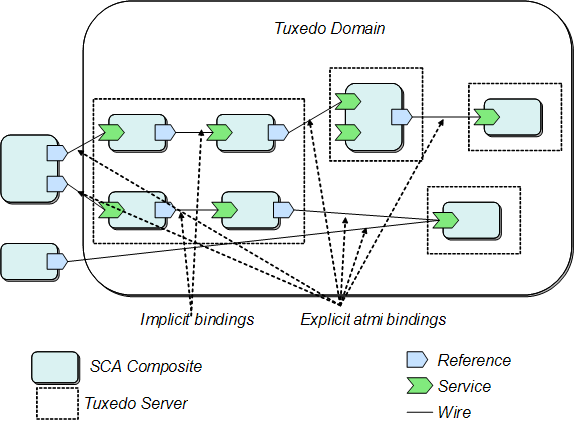
The Oracle SALT SCA container provides the capability of hosting SCA components in an Oracle Tuxedo server environment. This allows you to take full advantage of proven Oracle Tuxedo qualities: reliability, scalability and performance.

Figure 6-1 summarizes SCA components and Tuxedo server mapping rules.

Figure 6-1 SCA Component and Tuxedo Server Mapping Rules

SCA Component and Tuxedo Server Mapping Rules

While SCA components using Tuxedo references do not require special processing, SCA components offering services must still be handled in a Tuxedo environment.

The mapping is as follows:

SCA composites are deployed in a Tuxedo application by configuring instances of generated SCA servers in the UBBCONFIG file. Multiple instances are allowed. Multi-threading capabilities are also allowed and controllable using already-existing Tuxedo features.

SCA Component Programming Steps

The steps required for developing SCA component programs are as follows:

  1. Setting Up the Component Directory
  2. Developing the Component Implementation
  3. Composing the SCDL Descriptor
  4. Compiling and Linking the Components
  5. Building the Tuxedo Server Host

Setting Up the Component Directory

You must first define the applications physical representation. Listing 6-13 shows the directory structure used to place SCA components in an application:

Listing 6-13 SCA Component Directory Structure
myApplication/ (top-level directory, designated by the APPDIR environment variable)
    root.composite (SCDL top-level composite, contains the list of components in this application)
    myComponent/ (directory containing actual component described in this section)
        myComponent.composite (SCDL for the component)
        myComponent.componentType
        myComponentImpl.cpp (component implementation source file)
        TuxService.h (interface of component being exposed)
        TuxServiceImpl.h (component implementation definitions)

Listing 6-14 shows typical root.composite content.

Listing 6-14 root.composite Content
<composite xmlns="http://www.osoa.org/xmlns/sca/1.0" 
       name="simple.app">
       <component name="myComponent">
              <implementation.composite name="myComponent"/>
       </component>
</composite>

The implementation.composite@name parameter references the directory that contains the 'myComponent' component.

Developing the Component Implementation

Components designed to be called by other components do not need to be aware of the SCA runtime. There are, however, limitations in terms of interface capabilities, such as:

Listing 6-15 shows an example of an interface implemented for a client program.

Listing 6-15 Component Implementation Interface
#include <string> 
/**
  * Tuxedo service business interface
  */
  class TuxService
  {
  public:
       virtual std::string TOUPPER(const std::string inputString) = 0;
  };

The component implementation then generally consists of two source files (as shown Listing 6-16 and Listing 6-17 respectively):

Additionally, a side-file (componentType), is required. It contains the necessary information for the SCA wrapper generation and possibly proxy code (if this component calls another component).

This componentType file (<componentname>Impl.componentType)is an SCDL file type. Listing 6-18 shows an example of a componentType file (TuxServiceImpl.componentType).

Listing 6-18 componentType File Example
<?xml version="1.0" encoding="UTF-8"?> 
 <componentType xmlns="http://www.osoa.org/xmlns/sca/1.0" >
       <service name="TuxService">
              <interface.cpp header="TuxService.h"/>
       </service>
 </componentType>

Composing the SCDL Descriptor

The link between the local implementation and the actual component is made by defining a binding in the SCDL side-file. For example, for the file type in Listing 6-18 to be exposed as a Tuxedo ATMI service, the SCDL in Listing 6-19 should be used. This SCDL is contained in a file called <componentname>.composite (for example, myComponent.composite).

Listing 6-19 Example SCDL Descriptor
<?xml version="1.0" encoding="UTF-8"?>     
<composite xmlns="http://www.osoa.org/xmlns/sca/1.0" name="myComponent">  
  <service name="TuxService">                                        
     <interface.cpp header="TuxService.h"/>                                                                  
        <binding.atmi requires="legacy"/>                           
   <map target="toupper">TUXSVC</map>   
   <inputBufferType target="toupper">STRING</inputBufferType>
   <outputBufferType target="toupper">STRING</outputBufferType>
          <reference>MYComponent</reference>    
    </service>   
    <component name="MYComponent">  
        <implementation.cpp library="TuxService" header="TuxServiceImpl.h"/> 
    </component>                                               
</composite>

This composite file indicates that the service, mySVC, can be invoked via the Tuxedo infrastructure. It further indicates that the toupper() method is advertised as the TUXSVC service in the Oracle Tuxedo system. Once initialized, another SCA component may now call this service, as well as a non-SCA Tuxedo ATMI client.

The inputBufferType and outputBufferType elements are used to determine the type of Tuxedo buffer used to exchange data. For more information, see SCA Data Type Mapping and the ATMI Binding Element Reference for a description of all possible values that can be used in the binding.atmi element.

Note: The mycomponent.componentType service name should be same as the composite file, otherwise an exception is thrown.

Compiling and Linking the Components

Once all the elements are in place, the component is built using the buildscacomponent command. The steps are as follows:

  1. Navigate to the APPDIR directory. The component and side files should be in its own directory one level down
  2. Execute the following command:
  3. $ buildscacomponent -c myComponent -s . -f TuxServiceImpl.cpp

    This command verifies the SCDL code, and builds the following required elements:

    • A shared library (or DLL on Windows) containing generated proxy code

Building the Tuxedo Server Host

In order for components to be supported in a Tuxedo environment, a host Tuxedo server must be built. This is achieved using the buildscaserver command.

For example: $ buildscaserver -c myComponent -s . -o mySCAServer

When the command is executed, mySCAServer is ready to be used. It automatically locates the component(s) to be deployed according to the SCDL, and performs the appropriate Tuxedo/SCA associations.


SCA Python and Ruby Programming

This section contains the following topics:

SCA Python and Ruby Programming Overview

Integration of Python or Ruby scripts in an environment such as Tuxedo via the SALT, is intended for providing additional flexibility in terms of program development.

Python and Ruby are comparable object-oriented scripting languages that offer many advantages over C/C++:

SALT SCA Python and Ruby support provides a set of APIs to perform SCA calls from Python or Ruby client programs, and language extensions to call Python or Ruby components. For more information, see Python and Ruby Client Programming and Python and Ruby Component Programming.

The buildscaclient, buildscaserver and buildscacomponent commands do not need adapting for use with Python or Ruby programs, as they are not be required to produce executables or component libraries.

Note: A system server, SCAHOST, is provided to correctly marshal requests and responses to and from Python or Ruby scripts. It contains Python and Ruby scripts exposed as SCA services (via the Oracle Tuxedo Metadata Repository). The definitions describe the parameters and return types of the corresponding exposed Python or Ruby functions.
Note: For more information, see Python and Ruby Data Type Mapping for Service Metadata Repository entry examples.

Available bindings are used from Python or Ruby programs, or are used to invoke Python or Ruby components. Like C++, the Python and Ruby language extension is binding-independent.

Figure 6-2 provides an overview of the SALT SCA environment Python and Ruby support architecture.

Figure 6-2 SALT SCA Python and Ruby Programming Support Architecture

SALT SCA Python and Ruby Programming Support Architecture

Python and Ruby Client Programming

SCDL Clients

From a client component perspective, the SCDL code only has to mention the referenced component and possibly the binding used (that is, no interface element is required).

For example, the following snippet allows a Python or Ruby client to make an invocation to an SCA component via ATMI binding, and using the default buffer type (STRING input, STRING output):

<reference name="CalculatorComponent">
     <binding.atmi/>
</reference>

Python Clients

To invoke an SCA component from a Python program, you must do the following:

  1. Import the SCA library using the following command:
  2. import sca

  3. Use the following API to locate the service:
  4. calc = sca.locateservice("CalculatorComponent")

The calc object is used to invoke the “add” operation (for example, result = calc.add(val1, val2)).

Ruby Clients

To invoke an SCA component from a Ruby program, you must do the following:

  1. Load the Ruby proxy extension:
  2. require("sca_ruby")

  3. Use the following API to locate the service:
  4. calculator = SCA::locateService("CalculatorComponent")

The calculator object is used to invoke the “add” operation (for example, x = calculator.add(3, 2)).

Python and Ruby Component Programming

SCDL Components

In order to use Python or Ruby scripts in SCA as components, you must use the implementation.python and implementation.ruby parameters.

Note: implementation.python and implementation.ruby usage is similar to the implementation.cpp element (see Listing 6-19 and Listing 6-29); the difference is that the interface.python and interface.ruby elements, or .componentType are not required.

Their syntax and attributes are as follows:

Listing 6-20 shows an example of a Python component in an SCA composite accessible using the ATMI binding. In this example, runtime looks for a Python component located in a file named ToupperService.py in the same location as the composite file.

Similarly, a Ruby component is required in a file named ToupperService.rb, in the same location as the composite file.

Listing 6-20 Python Component in an SCA Composite
<?xml version="1.0" encoding="UTF-8"?>

<composite xmlns="http://www.osoa.org/xmlns/sca/1.0"
              name="simpapp.server">

       <service name="SCASVC">
              <binding.atmi/>
              <reference>ToupperServiceComponent</reference>
</service>

<component name="ToupperServiceComponent">
       <implementation.python module="ToupperService"
                                   scope="composite"/>
</component>
       
</composite>

Python Components

Python operations are exposed as module-level functions contained in a Python module file. For example, a ToupperService.py file would contain the code shown in Listing 6-21.

Listing 6-21 Python Module File
def charToup(val1):
    print "input: " + val1
    result = "result"
    print "Python - toupper"
    return result

Parameter and return values types are dynamically determined at runtime. Application exceptions are caught by the extension runtime and re-thrown as tuscany::sca::ServiceInvocationException.

During input, unsupported types or an error processing an input DataObject results in the following exception:
a tuscany::sca::ServiceDataException.

During output, simple return types are always processed. An error generating a DataObject (from XML data) results in the following exception:
tuscany::sca::ServiceDataException.

For more information, see Python and Ruby Data Type Mapping.

Ruby Components

Ruby operations are exposed as methods of an implementation class contained in a Ruby script file (.rb extension). For example, a ToupperService.rb file would contain the code shown in Listing 6-22.

Listing 6-22 Ruby Script File
class ToupperService

  def initialize()
    print "Ruby - ToupperService.initialize\n"
  end

  def charToup(arg1)
    print "Ruby - ToupperService.div\n"
    arg1.ToUpper()
  end

end

Parameter and return values types are dynamically determined at runtime. Application exceptions are caught by the extension runtime and re-thrown as tuscany::sca::ServiceInvocationException.

During input, unsupported types or an error processing an input DataObject results in the following exception:
a tuscany::sca::ServiceDataException.

During output, simple return types are always processed. An error generating a DataObject (from XML data) results in the following exception: tuscany::sca::ServiceDataException.
For more information, see Python and Ruby Data Type Mapping.


SCA Structure Support

This section contains the following topics:

Note: This section applies to application defined structures only. For information on Oracle SALT SCA defined structures, see SCA Data Type Mapping.

SCA Structure Support Overview

SCA Structure support provides:

You must use the struct data type specified in the SCA method parameter definition or in the definition of a return value from an SCA method as follows:

Elements within the structure can be any of the following simple data types/arrays that are supported as an SCA parameter:

SCA Structure Limitations

Using SCA Structure Description Files

A structure description file may be used to describe the format of an SCA structure parameter. Structure description files are very similar to Tuxedo viewfiles, with additional capabilities added for SCA.

Note: The use of structure description files is optional, and is needed only when FML field names corresponding to structure elements are different from the names of the structure elements, or when some other non-default structure related feature is required. If an application wants to make use of an Associated Length Member, an Associated Count Member, or an application-specified default value for a structure element, it may choose to make use of a structure description file.

If no structure description file is provided for a particular structure, then the structure definition used in application code is used, and FML field names in SCA-ATMI mode are the same as structure element names. Since field numbers are generated automatically for SCA-SCA applications, these applications do not need to specify a structure description file.

The structure description file format is identical to the Tuxedo viewfile format, with the following exceptions:

If a structure described in a structure description file is converted to (or from) an FML32 or FML buffer at runtime in an SCA-ATMI application, then the name of the corresponding FML field is the fbname value specified in column 3, if any, and is the cname value specified in column 2 (if no value is specified in column 3). When compiled, the structure description file produces a binary structure description file as shown in Listing 6-23. The binary structure header file is shown in shown in Listing 6-24.

Note: In an SCA-SCA application, FML32 field numbers are generated automatically.
Listing 6-23 SCA Structure Description File
VIEW empname
#TYPE       CNAME     FBNAME        COUNT      FLAG      SIZE      NULL
string      fname     EMP_FNAME       1          -        25        -
char        minit     EMP_MINI       1          -         -        -
string      lname     EMP LNAME       1          -        25        -
END

VIEW emp
struct         empname      ename     1          -         -        -
unsignedlong   id           EMP_ID    1          -         -        -
long           ssn          EMP_SSN   1          -         -        -
double         salaryhist   EMP_SAL   10         -         -        -
END
Listing 6-24 Binary Structure Header File
struct empname {
  char fname[25];
  char minit;
  char lname[25];
};

struct emp {
  struct empname ename;
  unsigned long id;
  long ssn;
  double salaryhist[10];
}

The scastructc32 and scastructc commands are used to convert a source structure description file into a binary structure description file and to generate a header file describing the structure(s) in the structure description file. The scastructdis32 and scastructdis commands accept the same arguments as viewdis32 and viewdis. For more information, see the Oracle SALT Command Reference.

Notes: scastructc32 and scastructc generate a binary file with suffix .V on Unix and suffix .VV on Windows.
Note: If the structure description file contains no SCA extensions that are not available in Tuxedo views, then the magic value for the binary structure description file shall be the same as the magic value used by viewc32. If any SCA specific extensions are used, then a different magic value shall be used for the binary structure description file.

Using tuxscagen to Generate Structures

When invoked with the option -S, tuxscagen generates a structure for any function parameter or return value that would otherwise have been passed using DataObjectPtr.

Note: If tuxscagen -S is run, then simple data types are generated just as they would have been if tuxscagen were run without the -S option. It is possible to mix simple data types, structures, and other complex data types within a single metadata repository. In order to use simple data types in an application that also uses structures, it is not necessary to run tuxscagen without -S.


SCA Remote Protocol Support

SCA Tuxedo invocation supports the following remote protocols:

/WS

SCA invocations made using the SCA container have the capability of being performed using the Tuxedo WorkStation protocol (/WS). This is accomplished by specifying the value WorkStation (not abbreviated so as not to confuse it with WebServices) in the <remoteAccess> element of the <binding.atmi> element.

Only reference-type invocations are be available in this mode. Service-type invocations may be performed using the /WS transparently (there is no difference in behavior or configuration, and setting the <remoteAccess> element to WorkStation for an SCA service has no effect).

Since native and WorkStation libraries cannot be mixed within the same process, client processes must be built differently depending on the type of remote access chosen.

Note: When using the value propagatesTransaction in /binding.atmi/@requires, the behavior of the ATMI binding does not actually perform any transaction propagation. It actually starts a transaction, since the use of this protocol is reserved for client-side access to Tuxedo (SCA or non-SCA) applications only. For more information, see ATMI Binding.

/Domains

SCA invocations made using the SCA container have the capability of being performed using the Tuxedo /Domains protocol. No additional configurations are necessary on <binding.atmi> declarations in SCDL files.

Note: /Domains interoperability configuration is controlled by the Tuxedo administrator.
Note: The SCA service name configured for Tuxedo /Domains is as follows:
Note: For more information, see SCA and Tuxedo Interoperability.


SCA Binding

Oracle SALT supports

ATMI Binding

Tuxedo communications are configured in SCDL using a <binding.atmi> element. This allows you to specify configuration elements specific to the ATMI transport, such as the location of the TUXCONFIG file, the native Tuxedo buffer types used, Tuxedo-specific authentication or /WS (WorkStation) configuration elements, etc.

Listing 6-25 shows a summary of the <binding.atmi> element.

Note: ? refers to a parameter that can be specified 0 or 1 times.
Note: * refers to a parameter that can be specified 0 or more times.

For more information, see Appendix F: Oracle SALT SCA ATMI Binding Reference in the Oracle SALT Reference Guide.

Listing 6-25 ATMI Binding Pseudoschema
<binding.atmi requires="transactionalintent legacyintent"?>
       <tuxconfig>...</tuxconfig>?
       <map target="name">...</map>*
       <serviceType target="name">...</serviceType>*
       <inputBufferType target="name">...</inputBufferType>*
       <outputBufferType target="name">...</outputBufferType>*
       <errorBufferType target="name">...</errorBufferType>*
       <workStationParameters>?
              <networkAddress>...</networkAddress>?
              <secPrincipalName>...</secPrincipalName>?
              <secPrincipalLocation>...</secPrincipalLocation>?
              <secPrincipalPassId>...</secPrincipalPassId>?
              <encryptBits>...</encryptBits>?
       </workStationParameters>
       <authentication>?
              <userName>...</userName>?
              <clientName>...</clientName>?
              <groupName>...</groupName>?
              <passwordIdentifier>...</passwordIdentifier>?
              <userPasswordIdentifier>...
                                          </userPasswordIdentifier>?
       </authentication>
       <fieldTablesLocation>...</fieldTablesLocation>?
       <fieldTables>...</fieldTables>?
       <fieldTablesLocation32>...</fieldTablesLocation32>?
       <fieldTables32>...</fieldTables32>?
       <viewFilesLocation>...</viewFilesLocation>?
       <viewFiles>...</viewFiles>?
       <viewFilesLocation32>...</viewFilesLocation32>?
       <viewFiles32>...</viewFiles32>?
       <remoteAccess>...</remoteAccess>?
       <transaction timeout="xsd:long"/>?
</binding.atmi>

Java ATMI (JATMI) Binding

Java ATMI (JATMI) binding allows SCA clients written in Java to call Tuxedo services or SCA components. It provides one-way invocation of Tuxedo services based on the Tuxedo WorkStation protocol (/WS). The invocation is for outbound communication only from a Java environment to Tuxedo application acting as a server. Apart from a composite file for SCDL binding declarations, no external configuration is necessary. The service name, workstation address and authentication data are provided in the binding declaration.

Note: SSL is supported through the Oracle 11gR1 JCA Adapter. LLE is not currently supported.

Most of the Tuxedo CPP ATMI binding elements support JATMI binding and have the same usage. However, due to different underlying technology and running environment differences, some elements are not supported and some that are supported but have different element names.

The following Tuxedo CPP ATMI binding elements are not supported:

The following Tuxedo CPP ATMI binding workStationParameters elements are not supported:

The following Tuxedo CPP ATMI binding element is supported in a limited fashion.

All the classes in the elements mentioned below must be specified in Java CLASSPATH:

Listing 6-26 shows an example of composite file for binding declaration of a Tuxedo service named "ECHO“.

Listing 6-26 ECHO Composite File
<?xml version="1.0" encoding="UTF-8"?>
<composite xmlns="http://www.osoa.org/xmlns/sca/1.0" xmlns:f="binding-atmi.xsd"
name="ECHO">
    <reference name="ECHO" promote="EchoComponent/ECHO">
       <interface.java interface="com.abc.sca.jclient.Echo" />
       <f:binding.atmi requires="legacy">
       <f:inputBufferType target="echoStr">STRING</f:inputBufferType>
         <f:outputBufferType target="echoStr">STRING</f:outputBufferType>
           <f:errorBufferType target="echoStr">STRING</f:errorBufferType>
            <f:workStationParameters>

<f:networkAddress>//STRIATUM:9999,//STRIATUM:1881</f:networkAddr
ess>
            </f:workStationParameters>
            <f:remoteAccess>WorkStation</f:remoteAccess>
        </f:binding.atmi>
    </reference>
    <component name="EchoComponent">
      <implementation.java class="com.abc.sca.jclient.EchoComponentImpl" />
    </component>
</component>

Listing 6-27 shows the interface for the example mentioned in Listing 6-26.

Listing 6-27 ECHO Interface
package com.abc.sca.jclient;

import com.oracle.jatmi.AtmiBindingException;

public interface Echo {
        String echoStr(String requestString) throws AtmiBindingException;
}

Listing 6-28 shows an example of an SCA client implementation.

Listing 6-28 SCA Client Implementation
package com.abc.sca.jclient;

import org.osoa.sca.annotations.Constructor;
import org.osoa.sca.annotations.Reference;
import com.oracle.jatmi.AtmiBindingException;

/**
* A simple client component that uses a reference with a JATMI binding.
*/
public class EchoComponentImpl implements Echo {

       private Echo echoReference;

        @Constructor
       public EchoComponentImpl(@Reference(name = "ECHO", required = true) Echo
 echoReference) {
                this.echoReference = echoReference;
       }

        public String echoStr(String requestString) throws AtmiBindingException {
                return echoReference.echoStr(requestString);
        }
}

Python and Ruby Binding

The Python and Ruby language extensions are binding-independent, meaning that binding extensions are not aware of the language of clients or components. Language extensions are not aware of the binding used.

Binding extensions are not modified to comply with Python and Ruby program support. Note the following:

Python and Ruby Binding Limitations

Using Python and Ruby bindings have the following limitations:

Web Services Binding

The Web services binding (binding.ws) leverages previously existing Oracle SALT capabilities by funneling Web service traffic through the GWWS gateway. SCA components are hosted in Tuxedo servers, and communications to and from those servers are performed using the GWWS gateway.

SCA clients using a Web services binding remain unchanged whether the server is running in a Tuxedo environment or a native Tuscany environment (for example, exposing the component using the Axis2 Web services binding).

Note: HTTPS is not currently supported.

When SCA components are exposed using the Web services binding (binding.ws), tooling performs the generation of WSDF information, metadata entries and FML32 field definitions.

When SCDL code of SCA components to be hosted in a Tuxedo domain (for example, service elements) contains <binding.ws> elements, the buildscaserver command generates an WSDF entry in a file named service.wsdf where 'service' is the name of the service exposed. An accompanying service.mif and service.fml32 field table files are also generated, based on the contents of the WSDL interface associated with the Web service. You must compose a WSDL interface. If no WSDL interface is found, an error message is generated.

Web services accessed from a Tuxedo domain using a Web services binding (for example, reference elements found in SCDL) require the following manual configuration steps:

  1. Convert the WSDL file into a WSDF entry by using the wsdlcvt tool. Simultaneously, a Service Metadata Entry file (.mif), and fml32 mapping file are generated.
  2. Make sure that the UBB source has the TMMETADATA and GWWS servers configured
  3. Import the WSDF file into the SALTDEPLOY file
  4. Convert the SALTDEPLOY file into binary using wsloadcf.
  5. Load the Service Metadata Entry file (.mif) into the Service Metadata Repository using the tmloadrepos command.
  6. Boot (or re-boot) the GWWS process to initiate the new deployment.

The Web services binding reference extension initiates the Web services call.

Listing 6-29 shows an SCA component service exposed as a Web service.

Listing 6-29 Example SCA Component Service Exposed as a Web Service
<composite xmlns="http://www.osoa.org/xmlns/sca/1.0"
       name="bigbank.account">
...
   <service name="AccountService">
       <interface.wsdl interface="http://www.bigbank.com/AccountService
              #wsdl.interface(AccountService)"/>
       <binding.ws/>
       <reference>AccountServiceComponent</reference>
   </service>

   <component name="AccountServiceComponent">
       <implementation.cpp
                     library="Account" header="AccountServiceImpl.h"/>
       <reference name="accountDataService">
              AccountDataServiceComponent
       </reference>
   </component>
...
</composite>

The steps required to expose the corresponding service are as follows:

  1. Compose a WSDL interface matching the component interface.
  2. Use buildscacomponent to build the application component runtime, similar to building a regular SCA component.
  3. buildscaserver -w is used to convert SCDL code into a WSDF entry, and produce a deployable server (Tuxedo server + library + SCDL).
  4. The service from the above SCDL creates a WSDF entry as shown in Listing 6-30.

    Listing 6-30 WSDF Entry
    <Definition>
           <WSBinding id="AccountService_binding">
                  <ServiceGroup id="AccountService">
                         <Service name="TuxAccountService"/>
                  </ServiceGroup>
           </WSBinding>
    </Definition>
  5. buildscaserver -w also constructs a Service Metadata Repository entry based by parsing the SCDL and interface. The interface needs to be in WSDL form, and manually-composed in this release.
  6. Make sure that the UBB source has the TMMETADATA and GWWS servers configured.
  7. The Service Metadata Repository entry is loaded into the Service Metadata Repository using the tmloadrepos command.
  8. The WSDF file must be imported into the SALTDEPLOY file and SALTDEPLOY converted into binary using wsloadcf.
  9. The Service Metadata Entry file (.mif) is loaded into the Service Metadata Repository.
  10. The Tuxedo server hosting the Web service is booted and made available.
  11. The GWWS is rebooted to take into account the new deployment.

These steps are required, in addition to the SALTDEPLOY configuration, in order to set up the GWWS gateway for Web services processing (for example, configuration of GWInstance, Server Level Properties, etc.). When completed, Web service clients (SCA or other) have access to the Web service.

Listing 6-31 shows a reference accessing a Web service.

Listing 6-31 Example Reference Accessing a Web Service
<composite xmlns="http://www.osoa.org/xmlns/sca/1.0"
       name="bigbank.account">
...
       <reference name="StockQuoteWebService">
              <interface.wsdl interface="http://www.webserviceX.NET/#
                            wsdl.interface(StockQuoteSoap)"/>
              <binding.ws endpoint="http://www.webserviceX.NET/#
                            wsdl.endpoint(StockQuote/StockQuoteSoap)"/>
       </reference>
...
</composite>

The steps required to access the Web service are as follows:

  1. A WSDL file is necessary. This is usually published by the Web Service provider.
  2. The WSDL file must be converted into a WSDF entry using the wsdlcvt tool. At the same time a Service Metadata Entry file (.mif), and fml32 mapping file is generated.
  3. The WSDF file must be imported into the SALTDEPLOY file and SALTDEPLOY converted into binary using wsloadcf.
  4. The Service Metadata Entry file (.mif) is loaded into the Service Metadata Repository using the tmloadrepos command.
  5. The GWWS process is rebooted to take into account the new deployment.

These steps are required, in addition to the SALTDEPLOY configuration, in order to set up the GWWS gateway for Web services processing (for example, configuration of GWInstance, Server Level Properties, etc.). When completed, the SCA client has access to the Web service.

The process is the same, whether the client is stand-alone SCA program or an SCA component (already a server) referencing another SCA component via the Web service binding.


SCA Data Type Mapping

Using ATMI binding leverages the Tuxedo infrastructure. Data exchanged between SCA components, or Tuxedo clients/services and SCA clients/components is performed using Tuxedo typed buffers. Table 6-1 through Table 6-10 summarize the correspondence between native types and Tuxedo buffers/types, as well as SOAP types when applicable.

In the example shown in Listing 6-32, implementations send and receive a Tuxedo STRING buffer. To the software (binding and reference extension implementations), the determination of the actual Tuxedo buffer to be used is provided by the contents of the /binding.atmi/inputBufferType, /binding.atmi/outputBufferType, or /binding.atmi/errorBufferType elements in the SCDL configuration, and the type of buffer returned (or sent) by a server (or client). It does not matter whether client or server is an ATMI program or an SCA component.

Notice that the Tuxedo simpapp service has its own namespace within namespace services. A C++ method toupper is associated with this service.

Listing 6-32 C++ Interface Example
#include <string>
namespace services
{
    namespace simpapp
    {
        /**
         * business interface
         */
           class ToupperService
        {
        public:

        virtual std::string
           toupper(const std::string inputString) = 0;
        };

    } // End simpapp
} // End services

The following data type mapping rules apply:

Run-Time Data Type Mapping

Simple Tuxedo Buffer Data Mapping

The following are considered to be simple Tuxedo buffers:

Table 6-1 lists simple Tuxedo buffer types that are mapped to SCA binding.

Table 6-1 Simple Tuxedo Buffer Type Data Mapping
C++ or STL Type
Java Type
Tuxedo Buffer Type
Notes
char*, char array or std::string
java.lang.String
STRING
 
CARRAY_T
byte[] or java.lang.Byte[]
CARRAY
 
X_OCTET_T
byte[] or java.lang.Byte[]
X_OCTET
 
XML_T
byte[] or java.lang.Byte[]
XML
This type is passed as a C++ array within the data element of struct XML or as an array of java bytes. It is transformed to SDO.
wchar_t * or wchar_t array
N/A
MBSTRING
std::wstring
java.lang.String
MBSTRING

When a service called by an SCA client returns successfully, a pointer to the service return data is passed back to the Proxy stub generated by buildscaclient. The Proxy stub then de-references this pointer and returns the data to the application.

Table 6-1 can be interpreted as follows:

Multibyte String Data Mapping

Tuxedo uses multibyte strings to represent multibyte character data with encoding names based on iconv (as defined by Tuxedo). C++ uses a wstring, wchar_t*, or wchar_t[] data type to represent multibyte character data with encoding names (as defined by the C++ library).

Tuxedo and C++ sometimes use different names to represent a particular multibyte encoding. Mapping between Tuxedo encoding names and C++ encoding names is as follows:

Complex Return Type Mapping

The following C++ built-in types (used as return types) are considered complex and automatically encapsulated in an FML/FML32 buffer as a single generic field following the complex buffer mapping rules described in Complex Tuxedo Buffer Data Mapping. This mechanism addresses the need for returning types where a corresponding Tuxedo buffer cannot be used.

Note: Interfaces returning any of the built-in types assume that FML/FML32 is the output buffer type. The name of this generic field is TUX_RTNdatatype based on the type of data being returned. TUX_RTNdatatype fields are defined in the Usysflds.h/Usysfl32.h and Usysflds/Usysfl32 shipped with Oracle Tuxedo.

Complex Tuxedo Buffer Data Mapping

The following are considered to be complex Tuxedo buffers:

Table 6-2 lists the complex Tuxedo buffer types that are mapped to SCA binding.

For FML and FML32 buffers, parameter names in interfaces must correspond to field names, and follow the restrictions that apply to Tuxedo fields (length, characters allowed). When these interfaces are generated from metadata using tuxscagen(1), the generated code contains the properly formatted parameter names.

If an application manually develops interfaces without parameter names, manually develops interfaces that are otherwise incorrect, or makes incompatible changes to SALT generated interfaces, then incorrect results are likely to occur.

VIEW (and X_* equivalents) and VIEW32 buffers require the use of SDO DataObject wrappers.

Listing 6-33 shows an interface example. The associated field definitions (following the interface) must be present in the process environment.

Table 6-2 Complex Tuxedo Buffer Type Data Mapping
C++, STL, or SDO type
Java Type
Tuxedo field type
Tuxedo view type
Notes
bool
boolean or java.lang.Boolean
FLD_CHAR
char
Maps to 'T' or 'F'. (This matches the mapping used elsewhere in SALT.)
char, signed char, or unsigned char
byte or java.lang.Byte
FLD_CHAR
char
 
short or unsigned short
short or java.lang.Short
FLD_SHORT
short
An unsigned short is cast to a short before being converted to FLD_SHORT or short.
int or unsigned int
int or java.lang.Integer
FLD_LONG
int
An unsigned int being converted to FML or FML32 is cast to a long before being converted to FLD_LONG or long. An unsigned int being converted to a VIEW or VIEW32 member is cast to an int.
long or unsigned long
long or java.lang.Long
FLD_LONG
long
An exception is thrown if the value of a 64-bit long does not fit into a FLD_LONG or long on a 32-bit platform. An unsigned long is cast to long before being converted to FLD_LONG or long.
long long or unsigned long long
N/A
FLD_LONG
long
An exception is thrown if the data value does not fit within a FLD_LONG or long. An unsigned long long is cast to long long before being converted to FLD_LONG or long.
float
float or java.lang.Float
FLD_FLOAT
float
 
double
double or java.lang.Double
FLD_DOUBLE
double
 
long double
N/A
FLD_DOUBLE
double
 
char* or char array
N/A
FLD_STRING
string
 
std::string
java.lang.String
FLD_STRING
string
 
CARRAY_T or X_OCTET_T
class CARRAY
FLD_CARRAY
carray
Will map externally following GWWS rules. This departs from the OSOA spec. (which does not support them), and should be considered an improvement.
Bytes
N/A
FLD_CARRAY
Carray
This mapping is used when part of a DataObject
wchar_t* or wchar_t array
N/A
FLD_MBSTRING (FML32 only)
mbstring (VIEW32 only)
(Java char is Unicode and can range from -32768 to +32767.)
std::wstring
java.lang.String
FLD_MBSTRING (FML32 only)
mbstring (VIEW32 only)
commonj::sdo::DataObjectPtr
TypedFML32
FLD_FML32 (FML32 only)
N/A
Generate a data transformation exception, which is translated to an ATMIBindingException before being returned to the application, when:
  • Attempting to add such a field in a Tuxedo buffer other than FML32
  • The data object is not typed (i.e., there is no corresponding schema describing it).
commonj::sdo::DataObjectPtr
TypedView32
FLD_VIEW32 (FML32 only)
N/A
struct structurename
N/A
FLD_FML32 (FML32 only)
structurename

Listing 6-33 Interface Example
...
int myService(int param1, float param2); ...
Field table definitions
#name         number type          flag comment
#---------------------------------------------------------
param1 20     int           -     Parameter 1
param2 30     float         -     Parameter 2
...
SDO Mapping

C++ method prototypes that use commonj::sdo::DataObjectPtr objects as parameter or return types are mapped to an FML, FML32, VIEW, or VIEW32 buffer.

You must provide an XML schema that describes the SDO object. The schema is made available to the service or reference extension runtime by placing the schema file (.xsd file) in the same location as the SCDL composite file that contains the reference or service definition affected. The schema is used internally to associate element names and field names.

Note: When using view or view32, a schema type (for example, complexType) which name matches the view or view32 used is required.

For more information, see mkfldfromschema and mkfld32fromschema in the SALT 11g Release 1 (11.1.1.0) Command Reference.

For example, a C++ method prototype defined in a header such as:

long myMethod(commonj::sdo::DataObjectPtr data);

Listing 6-34 shows the associated schema.

Listing 6-34 Schema
<xsd:schema xmlns:xsd=http://www.w3.org/2001/XMLSchema
     xmlns="http://www.example.com/myExample"
     targetNamespace="http://www.example.com/myExample">

     <xsd:element name="bike" type="BikeType"/>
     <xsd:element name="comment" type="xsd:string"/>

     <xsd:complexType name="BikeType">
         <xsd:sequence>
             <xsd:element name="serialNO" type="xsd:string"/>
             <xsd:element name="name" type="xsd:string"/>
             <xsd:element name="type" type="xsd:string"/>
             <xsd:element name="price" type="xsd:float"/>
         </xsd:sequence>
     </xsd:complexType>
</xsd:schema>

Table 6-3 shows the generated field table.

Table 6-3 Generated Field Tables
NAME
NUMBER
TYPE
FLAG
Comment
bike
20
fml32
-
 
comment
30
string
-
 
serialNO
40
string
-
 
name
50
string
-
 
type
60
string
-
 
price
70
float
-
 

The following restrictions in XML schemas apply:

SCA Utility Data Type Mapping

The scatuxgen and tuxscagen utilities are used to generate manual SCA data type mapping. The scatuxgen mapping rules are as follows:

Note: The mapping rules for tuxscagen are executed in the reverse direction (Tuxedo Buffer Type -> C++ Parameter Type).

C++ Parameter/Return Type and Tuxedo Buffer Type Mapping

Table 6-4 shows the correspondence between parameter/return types and Tuxedo buffer types (inbuf service-level keyword).

Table 6-4 'inbuf' Keyword Buffer Type Mapping Table
C++ Parameter Type
TUXEDO Buffer Type
std::string or char*
STRING
struct carray_t
CARRAY
char
FML32
short
FML32
int
FML32
long
FML32
float
FML32
double
FML32
wchar_t[ ]
MBSTRING
struct xml_t
XML
struct x_octet_t
X_OCTET
commonj::sdo::DataObjectPtr
X_COMMON, X_C_TYPE, VIEW, VIEW32, FML, or FML32 depending on intputBufferType setting
struct structurename
X_COMMON, X_C_TYPE, VIEW, VIEW32, FML, or FML32 depending on intputBufferType setting
multiple parameters, or one commonj::sdo::DataObjectPtr or struct structurename and no binding.atmi or no corresponding inputBufferType and the input buffer is not specified using a command line option
FML32

Table 6-5shows the correspondence between parameter/return types and Tuxedo buffer types (outbuf or err buf service-level keywords).

Table 6-5 outbuf' or 'errbuf' Keyword Buffer Type Mapping Table
C++ Return Type
TUXEDO Buffer Type
std::string or char*
STRING
struct carray_t
CARRAY
char
FML32
short
FML32
int
FML32
long
FML32
float
FML33
double
FML32
wchar_t[], wstring
MBSTRING
struct xml_t
XML
struct x_octet_t
X_OCTET
commonj::sdo::DataObjectPtr
X_COMMON, X_C_TYPE, VIEW, VIEW32, FML or FML32 depending on the binding.atmi/outputBufferType or binding.atmi/errorBufferType setting.
commonj::sdo::DataObjectPtr
FML32 if no binding.atmi is set, or binding.atmi is set and binding.atmi/outputBufferType or binding.atmi/errorBufferType aren't specified.
struct structurename
X_COMMON, X_C_TYPE, VIEW, VIEW32, FML or FML32 depending on the binding.atmi/outputBufferType or binding.atmi/errorBufferType setting.
struct structurename
FML32 if no binding.atmi is set, or binding.atmi is set and binding.atmi/outputBufferType or binding.atmi/errorBufferType are not specified.

C++ Parameter Type and Tuxedo Parameter Type Mapping

Table 6-7 shows how scatuxgen handles interface parameter types and converts them to a Tuxedo Service Metadata Repository parameter-level keyword value when more than one parameter is used in the method signature.

Table 6-6 Parameter-Level/Field Type Mapping Table
C++ Parameter Data Type
Tuxedo Parameter-Level Keyword (FML FIELD Type)
char
byte(FLD_CHAR)
short
short(FLD_SHORT)
int
integer(FLD_LONG)
long
integer(FLD_LONG)
float
float(FLD_FLOAT)
double
double(FLD_DOUBLE)
std::string or char *
string(FLD_STRING)
struct carray_t
carray(FLD_CARRAY)
std::wstring
mbstring(FLD_MBSTRING)
commonj::sdo::DataObjectPtr
fml32(FLD_FML32)
struct structurename
fml32(FLD_FML32)

C++ Parameter Type and Tuxedo Complex Type Mapping

This section contains the following topics:

SDO Mapping

When a method takes an SDO object as an argument, or returns an SDO object, for example as follows: commonj::sdo::DataObjectPtr myMethod(commonj::sdo::DataObjectPtr input).

The corresponding runtime type may be described by an XML schema as shown in Listing 6-35 and then referenced in the binding as shown in Listing 6-36.

Listing 6-35 XML Schema
<xsd:schema xmlns:xsd="http://www.w3.org/2001/XMLSchema" xmlns="tuxedo" targetNamespace="tuxedo">

    <xsd:complexType name="BikeInventory">
        <xsd:sequence>
           <xsd:element name="BIKES" type="Bike"
                       minOccurs="0" maxOccurs="unbounded"/>
           <xsd:element name="STATUS" type="xsd:string" maxOccurs="1"/>
        </xsd:sequence>
    </xsd:complexType>

    <xsd:complexType name="Bike">
        <xsd:sequence>
           <xsd:element name="SERIALNO" type="xsd:string"/>
           <xsd:element name="SKU" type="xsd:string"/>
           <xsd:element name="NAME" type="xsd:string"/>
           <xsd:element name="TYPE" type="xsd:string"/>
           <xsd:element name="PRICE" type="xsd:float"/>
           <xsd:element name="SIZE" type="xsd:int"/>
           <xsd:element name="INSTOCK" type="xsd:string"/>
           <xsd:element name="ORDERDATE" type="xsd:string"/>
           <xsd:element name="COLOR" type="xsd:string"/>
           <xsd:element name="CURSERIALNO" type="xsd:string"/>
        </xsd:sequence>
    </xsd:complexType>

</xsd:schema>
Listing 6-36 Binding
...  
  <reference name="UBIK">
    <interface.cpp header="uBikeService.h"/>
    <binding.atmi>
       <inputBufferType>FML32/Bike</inputBufferType>
       <outputBufferType>FML32/BikeInventory</outputBufferType>
    </binding.atmi>
  </reference>
  ...

When such a schema is present, scatuxgen parses it and generates the corresponding parameter-level mapping entries as listed in Table 6-7.

Table 6-7 Parameter-level/Field Type Mapping
XML Schema element type
Tuxedo Parameter-Level Keyword (FML FIELD Type)
xsd:byte
byte(FLD_CHAR)
xsd:short
short(FLD_SHORT)
xsd:int
integer(FLD_LONG)
xsd:long
integer(FLD_LONG)
xsd:float
float(FLD_FLOAT)
xsd:double
double(FLD_DOUBLE)
xsd:string
string(FLD_STRING)
xsd:string
mbstring(FLD_MBSTRING) when -t option is specified
xsd:base64binary
carray(FLD_CARRAY)
xsd:complexType
fml32(FLD_FML32)
xsd:minOccurs
requiredcount
xsd:maxOccurs
count

C Struct Mapping

When a method takes a C struct as an argument, or returns a C struct (for example, as shown in Listing 6-37), scatuxgen parses it and generates the corresponding parameter-level mapping entries listed in Table 6-8.

Listing 6-37 C Struct
struct customer {
    char firstname[80];
    char lastname[80];
    char address[240];
};

struct id {
    int SSN;
    int zipCode;
};

struct customer* myMethod(struct *id input);

Table 6-8 Parameter-Level/Field Type Mapping
Struct Member Type
Tuxedo Parameter-Level Keyword (FML FIELD Type)
char, unsigned char, signed char
byte(FLD_CHAR)
char [ ]
string(FLD_STRING)
wchar_t [ ]
mbstring(FLD_MBSTRING)
short, unsigned short
short(FLD_SHORT)
int, unsigned int
integer(FLD_LONG)
long, unsigned long, long long, unsigned long long
integer(FLD_LONG)
float
float(FLD_FLOAT)
double, long double
double(FLD_DOUBLE)
struct nestedstructname (for more information, see SCA Structure Support)


fml32 (FLD_FML32)
array type
count=requiredcount=array specifier

Parameter and Return Types to Parameter-Level Keyword Restrictions

For parameter-level keywords, the Tuxedo buffer type/parameter type restrictions are consistent with the contents expected by tmloadrepos. An error message is returned when an attempt to match any combinations that are not listed in Table 6-9 and Table 6-10.

Table 6-9 Tuxedo Buffer Type/Parameter Type Restrictions (Part 1)
Parameter Type / Tuxedo Buffer
byte(char)
short
integer
float
double
String
CARRAY
           
FML
X
X
X
X
X
X
FML32
X
X
X
X
X
X
VIEW
X
X
X
X
X
X
VIEW32
X
X
X
X
X
X
X_COMMON
 
X
 
X
 
X
X_C_TYPE
X
X
X
X
X
X
X_OCTET
           
STRING
         
X
XML
         
X
MBSTRING
           

Table 6-10 Tuxedo Buffer Type/Parameter Type Restrictions (Part 2)
Parameter Type / Tuxedo Buffer
carray
xml
view32
fml32
mbstring
CARRAY
X
       
FML
X
       
FML32
X
X
X
X
X
VIEW
X
       
VIEW32
X
     
X
X_COMMON
         
X_C_TYPE
         
X_OCTET
X
       
STRING
         
XML
 
X
     
MBSTRING
X
     
X

Python and Ruby Data Type Mapping

The following sections describe the supported data types in Python and Ruby clients or components with respect to the native, C/C++ based environment, and in order to give the correspondence for writing the Oracle Tuxedo Service Metadata Repository interface required by the ATMI binding. Corresponding Oracle Tuxedo buffer and field type are also indicated for uses with the ATMI or Web Services binding.

Python Data Type Mapping

In Python, clients or components only use parameters and return values which types are listed in Table 6-11. Multiple parameters are supported (in the same way that multiple parameters are supported in C++), using FML32 Tuxedo buffers.

Note: Arrays are not supported as they are not supported by bindings or the C++ language extension.

Table 6-11 Supported Python, C++ and Tuxedo Buffer Types
Python parameter(s) or Return Type
C/C++ Native Type
ATMI Binding Type
Buffer type/Field Type
int
short, unsigned short
FML32/FLD_SHORT
long
short, unsigned short
FML32/FLD_SHORT
int
long, unsigned long
FML32/FLD_LONG
long
long, unsigned long
FML32/FLD_LONG
bool
bool
FML32/FLD_CHAR
float
float
FML32/FLD_FLOAT
float
double, long double
FML32/FLD_DOUBLE
string of length 1
char
FML32/FLD_CHAR
string
char *, std::string
STRING
xml
commonj::sdo::DataObjectPtr
FML32, VIEW, VIEW32

Notes: int (short), long, int (long), float (float) are allowed in the C++ to Python direction only. The Python runtime catches any overflow situation (e.g.: when copying a C++ long into a Python int).
Note: In order to map a string of length 1 to a char*/std::string/STRING, the originating Python variable will have to have 2 ending zeroes, e.g.: 't = "a\x00".

Supported XML objects in Python must be xml.etree.ElementTree objects, (that is, the language extension converts xml.etree.ElementTree objects into commonj::sdo::DataObjectPtr objects, and commonj::sdo::DataObjectPtr objects into xml.etree.ElementTree objects.

Using lists and dictionaries are also supported, as detailed in Python Parameters and Dictionaries.

Note: Lists and dictionaries are allowed as parameters, but are not allowed to be returned.

Some limitations concerning multiple parameters and lists will stand with respect to using bindings. For more information, see Python and Ruby Binding.

Python Parameters

You can use the list notation (*) to pass an undetermined number of parameters to/from a Python program. For example:

def test(*params)

for p in params:

print "parameter:", p

and an example of call: test(1, 2, 3, 4, 5)

This notation is equivalent to having an actual list of parameters, such as:

def test(parm1, parm2, parm3, parm4, parm5)

...

Individual supported types are limited to the types listed in Table 6-11.

Exposing a Python function as an SCA service with ATMI or Web services binding requires an interface. This interface is stored in the Tuxedo Service Metadata Repository as outlined in Python and Ruby Component Programming.

When called, the Python function receives a list of parameters corresponding exactly to what the interface specifies. Any extra parameters passed by the client are ignored, and any type mismatch results in a data mapping exception.

Note: Using this notation is limited to local calls (no binding), or using ATMI binding between SCA components (that is, the <binding.atmi> element with no requires="legacy" attribute).

For local calls (no binding specified), or references, no interface is required.

Dictionaries

You can use the named parameters notation (** ) to pass name/value pairs, also known as dictionaries, to/from Python programs. For example:

def test(**params):

for p in params.keys():

print "key:", p, " parameter:", params[p]

and an example of call: test(a=1, b=2)

Individual supported types are limited to the types listed in Table 6-11.

Exposing a Python function as an SCA service with the ATMI or Web Services binding requires an interface. This interface is stored in the Tuxedo Service Metadata Repository as outlined in Python and Ruby Component Programming.

For example, consider the Oracle Tuxedo Service Metadata Repository entry shown in Listing 6-38

Listing 6-38 Oracle Tuxedo Service Metadata Repository Entry for Python
##
service=testPython2
tuxservice=TESTPT
inbuf=FML32
outbuf=FML32

param=NUMBER
type=long
access=in

param=TEXT
type=string
access=in

param=FNUMBER
type=double
access=in
##

When called, the Python function receives a list of parameters corresponding exactly to what the interface specifies. Any extra parameters passed by the client are ignored, and any type mismatch results in a data mapping exception.

The names of the parameters match the key names passed to the Python function. The interface is obtained by making an internal call to the TMMETADATA server. The TMMETADATA server must be running in order to make calls to Python or Ruby functions.

A Python function called with the interface is equivalent to the following Python call:

test(a=1, b=2)

Ruby Data Type Mapping

In Ruby, clients or components only use parameters and return values types are listed in Table 6-12. Multiple parameters are supported (in the same way that multiple parameters are supported in C++), using FML32 Tuxedo buffers.

Arrays are not supported as they are not supported by bindings or the C++ language extension.

Table 6-12 lists supported Ruby, C/C++ and Tuxedo buffer types.

Table 6-12 Supported Ruby, C++ and Tuxedo Buffer Types
Ruby parameter or return type
C/C++ native type
ATMI binding type
Buffer type/Field type
   
Fixnum
short, unsigned short
FML32/FLD_SHORT
Fixnum
long, unsigned long
FML32/FLD_LONG
Bignum
double, long double
FML32/FLD_DOUBLE
True/false
bool
FML32/FLD_CHAR
Float
float
FML32/FLD_FLOAT
Float
double, long double
FML32/FLD_DOUBLE
String
char *, std::string
STRING
REXML Object
commonj::sdo::DataObjectPtr
FML32, VIEW, VIEW32

Notes: Ruby runtime may catch an overflow exception.
Note: Possible loss of precision when the Ruby Bignum is bigger than a C++ double.
Note: Float (float) is allowed in C++ to Ruby direction only.
Note: There is no mapping to single character (char/FLD_CHAR) possible in Ruby.

Supported XML objects in Ruby must be REXML (that is, the language extension converts REXML::Document objects into commonj::sdo::DataObect objects, and commonj::sdo::DataObjectPtr objects into REXML::Document objects.

Using variable argument lists and hashes are also be supported, as detailed in the following paragraphs.

Note: Variable argument lists and hashes are allowed as parameters, but are not allowed to be returned.

Some limitations concerning multiple parameters and lists will stand with respect to using bindings. For more information, see Python and Ruby Binding.

Ruby Parameters

You can use the list notation (*) to pass an undetermined number of parameters to/from a Ruby script. For example:

def func(a, b, *otherargs)

puts a

puts b

otherargs.each { |arg| puts arg }

end

which can be called like this: func(1, 2, 3, 4, 5)

Individual supported types are limited to the types listed in Table 6-12.

Exposing a Ruby function as an SCA service with the ATMI or Web Services binding requires an interface. This interface is stored in the Tuxedo Service Metadata Repository as outlined in Python and Ruby Component Programming.

For example, consider the Oracle Tuxedo Service Metadata Repository entry shown in Listing 6-39

Listing 6-39 Oracle Tuxedo Service Metadata Repository Entry for Ruby
##
service=testRuby
tuxservice=TESTRU
inbuf=FML32
outbuf=FML32

param=first
type=char
access=in

param=next
type=long
access=in

param=last
type=string
access=in
##

When called, the Ruby function receives a list of parameters corresponding exactly to what the interface specifies. Any extra parameters passed by the client are ignored, and any type mismatch results in a data mapping exception.

Notes: Using this notation is limited to local calls (no binding), or with using the ATMI binding between SCA components (that is, the <binding.atmi> element with no requires="legacy" attribute).
Note: Local calls (no binding specified), or references, do not require an interface.
Hash

You can use named parameters in the form of hash type parameters to pass name/value pairs to/from Ruby scripts. For example:

def func2(hash)

hash.each_pair do |key, val|

puts "#{key} -> #{val}"

end

end

which can be called like this: func2("first" => true, "next" => 5, "last" => "hi")

Individual supported types are limited to the types listed inTable 6-12.

When exposing a Ruby function as an SCA service with the ATMI or Web Services binding, an interface is required. This interface is stored in the Tuxedo Service Metadata Repository as outlined in Python and Ruby Component Programming.

When called, the Ruby function receives a list of parameters corresponding exactly to what the interface specifies. Any extra parameters passed by the client are ignored, and any type mismatch results in a data mapping exception.

The names of the parameters match the key names passed to the Ruby function (that is, a Ruby function called with the above interface is equivalent to the following Ruby client call:

func2("first" => true, "next" => 5, "last" => "hi")

where the values 'true', 5 and 'hi' are arbitrary, not the keys.

SCA Structure Data Type Mapping

In SCA-ATMI applications, an SCA structure parameter can be mapped to an ATMI FML32, FML, VIEW32, VIEW, X_COMMON, or X_C_TYPE data type, and this is the data type that is specified in the SCA composite file.

If a VIEW32, VIEW, X_COMMON, or X_C_TYPE data type is specified, then this view must exactly match the structure used as an SCA parameter or return type.

Note: In order for the view to exactly match the structure, the compilation of the view needs to produce the same structure with the same fields and same offsets as the structure used in the application.

SCA Structure and FML32 or FML Mapping

If the SCA structure parameter is mapped to FML32 or FML, then the field type of the associated FML32 or FML field is a type that can be converted to and from the SCA structure data type For more informations, see SCA Data Type Mapping.

FML Field Naming Requirements

In SCA-SCA applications, fields are identified by field number, and FML32 field numbers are automatically generated. In the case of nested structures, field numbers are assigned as if the fields in the inner structure had occurred as flat fields in the outer structure in the place where the inner structure is defined in the outer structure.

In SCA-ATMI applications, the FML32 or FML field name associated with a structure element shall be obtained from the structure description file. For more information, see Using SCA Structure Description Files.

Long Element Truncation

When converting an FML32 or FML string, carray, or mbstring field to a structure element, any data that does not fit in the structure element is truncated (without warning) to the provided length.

For example, if a structure element is char COMPANY_NAME[20]; and FML field COMPANY_NAME with value "International Business Machines" is mapped to this structure element, then "International Busine" is copied to the structure element with no trailing null character.

SCA Structure and VIEW32, VIEW, X_OCTET, or X_C_TYPE Mapping

If an SCA structure is mapped to a VIEW32, VIEW, X_OCTET, or X_C_TYPE data type, then the structure used for the Tuxedo view-based type must exactly match the SCA structure, and is copied byte-by-byte. In other words, no marshalling of data is done when converting between an SCA structure, and a view. FML32 or FML should be used if data marshalling is required.

When an SCA structure is mapped to a view-based Tuxedo type, you cannot specify bool, wchar_t, long long, unsigned long long, long double, or nested structure data types within the SCA structure since corresponding data types do not exist within Tuxedo views. Elements corresponding to any Tuxedo Associated Count Member or Associated Length Member fields must be provided. Appropriate values for any such elements must also be provided by the application if converting an SCA structure to a Tuxedo view.

SCA Structure and Mbstring Mapping

An mbstring field type currently exists in VIEW32 (for more information, see tpconvvmb32(3fml)). SCA structures treat the mbstring field type in the same way as in VIEW32. The encoding information is part of an mbstring structure element, and Fmbunpack32() and Fmbpack32() must be used in application programs using mbstring data in structures.

TPFAIL Return Data

You can specify a structure pointer as data returned on TPFAIL if the same structure pointer is also returned on successful output. Since SCA must store internal information describing the returned structure along with the application data, <tuxsca.h> is used to define the structure and typedef as shown in Listing 6-40.

Listing 6-40 <tuxsca.h> SCA Structure and Typedef Definition
struct scastruct_t {
  void *data;
  void *internalinfo;
};
typedef struct scastruct_t *SCASTRUCT_PTR;

If an application normally returns "struct mystruct *" data, it accesses TPFAIL data as shown in Listing 6-40.

Listing 6-41 TPFAIL Example
… catch (Tuscany::sca::atmi::ATMIBindingException& abe) {
  SCASTRUCT_PTR *scap = (SCASTRUCT_PTR *)abe.getData();
  struct mystruct *result = (struct mystruct *)scap->data;
}


SCA and Tuxedo Interoperability

Existing Tuxedo service interoperability is performed by using the /binding.atmi/@requires attribute with the legacy value. When a legacy value is specified, invocations are performed using the following behavior:

Otherwise:

Additionally, the /binding.atmi/@requires attribute is used to internally control data mapping, such that FML32 or FML field tables are not required.

Note: When not specified, communications are assumed to have SCA -> SCA semantics where the actual Tuxedo service name is constructed from /service/@name or /reference/@name and actual method name (see the pseudo schema shown Listing 6-25).


SCA Transactions

The ATMI binding schema supports SCA transaction policies by using the /binding.atmi/@requires attribute and three transaction values. These transaction values specify the transactional behavior that the binding extension follows when ATMI binding is used (see the pseudo schema shown Listing 6-25).

The transaction values are as follows:


SCA Security

SCA references pass credentials using the <authentication> element of the binding.atmi SCDL element.

SCA services can be ACL protected by referencing their internal name: /binding.atmi/service/@name attribute followed by a '/' and method name in SCA -> SCA mode, /binding.atmi/service/@name attribute in legacy mode (SCA -> Tux interop mode).

See also, SCA and Tuxedo Interoperability.


See Also


  Back to Top       Previous  Next