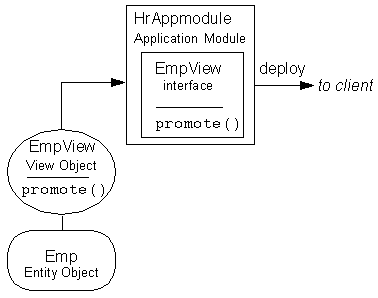
Figure 1: Defining an Exported View Object Method on the Application Tier
This topic describes examples of allowing the client to access methods written on application tier business components. It has these sections:
When methods on application tier objects are exported, the Business Components for Java framework automatically creates a remote interface for the object that contains the custom method signatures. The framework also automatically handles the runtime marshalling of arguments from the client to the application tier, return values, and exceptions. By moving code such as a data intensive calculation from the client to the application tier, the client can receive the answer in a single round-trip and often without expensive processing effort.
Exporting View Object methods lets a client invoke business logic within the context of a View Object in the application tier.
For example, given an employee View Object EmpView class, you can write a promote() method that changes the values of an employee's salary and job attributes in the underlying employee Entity Object Emp. By exporting the method, a client can invoke promote() with any parameters it might require, and make the corresponding changes to the values of salary and job in EmpView. The exported method lets a client operate, by proxy, on the Emp data.
Figure 1: Defining an Exported View Object Method on the Application Tier
As shown in the above figure, when you are designing your View Object, write the methods that you want to make available to clients. In this example, the EmpView View Object references the Emp Entity Object. A promote() method has been written in the View Object's .java file. When you use JDeveloper to indicate that a method is exportable, it generates a Java interface named for the View Object (that is, EmpView.java in the Common package) and a custom proxy View Object. The generated interface contains the signature of the exported method. The proxy object implements the generated EmpView interface.
This remote interface is a custom proxy View Object which implements the EmpView interface. Note that it is the proxy that is deployed to the client; the object and its methods, reside on the application tier. The client program uses the proxy to invoke the business logic on the application tier.
All objects are deployed in the context of an Application Module. In this example, JDeveloper was used to create a HrAppmodule that contains the EmpView View Object. If you wish, you can write methods on the Application Module itself (that is, in the HrAppmodule.java file) and include them for export as well.
Make the Application Module remotable and deploy it. For more information on how to use JDeveloper to do this, see Creating a Remotable Application Module for Exported Methods.
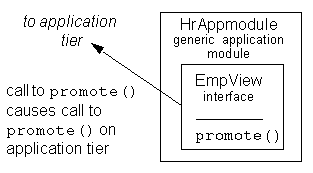
Figure 2: Using an Exported View Object Method on the Client
Once the Application Module has been deployed, you can use the promote() method in your client-side programs. Calls to the promote() method in client-side programs will result in calls to the promote() method in the application tier.
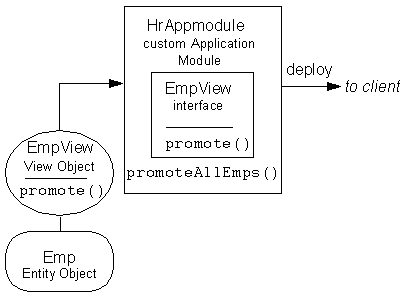
Exporting Application Module methods lets a client invoke business logic within the context of an Application Module containing multiple View Objects in the application tier.
Suppose you use JDeveloper to create an Application Module, HrAppmodule. You can write a promoteAllEmps() method in its .java file that will invoke promote()on all employees in EmpView. Although typically the methods you write on an Application Module will operate on multiple View Objects, you can also write methods that will operate on a single object.
Use the Application Module Wizard to make the Application Module remotable and export the method. This will generate an interface for HrAppmodule (HrAppmodule.java in the Common package) which contains the signature for the exported method promoteAllEmps(). Then, deploy the Application Module.
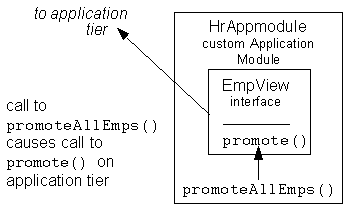
Once the Application Module has been deployed, you can use the promoteAllEmps() method in your client-side programs. Calls to the promoteAllEmps() method in client-side programs will result in calls to the promote() method in the application tier.
Exporting View Object row accessor methods lets a client:
Access specific row instances rather than work with the View Object's row collection.
(optionally) Invoke business logic within the context of a View Object Row in the application tier.
Ensure type safety when setting row values.
When you use JDeveloper to indicate that a row accessor method is exportable, it generates:
A Java interface named for the View Object row (for example, DeptView).
A View Object row-proxy (for example, DeptViewImpl).
The generated interface contains the signature of the exported accessor method. The row-proxy object implements the generated ViewObjectRow interface.
This remote interface is the View Object row-proxy that implements the ViewObjectRow interface. Note that it is the row-proxy that is deployed to the client; the object and its methods reside on the application tier. The client program uses the proxy to invoke the row accessor methods on the application tier. This requires that you make the Application Module remotable and deploy it.
Using an Exported View Object Row Accessor Method on the Client
Once the Application Module has been deployed, you can use the getDeptNo() method in your client-side programs. Calls to the getDeptNo() method in client-side programs will result in calls to the getDeptNo() method in the application tier.