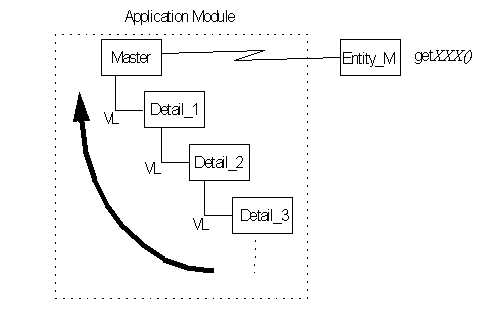
JDeveloper makes it possible for you to use the relationships defined by View Links to better define the results obtained while traversing Entity Objects. JDeveloper does this by letting you create a method inside an Entity Object that provides easy access to data returned by the View Link. This feature has these advantages:
Allows you to more easily access predefined View Object ResultSets for use in defining rules or calculated attributes in your Entity Object. Most of the interesting coding is done at the Entity Object level—that is where you implement your business validation.
Allows you to work with a smaller dataset. View Links restrict the number of rows that are returned based on a given PL/SQL condition; View Objects can restrict the columns. This allows the Entity View Link accessor to make available just the data you need for any calculation or business logic at the Entity level.
The View Link makes it easy to write business logic which traverses from one object to a related object. The View Objects which comprise the View Link allow arbitrary PL/SQL statements. These statements can enable complex filtering and restriction of related datasets. Exposing the View Link as an Entity Accessor means that you can further enhance your business logic programming model with prebuilt "finders" that find related collections of more interestingly qualified pieces of dependent data.
The accessor can only exist on the Entity Object which corresponds to the selected attributes in the source View Object. Like View Links, the accessor is unidirectional: the accessor works with data in the detail View Object.
The accessor on the Entity Object passes parameters into a new View Object which it instantiates. The data in the View Object is whatever data is defined by the Entity Object row, the specified View Link, and View Object.
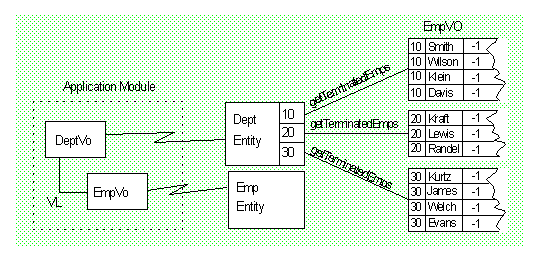
For example, assume you have created the Dept and Emp Entity Objects and their corresponding View Objects. The Dept Entity Object has three rows, corresponding to department numbers (Deptno) 10, 20, and 30. In the Emp Entity Object, all terminated employees have their employee ID (Empno) set to -1. Assume also that a View Link, DeptToEmpVL, has been defined from Dept as the source, to Emp on the Deptno attribute. In this case, the Dept Entity Object can instantiate a View Object containing employee data corresponding to department 10. It can also instantiate a View Object containing employee data corresponding to department 20, and so on.
You can define an accessor in the Dept Entity, getTerminatedEmps, that will return the records of employees whose Empno is less than 0. This accessor works by searching the View Object containing employee data corresponding to a specified department number. The accessor will return an iterator into the records that match Empno<0 for the current Dept row.
As described above, the accessor on the Entity Object can traverse the View Link to use data returned by the destination View Object. If you have multiple levels of detail in your Application Module, once you get the View Object ResultSet, you are free to use any of the data that it returns.