Business Components for Java provides a framework for defining, implementing, and executing validation logic in the business logic tier. The validation framework provides a consistent programming model that hides internal implementation details. It frees you to focus on rules that prevent users from entering invalid values into the database.
Business logic tier validation is different from an integrity (or "database") constraint. An integrity constraint is a declarative way to define a business rule for a column of a table. Integrity constraints are defined with a table and are stored as part of the table's definition, centrally in the database's data dictionary, so that all database applications adhere to the same set of rules. You can use integrity constraints (in addition to validation) when some clients do not use Business Components for Java.
The business logic tier employs validation logic when it needs to create or change data, but it assumes that data already in the table is valid. So a query could return a result set that contains invalid values (for example, from legacy data entered before the validation logic was applied), but a user cannot enter an invalid value into the table.
You can define and apply validation logic in the business logic tier in the following ways. All of these techniques are programmatic (in Java code), except for validation rules, which are declarative (in XML code). If you have multiple levels of validation, the validation will usually trigger in this order, from first to last. (The details are described in a following section.) Remember that the framework applies rules to contained objects before invoking rules on top-level objects.
A domain object validates data in its constructor. You can also apply rules and add code to a domain object's validate method to further refine the business logic. A domain lets you share attribute-level validation across entities, views, or both. Depending on how you program your client, the validation can be triggered at the client or at the business logic tier. For example, you might create a Price attribute of a Currency domain type; if the domain is downloaded onto the client, the moment a user clicks out of a field, they get feedback if they didn't enter the currency correctly. Domains are reusable among attributes. For example, a CreditCard domain would be very reusable — you wouldn't have to add this code in every entity object that needs it and you could update it in one place.
Once constructed, instances of domains can be freely passed around in a type-safe way as method parameters.
The business components framework can generate setAttribute methods for entity objects (for example, Dept.setLoc). Here you can add validation that occurs before or after the attribute is set. In the setter method, you would add rules that are affected only by that attribute value and that do not need to be reused often.
The base entity class provides a validateEntity method that your entity objects can override. Entity validation occurs before moving from one row to another. It is useful for validating values of two or more attributes; for deferring validation of individual fields until values for the entire row have been entered; for validating values in separate entity objects that are associated. For example, a Salary attribute may need to check other field values, such as job title, currency, and so on. Another example is a date range, where the begin date must be less than the end date.
Validation rules encapsulate reusable patterns of validation that you can use by supplying appropriate parameter values. You can use the Entity Object Wizard and Editor and Attribute Editor to define and apply simple rules without writing code. When you use the wizard (as opposed to writing code by hand), it generates XML, enabling you to customize rules without recompiling Java code. You can use predefined validator types or define your own. You could implement more complex rules in your own custom validation classes; then you can register the classes as validator types and apply them, the same as the predefined rules.
A composition provides parent and child hierarchic validation on the entity object level. The validateEntity method of the parent validates the children. For example, there should be no line item unless it's in an order.
When deciding whether to use a domain or a validation rule to add validation logic, remember that a domain is reusable with multiple attributes, while a validation rule applies to one attribute or entity object only. For example, it's appropriate to use a domain to validate a URL attribute, because you might want to use the domain with another attribute later. But if you're checking whether a field contains one of Platinum, Gold, or Silver, you'd use a validation rule because it is unlikely that you will have another attribute that uses these values.
Alternatively, instead of using domains and validation rules, you could implement validation logic by modifying the Java source file of the entity object. Like a validation rule, this logic applies to the entity object or attribute only; however, you can add more complex logic that might not be possible through a validation rule.
Remember that the framework applies rules to contained objects before invoking rules on top-level objects. Integrity constraints and validation are triggered as follows:
When data is requested by a view object query, as data is read in, domain validation occurs.
The framework assumes that committed data in the database is valid. If data does not pass domain validation, the fetch operation fails. No data is read in, even if one just one attribute fails validation.
When a user action enters new data for an attribute, if the domain was not created already, it's validation is triggered when it is created by the setAttribute method. For setAttribute methods, the domain must be created before the method is called. After, attribute level validation occurs.
If the current row has a change, and then the current row is switched, entity level validation fires. For view row iterators other than the default ("secondary" view row iterators), you can switch off entity validation with the setRowValidation method.
At commit time, all invalid entity objects are validated with entity level validation, including composition validation. Except for composition validation, the order that invalid entity objects are validated is nondeterministic. After, rows are posted to the database, which fires integrity constraints, if present. If you want to fire integrity constraints sooner, you can call the postChanges method to trigger integrity constraints, but not entity validation.
In summary:
When data is read in from the database, domain validation occurs.
When data is put in the entity cache, attribute level validation (including domain validation) occurs.
Entity level validation occurs when row currency changes, validation is explicitly called, or before committing to the database.
Integrity constraints are fired when data is posted to database, after validation logic in the business logic tier has triggered. Or, you can explicitly fire integrity constraints before entity level validation by using the postChanges method.
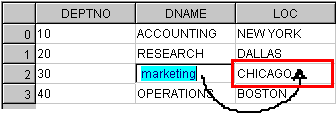
Attribute validation occurs when the value of an attribute is changed by a setAttribute method (for example, setDname). Figure 1 shows a client application editing the DEPT table. When the user changes the value of the DNAME field and moves to another field in the same row, the setDname method fires and invokes attribute-level validation rules for DNAME. (The effect is the same when an attribute value is set programmatically.)
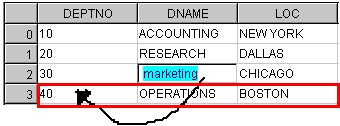
Entity validation is invoked before moving from one row to another. It is useful for validating values of two or more related attributes, and for deferring validation of individual fields until values for the entire row have been entered. Figure 2 shows a client application editing the DEPT table. When the user changes the value of the DNAME field and moves to a field in a different row, Dept.validateEntity fires and invokes entity-level validation rules for the Dept Entity Object. (The effect is the same changes are made programmatically.)
You can also invoke entity validation explicitly by calling methods in the Business Components API such as Entity.validate, Transaction.validate, ApplicationModule.validate, or Transaction.commit.
The framework invokes entity validation to validate business objects. Validation code written on the top-level Entity Object performs validation checks on any contained Entity Objects. The framework invokes rules on contained objects before invoking rules on top-level objects. Code you add to validation methods executes before or after framework code depending on whether you place it before or after the call to a framework method (such as super.validateEntity).
At commit time, the Application Module invokes the validate method on each business object that requires validation, which in turn lets each contained entity invoke its validate method, and so forth. For example, Figure 3 shows a business object that represents a purchase requisition. If the association was defined as a composition, then entity-level validation code attached to RequisitionHeader (the top-level Entity Object) cascades and validates the other Entity Objects in this business object.
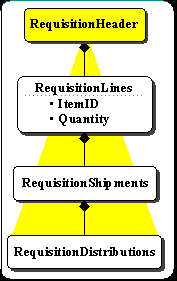
An entity requires validation when any of its attribute values changes. If there are container entities accessible through ownership associations, then each container will also require validation. For example, if the RequisitionShipments entity in the figure above requires validation, the RequisitionLines and RequisitionHeader entities would also require validation.
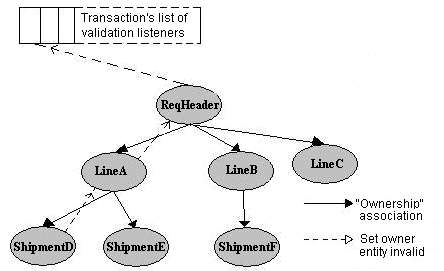
In Figure 4, if an attribute value in ShipmentD changes, it invokes setValidated(false) on LineA, which invokes setValidated(false) on ReqHeader. ReqHeader, the top-level entity in this Business Object, is added to the transaction's list of invalid entities.
During the commit cycle, the transaction calls validate on ReqHeader, which in turn calls validate on LineA, which calls validate on ShipmentD. On successful validation, ShipmentD calls setValidated(true)and removes itself from LineA's list of invalid entities. LineA then performs its own validation, resets its invalid flag, and removes itself from ReqHeader's list. ReqHeader then performs its validation and on success, removes itself from the transaction's list.