Once you have developed and delivered an enterprise application, you might find that you need to add additional functionality or features. Business Components are reusable, in that you can tailor existing components to fit your needs. For example, if the delivered application includes an EMP Entity Object, you might find that you need to extend its definition to include additional information such as telephone number, years of service, pension plan, and business logic to calculate the salary withholding based on the type of pension plan. This is only one way in which you can customize an Entity Object. You can also customize Entity Objects by:
Adding new attributes to Entity Objects. These additional attributes can capture extra information that a particular site needs to track in addition to the base information that is part of the supplied business components. For example, you can create an extended Emp Entity with an added a YearsOfService attribute as a calculated value.
Creating New Entity Objects to represent constructs that are specific to a certain site, and associating these new entities to existing Entities in the delivered application.
Adding, changing, or supplementing the Java code on the Entities in the delivered application to tailor the business logic to a site's needs. For example, for a Customer Entity Object you can create an extended Entity with business logic that examines the Customer's Address attribute and determines shipping costs based on the distance from the site.
Adding additional validation rules to existing Entity Object attributes. The effect of adding rules to an attribute "ANDs" the rules. For example, assume there is a rule on a CreditRating attribute in the original Customer Entity Object that requires its value to be greater than 200 points. In the extended Entity Object you can add an additional rule to test that the payment status is not over due. If either rule fails an exception will be thrown.
Changing default values for an Entity Attribute. For example, if an Emp Entity Object has a Phone attribute, the extended Entity can list the site's main telephone number as the default value. This can later be replaced with the direct telephone number for the employee.
Globally substituting existing components with ones you have extended without requiring or modifying the application in which they are used. This topic is described in Substituting Business Components in Packaged Applications.
Just as an Entity Object in your application references a table in the database, an extended Entity Object must also reference a table. There are two possible ways in which you can provide a table to support the extended Entity Object:
alter the existing database table to add the extra columns required. In this case, both the original and the extended Entity Object will reference the same table.
OR
create a new table in the database for the extended Entity whose leading columns match the structure of the parent Entity Object's table. In this case, both the original and the extended Entity Object will reference their own tables.
If you intend to have your application work with instances of both the parent and the extended Entity Object concurrently, the simplest solution is for each Entity to have its own database table. In this case, there are two possible ways to provide the database table for the extended Entity Object:
create a table in the database that corresponds to the extended Entity. This table must have at a minimum the same number of columns and the same Primary Key as the table that corresponds to the base Entity (that is, the Entity you want to extend). It is recommended that the table also have the same column order, although this is not required. Then, you can add to the table any additional columns that you want the extended component to have. In other words, the new table should have all of the features as the original table, plus maybe some extra columns. Once you have created the new table, use the Entity Object Wizard to generate the extended component from it.
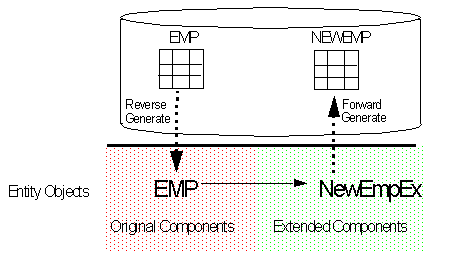
create the extended Entity in the wizard, using the Entity that you want to use as the base component. Then, select the extended Entity in JDeveloper's Navigator and use the Create Database Objects command to forward generate a corresponding table in the database. For example, given an Emp Entity Object that references an EMP table, you can create the NewEmpEx Entity by extending Emp. Then use forward generation to create the NEWEMP table in the database. This is illustrated in Figure 1.
Figure 1: Extending an Existing Entity then Forward Generating the Database Table
The following example illustrates the second possibility described above: creating the extended Entity in the wizard, then using forward generation to to create the table in the database. This example assumes that you have already creates a project, imported the package of original components and created a package to house the extended components.
Suppose a vendor (Oracle, for example) sells an Emp component for working with employee data, and a (fictional) company named Solutions Tech wants to customize it. Their developers could take the following approach to create a custom NewEmp component.
Right-click the package that will hold the customized Entities and select Create Entity Object. The Entity Object Wizard opens.
In the Name panel, enter the name of the new Entity (NewEmpEx) in the Name field. To offer you greater flexibility, note that in this panel, the Name, Package, Extends Entity, and Schema Object fields are editable.
Click the Browse button next to the Extends Entity field to open the Parent dialog. Use the Parent dialog box to select the Entity from which NewEmpEx will be extended. In this case, select Emp, then click OK. Note, it is implied that the base object is in a package in the project. Note: if you are creating the extended Entity from a pre-existing table, see Creating an Extended Entity Object from a Pre-existing Table.
Click Next to proceed to the Attributes and Attribute Settings panels. Use these panels to specify additional features for the NewEmpEx. For example, use the Define New Attribute dialog (available by clicking New on the Attributes Panel) to create a YearsOfService attribute of type Number. Use New From Table if you have made changes to any of the existing Entity Object's attributes. Note that the Attributes Panel shows only new or overridden attributes—not the entire set.
The attributes you define in these panels will be captured in the XML component definition NewEmpEx.xml.
Optionally, use the Java panel to generate Java classes for the extended Entity Object. This will provide the ability to add domain-specific Java logic. The Java inheritance is automatically set by the Wizard using the extends keyword in the Java source code. Note, if Solutions Tech wants to override any pre-created business logic, then they can edit this file.
Click Finish to create the new NewEmpEx Entity Object. The framework will creates a .java and a .xml file for the extended Entity Object.
Right-click the package and choose Create Database Objects. In the Create Database Objects dialog, shuttle NewEmpEx to the Objects to Create side and click OK. A table corresponding to NewEmpEx will be created in the database.
If you are creating an extended Entity Object from a pre-existing table, follow the steps 1, 2, and 3 described above. Instead of step 4, do this:
From the Database Schema drop-down list in the Name panel, select the name of the schema that contains the schema object that will provide the base definition for the extended Entity Object.
Select the appropriate combination of Tables, Views, Synonyms, and Snapshots that might contain the object you want to represent as an Entity Object.
In the Select Object field, select the name of the database object that that will provide the base definition for the extended Entity Object.
After you complete these steps, continue with steps 5 and 6 above. Do not perform step 7, using Create Database Objects to generate a table.
The NewEmpEx Entity is created by extending the functionality of the Emp entity without any source code modification. JDeveloper creates a .java and a .xml file for NewEmp which can be seamlessly integrated into the packaged application. The NewEmpEx Entity can now be used at runtime, however, you might want to add some additional features, such as business logic or validation, to its .java file. You can then substitute it for all instances of Emp in the original application. For information on how to substitute NewEmpEx for all instances of Emp in your application, see Substituting Business Components.
Notice that the NewEmpEx Entity Object's XML file contains only the differences between the definition of the original Entity and the extended version. The following is a code sample of NewEmpEx.xml.
1   <?xml version="1.0" encoding='WINDOWS-1252'?>
2  <!DOCTYPE Entity SYSTEM "jbo_03_01.dtd">

3  <Entity
4     Name="NewEmpEx"
5     Extends="package27.Emp"
6     DBObjectType="table"
7     DBObjectName="NEWEMPEX"
8     AliasName="NewEmpEx"
9     BindingStyle="Oracle"
10    CodeGenFlag="20"
11      RowClass="Extender.NewEmpExImpl"
12      DefClass="Extender.NewEmpExDefImpl" >
13      <DesignTime>
14         <Attr Name="_isCodegen" Value="true" />
15         <Attr Name="_superClass" Value="package27.EmpImpl" />
16         <AttrArray Name="_publishEvents">
17         </AttrArray>
18      </DesignTime>
19      <Attribute
20         Name="Serviceinyear"
21         Type="oracle.jbo.domain.Number"
22         ColumnName="SERVICEINYEAR"
23         ColumnType="NUMBER"
24         SQLType="NUMERIC"
25         Precision="2"
26         Scale="0"
27         TableName="EMP1" >
28         <DesignTime>
29            <Attr Name="_DisplaySize" Value="0" />
30         </DesignTime>
31      </Attribute>
32   </Entity>
Lines 4-7: The Name, Extends, DBObjectType, and DBObjectName fields contain information about the name of the extended component (NewEmpEx), the name of the component which it extends (package27.Emp), the type of schema object that it references (table), and the name of the database object (NEWEMPEX).
Lines 20-30: Notice that the Attribute tag contains information about the attribute that was added to the extended Entity Object during Design Time. Information about the original attributes will be obtained from the original component (package27.Emp). The only way that the tag will contain information about the attributes in the original Entity, is if you selected them in New From Table in the Attributes panel, then changed their definition in the Attribute Setting panel.