JDeveloper provides the extended association feature to let you preserve the association relationship between extended Entities. In addition, by extending an association, you can access any new attributes that might have been added to the extended Entities. Extending the Entity Objects and the association between them preserves typesafe binding: any association accessors written in the original Entity Objects will be inherited by the extended Entities and will be able to traverse the original association.
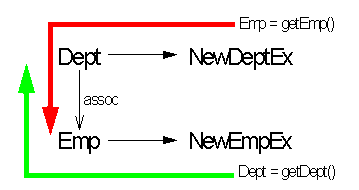
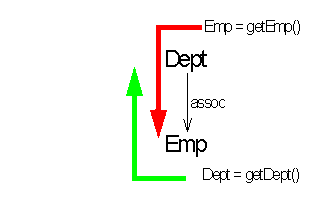
As illustrated in Figure 1, an association defines a relationship between source and destination Entity Objects based on common attributes. Each Entity can have an accessor method that traverses the association. For example, assume you have a Dept and an Emp Entity Object, and that Dept contains a getEmp() method that retrieves a row set of Emp Objects for the given department, and Emp contains a getDept() method that retrieves the current department.
Figure 1: Original Source and Destination Entity Objects
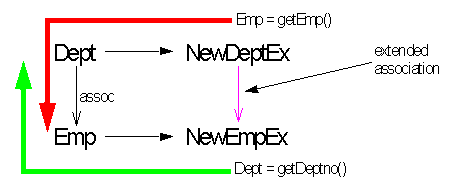
As illustrated in Figure 2, an extended Entity Object inherits the associations and the association accessors of its parent. The accessor in the extended Entity can traverse the original association. If you extend the Dept Entity, the getEmp() method will be inherited by NewDeptEx and will be able to traverse the original association to retrieve data from Emp. Similarly, if you extend the Emp Entity, the getDept() method will be inherited by NewEmpEx and will be able to retrieve data from Dept.
Figure 2: Extending the Association Source and Destination Entity Objects
Notice, however, that extending the Entities does not extend the original association between them. You cannot call a accessor from NewEmpEx to NewDeptEx (or from NewDeptEx to NewEmpEx) unless you extend the association. An extended association allows the association to be updated to relate extended Entities.
Extending the association between the extended Entities gives you the flexibility of:
choosing any of the new extended Entity attributes as source and destination role attributes.
changing the values of any of the pre-existing association properties such as cardinality and composition.
Figure 3 illustrates an extended association between NewDeptEx and NewEmpEx.
Figure 3: Extending the Existing Association
The following example assumes that you have extended the original Entity Objects Dept and Emp. The steps describe how to create an association between the extended Entities NewDeptEx and NewEmpEx by extending the association between the original Entities.
Right-click the package that will hold the customized Association and select Create Association. The Association wizard opens.
In the Name panel, enter the name of the new association (NewFKAssocEx) in the Name field. To offer you greater flexibility, note that in this panel, the Name, Package, and Extends Association fields are editable.
Click Browse to open the Parent dialog. Open the package of original components and select the association that you want to extend. Click OK to close the dialog. Click Next in the Name panel to proceed to the Association Entities panel.
In the Association panel, open the package containing the extended objects in the Select Source Entity Object list and select the Entity NewDeptEx. NewDeptEx will act as the source of the extended association. Next, open the package containing the extended objects in the Select Destination Entity Object list and select the Entity NewEmpEx. NewEmpEx will act as the destination of the extended association. Click Next to proceed to the Source Role Attributes panel.
In the Source Role Attributes panel, select the Entity attributes that define the relationship on the source end of the extended association. You must specify the same number of attributes for each Entity Object, in the proper order, on both the source and destination ends. Notice that any new attributes added to the extended Entity are also available. In this example, ensure that Deptno appears in the Selected Attributes list.
You can optionally specify all attributes that define a key. When you shuttle a key to the Selected Attributes list, the attributes associated with that key automatically appear. Also, if you select a key in the Source Role Attributes panel, the matching key (if applicable) will be included by default in the Destination Role Attributes panel. Click Next to proceed to the Destination Role Attributes panel.
In the Destination Role Attributes panel, select the Entity attributes that define the relationship on the destination end of the extended association. You must specify the same number of attributes for each Entity Object, in the proper order, on both the source and destination ends. Click Next to proceed to the Association Properties panel.
In the Association Properties panel, make any needed adjustments to the cardinality, accessor, or composition properties. Click Next, then Finish to dismiss the Association wizard.
JDeveloper will generate a NewAssocEx.xml file to define the new association.
The NewFKAssocEx association is created by extending the functionality of the EmpForeignKeyAssoc association without any source code modification. JDeveloper creates a .xml file for NewFKAssocEx which can be seamlessly integrated into the packaged application. The NewFKAssocEx association can now be used at runtime. You can also substitute it for all instances of EmpForeignKeyAssoc in the original application. For information on how to substitute NewFKAssocEx for all instances of EmpForeignKeyAssoc in your application, see Substituting Business Components.
The following is a code sample of NewFKAssocEx.xml.
1   <?xml version="1.0" encoding='WINDOWS-1252'?>
2   <!DOCTYPE Association SYSTEM "jbo_03_01.dtd">
3   <Association
4      Name="NewFKAssocEx"
5      Extends="package27.EmpForeignKeyAssoc" >
6   <DesignTime>
7         <Attr Name="_isCodegen" Value="true" />
8      </DesignTime>
9      <AssociationEnd
10        Name="Dept"
11        Cardinality="0"
12        Source="true"
13        Owner="Extender.NewDeptEx" >
14        <AttrArray Name="Attributes">
15           <Item Value="package27.Dept.Deptno" />
16        </AttrArray>
17     </AssociationEnd>
18     <AssociationEnd
19        Name="Emp"
20        Cardinality="-1"
21        Owner="Extender.NewEmpEx" >
22        <AttrArray Name="Attributes">
23           <Item Value="package27.Emp.Deptno" />
24        </AttrArray>
25     </AssociationEnd>
26  </Association>
Lines 4,5: The Business Components for Java framework adds the Name and the Extends fields to the Association tag to identify the name of the new association (NewFKAssocEx) and the name of the original association which it extends (package27.EmpEoreignKeyAssoc).
Lines 10-15: The framework uses the Name, Owner, Source, and Item Value fields within the AssociationEnd tag to identify the name of one end of the original association (Dept), the new owner of the association end (Extender.NewDeptEx), the source end of the association (Source="true"), and adds the name of the foreign key to the ItemValue tag in the AttrArray section (package27.Dept.Deptno).
Lines 19-23: Similarly, the framework uses the Name, Owner, and Item Value fields within the AssociationEnd tag to identify the name of the opposite end of the original association (Emp), the new owner of the association end (Extender.NewEmpEx), and the adds the name of the foreign key to the ItemValue tag in the AttrArray section (package27.Emp.Deptno).