|
Oracle® Application Server 10g Best Practices
10g (9.0.4) Part No. B12223-01 |
|


|

|
|
Oracle® Application Server 10g Best Practices
10g (9.0.4) Part No. B12223-01 |
|
|
|
|
This chapter describes high availability best practices for Oracle Application Server. It includes the following topics:
Section 4.3, "Analyze High Availability using iHAT or Topology Viewer"
Section 4.4, "Use Metric Based Load Balancing to Tune High Availability "
With Oracle Application Server 10g, Oracle Identity Management can be deployed in a variety of high availability configurations such as Oracle Application Server Cold Failover Clusters (OracleAS Cold Failover Cluster) and Active Failover Cluster (AFC).
AFC refers to the deployment of Oracle Identity Management and the OracleAS Metadata Repository on hardware clusters where each node of the cluster runs the database instances as well as the ID processes and all of them access a shared RAC database as their repository.
OracleAS Cold Failover Cluster solution for the infrastructure uses a two node hardware cluster (one active node and one passive node) that in case of failure of one of the nodes, relocates the execution of an application from a failed node to a designated standby node.
For both type of configurations, the "out-of-the-box" installation for Oracle Application Server places the OracleAS Single Sign-On service, Delegated Administration Service (DAS) and DIP in the same tier as the infrastructure database itself.
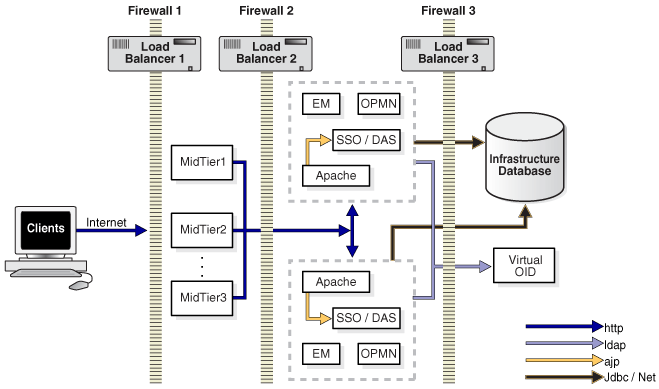
Both for scalability and security reasons, Oracle recommends separating the OracleAS Single Sign-On, DAS, and DIP services from the node or nodes where the infrastructure database resides as shown in Figure 4-1. Since users access most enterprise applications from both within the company intranet as well as Internet, their access needs to be authenticated by ID in both cases. A distributed Oracle Identity Management deployment where the OracleAS Single Sign-On and DAS components reside in the DMZ meets this requirement. It is also important that while users are allowed to authenticate and access applications, their authentication data is well protected from unauthorized access from the Internet. Locating Oracle Internet Directory and the database repository for the identity data in the intranet ensures this. If necessary, the OracleAS Single Sign-On and DAS tier servers can be co-located with the middle tier servers (in separate Oracle homes) in the DMZ allowing them to be scaled in tandem with middle-tier growth.
In the specific case of AFC, the infrastructure database is a RAC database and a group of Oracle Internet Directorys exposes a common virtual IP by using a Hardware Load Balancer where Firewall 3 is placed.
In the case of CFC, the cluster ware running on the active and standby nodes where the infrastructure database resides expose the same virtual IP to OracleAS Single Sign-On, DAS, and middle tiers.
Oracle Application Server 10g allows you to configure Oracle Process Manager and Notification server (OPMN) to execute your own custom event scripts whenever a particular component starts, stops, or crashes. The code associated with crash events should:
release any resources used by a component that has crashed
log special characteristics associated with each crash event
take possible actions that enhance the resiliency of the system
If the component being monitored by OPMN uses any special resources not controlled by Oracle Application Server, the crash event script should release them. A good example is any type of code in an OC4J container that uses JNI invocations. In this type of cases, OC4J does not control the resources under the JNI invocation, so that those resources may become trapped in the case of a Java Virtual Machine (JVM) crash. Common resources to control include sockets in use, memory in the JNI code, connections to database, and locked files.
The same script may take actions about the application that generated the crash. If it is likely that the crash was due to the overloading of the specific component, it could be useful to start a new instance of such a component in another node. For instance, the event script could be used for starting a new OC4J container in another application server instance that is mounting the same URL on Oracle HTTP Server. Or it could be used to relocate the repository in a file-based configuration when the DCM daemon of that specific instance crashes.
You can use OPMN to monitor your custom external process in a consistent mode with the default stack controlled by OPMN. Use OPMN to start, stop and monitor any additional processes that are used by your system. For example, if your application uses a external resource such as an HTTP Server different from Oracle HTTP Server, you can add it to the OPMN control list so that your system High Availability is monitored in a consistent way.
Refer to the Oracle Process Manager and Notification Server Administrator's Guide for more information.
Oracle Application Server Hi-Av Tool (iHAT) and Oracle Enterprise Manager Topology Viewer are real-time, graphical monitors based on topology information maintained by all the OPMN servers running in an Oracle Application Server Farm.
iHAT is a standalone java application that runs from a local display computer. iHAT connects to a single OPMN server to monitor and control an entire Oracle Application Server Farm.
The Topology Viewer is a J2EE application that can be deployed on Oracle Application Server Control to provide a real-time view of the application server processes managed by OPMN. You can view all the instances in a Farm, including clusters and their members.
Both iHat and the Topology Viewer display performance metrics for each component.
It is a good practice to verify the system High Availability prior to the publishing of its functionality to the end-user (pre-production testing). You can leverage either iHAT or Topology Viewer capabilities, to verify:
what is installed and configured to be managed by OPMN across an entire Oracle Application Server Farm
what is the current status of all the processes which are part of the Oracle Application Server Farm
By using various load simulators you can stress your High Availability topology and verify from the graphical tools that any component in the stack can be started, stopped, or disabled without any impact in the system response. You should verify that the number of requests sent to the system are all completed correctly even when one of the subcomponents is stopped. This verification is very simple from iHat or Topology Viewer. They both allow you to start, stop, or disable any process controlled by OPMN and they both show the number of completed requests. You should verify that the response to all requests are correct (this should be provided by your load simulator) and that the total number of requests is being completed. This information is available on iHat and Topology Viewer.
You can learn how to use Topology Viewer and iHat at the Oracle Application Server Utilities area on OTN (http://otn.oracle.com).
mod_oc4j is the module that routes requests from the Oracle HTTP Server to OC4J through the AJP 1.3 protocol. mod_oc4j provides the load balancing mechanism between Oracle HTTP Server and the OC4J containers that share a common OC4J mount point or are accessed through the same base URL. Thus, the high availability of a configuration where several OC4J nodes are being load balanced behind an Oracle HTTP Server, is totally dependent on the mod_oc4j configuration. A load balancing policy that mod_oc4j supports in Oracle Application Server 10g is the metric based policy. When this type of policy is specified in the mod_oc4j.conf file, mod_oc4j routes requests as per the run time metrics from OC4J processes that indicate how much load is currently being placed on the OC4J process. For this to happen, each one of the OC4J nodes continuously sends metric values to mod_oc4j. mod_oc4j then designates the node for routing of the HTTP request. However, this policy incurs a penalty on performance since the OC4J nodes are obtaining and sending metrics on a re al time basis.
If you want to maximize the usage of resources but without penalizing the performance of your system, you can use the metric based load balancing to tune your routing weights and then change the load balancing to a weighted round-robin protocol. Set up your load balancing protocol to metric-based and place the system in production or, if possible, in production simulation. Based on the number of the requests delivered to each node on a usage cycle you can make a good estimation of the weights that you should assign to each one of the nodes. Obviously, this tuning is more accurate when the number of requests and the load in each node due to external influences to the application being load balanced, do not change much during the usage cycle. You can then optimize the usage of each node with a better performance.
For more information refer to the Oracle HTTP Server Administrator's Guide.