|
Oracle® Application Server Release Notes
10g Release 2 (10.1.2) for Microsoft Windows (64-Bit) on Intel Itanium B15849-03 |
|


 Previous |
 Next |
|
Oracle® Application Server Release Notes
10g Release 2 (10.1.2) for Microsoft Windows (64-Bit) on Intel Itanium B15849-03 |
|
|
Previous |
Next |
This chapter describes management and security issues associated with Oracle Application Server. It includes the following topics:
This section describes Oracle Process Manager and Notification Server (OPMN) issues. It includes the following topic:
When you execute either an opmnctl stopall or opmnctl startall command, the oidctl log file contains the following error message:
*** Instance Number already in use. ***
*** Please try a different Instance number. ***
This error message can be safely ignored.
This error message occurs in Oracle Application Server Infrastructure installations with Oracle Internet Directory.
This section describes Distributed Configuration Management (DCM) issues. It includes the following topic:
You should understand the implications of the default port assignments for Distributed Configuration Management communication, in the case of environments that require inter-instance communication across a firewall.
The Oracle Universal Installer assigns the ports described inTable 3-1 by default when the instance is installed.
Table 3-1 Oracle Universal Installer Default Port Assignments
| Quantity | Purpose/Description |
|---|---|
|
1 |
DCM Discovery Port. The first instance installed on a computer is assigned port 7100 for this; the second instance installed on a computer is assigned 7101, and so on. This is defined in the |
|
50 |
Range of ports for inter-instance communication: 7120 to 7179. These are defined in the After installation, you will probably want to limit the number of ports open on the firewall. The actual port needs for inter-instance communication are:
|
If the ports in the range 7100 to 7179 were open on the firewall before installation, the instances in the farm will be able to communicate immediately after installation. Note that:
If you want the port assignments to be of a different numeric range from these, then, before installation, you must assign a DCM Discovery Port using the staticports.ini file, and select the Manual option during installation. (See the Oracle Application Server Installation Guide, Chapter 4, section titled "Using Custom Port Numbers (the "Static Ports" Feature)" for more information.) The range of ports will then be assigned accordingly, as specified in Table 3-1.
After installation of all instances, configure the firewall to close the unused ports within the assigned range on each instance.
This section describes other management issues. It includes the following topics:
Section 3.3.3, "Globalization Support Settings May be Changed During Cloning"
Section 3.3.5, "Use Trusted Certificates When Enabling SSL Between mod_oc4j and OC4J"
Section 3.3.6, "Benign Decoding Errors When Running ldapaddmt"
Section 3.3.7, "Missing Files During restore_config Operation"
Whenever a pfile is used, such as when it is required with an Oracle Application Server Cold Failover Cluster (OracleAS CFC) or when the OracleAS Administrator creates a pfile, for example, to tune the Infrastructure database and change parameters, there is a problem immediately following an OracleAS Guard asgctl instantiate farm operation when Oracle Fail Safe tries to use the pfile to try to start the ORCL instance or in any other case when the pfile is called into use to start the ORCL instance. For OracleAS CFC, Oracle Fail Safe fails to bring up the ORCL instance and generates an ORA-16033 error. In the other case, the ORCL instance fails to come up.
The problem is that during the OracleAS Guard asgctl instantiate farm operation the pfile is getting overwritten by the spfile and after this operation completes and when the pfile is called back into use it is no longer there. The workaround is to backup the pfile before running the OracleAS Guard asgctl instantiate farm operation, and immediately after this operation completes restore the pfile to its original location.
In the Oracle Application Server Disaster Recovery chapter in the Oracle Application Server High Availability Guide, in the sections that show an instantiate farm operation, such as in Section 7.5.2 Standby Instantiation, just before Step 1 in the procedure to perform a standby instantiation operation, a new note should be added that states: If you are using a pfile, make a backup copy of your pfile before proceeding to perform an asgctl instantiate farm operation. Then immediately following Step 5 in this same section, another note should be added that states: Immediately after performing an asgctl instantiate farm operation, restore your pfile to its original location before performing any other tasks. The other sections in this chapter where these notes should be added and where the use of the OracleAS Guard instantiate farm operation is shown include Section 7.6.1.2.1 Site Failover Operations, Section 7.8.1.5 Instantiating the Farm at the Secondary Site, and Section 7.8.5 Reference Section: OracleAS Guard asgctl Command-line Commands where the instantiate farm to command is described.
During an OracleAS Guard switchover farm to operation, OracleAS Guard recycles the database to get rid of any active sessions. However, there is a timing problem where some Enterprise Manager processes create a session after the database is started, but before the asgctl switchover farm to command is issued. The administrator must stop the OracleDBConsole<SID-name> service to prevent this from happening.
In the Oracle Application Server Disaster Recovery chapter in the Oracle Application Server High Availability Guide, in Section 7.6.1.1.1 Site Switchover Operations, at the end of Step 2 there is a paragraph that states:"On Windows systems, open the Services control panel. Locate the OracleAS10gASControl service and stop this service."This note should include an additional service that must be stopped and this paragraph should read as follows:"On Windows systems, open the Services control panel. Locate the OracleAS10gASControl service and stop this service, then locate the OracleDBConsole<SID-name> service and stop this service.If neither service is stopped when you perform the OracleAS Guard asgctl switchover farm to operation, a "SESSIONS ACTIVE" error occurs."
This same paragraph is also repeated in Section 7.8.5 Reference Section: OracleAS Guard asgctl Command-line Commands in the Usage Notes under the switchover farm to command, and should also read there as amended.
When you run the clone.pl script, Oracle Universal Installer creates the file index.html in the $Oracle_home\Apache\Apache\htdocs directory. As a result of the creation of this file, locale settings are overwritten.
To workaround this, rename the file to index.html.html.
On the source Oracle home during the prepare phase of the cloning process, do not attempt to undeploy OC4J applications while the prepare_clone.pl script is running.See the Oracle Application Server Administrator's Guide for more information about cloning.
You must use trusted certificates on both ends when enabling SSL between mod_oc4j and OC4J.
Otherwise, you will get the following error when accessing the HTTPS port:
500 Internal Server Error
Chapter 11, "Changing from a Test to a Production Environment," in the Oracle Application Server Administrator's Guide contains steps for migrating Oracle Internet Directory data to a production environment.These steps include running the ldapaddmt command, and examining the add.log file. The add.log file may contain a "Decoding Error" message. This is benign and can be ignored.
Running restore_config may result in missing files messages such as:
Could not copy file C:\Product\OracleAS\Devkit_1129/testdir/ to
C:\Product\OracleAS\Devkit_1129\backup_restore\cfg_bkp/2004-12-01_03-26-22.
During a restore_config operation, a temporary configuration backup is taken so that, if the restore fails, the temporary backup can be restored returning the instance to the same state as before the restore.If some files are deleted (including files/directories specified in config_misc_files.inp) before a restore operation, then, during the temporary backup, messages are displayed indicating that certain files are missing. These error/warning messages should be ignored since the missing files are restored as part of the restore_config operation.
For an Infrastructure database in an OracleAS Cold Failover Cluster environment, one of the steps in the procedure for using the Oracle Application Server Backup and Recovery Tool to backup the Infrastructure database is to enable ARCHIVELOG mode for the database.
The command to do this is: alter database archivelog. However, if Oracle Fail Safe has database polling enabled, the following error message will appear:
ORA-01126: database must be mounted EXCLUSIVE and not open for this operation
Database polling opens the database and monitors or "pings" the database. Hence, for the alter database archivelog command to succeed, database polling must be disabled and the database be mounted EXCLUSIVE before executing the command.
To disable database polling:
Start Oracle Fail Safe Manager.
Select Clusters, <cluster_name>, Cluster Resources, <instance_name> (where <cluster_name> is the name of the cold failover cluster and <instance_name> is the name of the database instance).
Select the Database tab.
Disable Database Polling.
|
Note: When taking a cold backup of the database, ensure that database polling is disabled before shutting down the database. Otherwise, the database will still be opened by the Oracle Fail Safe. |
Following application of RDBMS 10.1.0.4 patchset (patch number 4163362) to the ORACLE_HOME of Oracle Application Server 10g, DCM will fail with an ADM-100992 error message. There is a DCM compatibility problem with the newer XDK that is introduced when installing the patchset or patch. The failure may not manifest itself until some time later after patchset or patch application.
To correct this issue:
Create a DCM archive and export it on the file system for backup.
Obtain and apply the patch for Bug:4370593 to your Oracle Application Server installation.
Download the patch from Oracle Metalink (http://metalink.oracle.com). The Automatic Release Update (ARU) patch number is 7485905.
In Oracle Application Server 10g (10.1.2), there is currently not an installation type that enables deployment of OracleAS Portal with OracleAS Reports Services and Oracle Business Intelligence Discoverer (OracleBI Discoverer). The following sections describe how to enable this type of deployment with either a 9.0.4 or 10.1.2 Oracle Application Server Infrastructure:
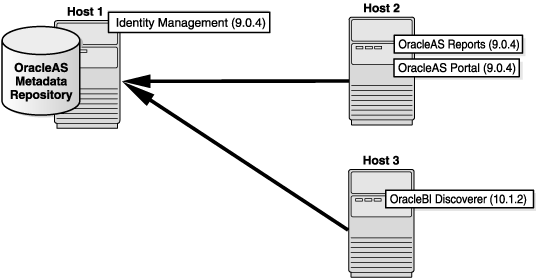
To enable deployment of OracleAS Portal and OracleAS Reports Services (9.0.4) with OracleBI Discoverer (10.1.2) (shown in Figure 3-1), perform the following steps:
Install and configure Oracle Application Server Infrastructure Identity Management plus OracleAS Metadata Repository on Host 1.
Install and configure the Oracle Application Server 10g (9.0.4) Business Intelligence and Forms install type, with OracleAS Portal and OracleAS Reports Services selected, on Host 2.
Install and configure the version of OracleBI Discoverer (10.1.2), available from the Oracle Application Server 10g Release 2 (10.1.2.0.0) Business Intelligence installation disc, on Host 3.
Refer to the Oracle Business Intelligence Installation Guide and the Oracle Business Intelligence Discoverer Configuration Guide for information on installation and configuration of the OracleBI Discoverer instance.
Run the upgradeMR.sh script, located in ORACLE_HOME/discoverer/util, to upgrade the discoverer5 schema. The upgradeMR.sh script only upgrades the discoverer5 schema.
Associate the instance on Host 3 to the OracleAS Metadata Repository on Host 1.
Refer to the Oracle Business Intelligence Discoverer Configuration Guide for information on how to associate the Business Intelligence instance.
Figure 3-1 Deployment of OracleAS Portal and OracleAS Reports Services (9.0.4) with OracleBI Discoverer (10.1.2)
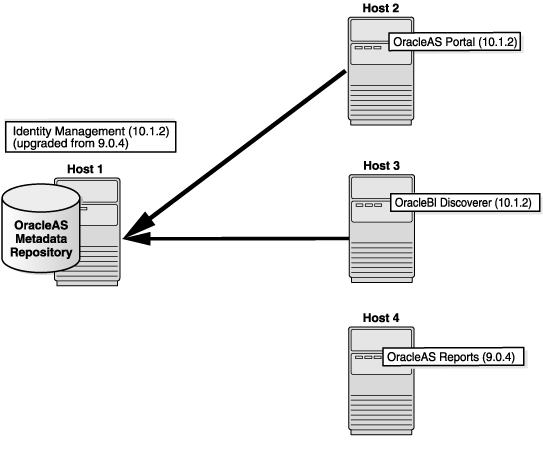
To enable deployment of OracleAS Reports Services (9.0.4) with OracleAS Portal and OracleBI Discoverer (10.1.2) (shown in Figure 3-2), perform the following steps:
Install and configure Oracle Application Server 10g (9.0.4) Infrastructure Identity Management plus OracleAS Metadata Repository on Host 1.
Following installation of the Identity Management instance, upgrade the version from 9.0.4 to 10.1.2.
For information on performing an upgrade refer to the Oracle Application Server Upgrade and Compatibility Guide.
Install and configure OracleAS Portal (10.1.2) on Host 2.
Install and configure OracleBI Discoverer (10.1.2) on Host 3.
Refer to the Oracle Business Intelligence Installation Guide and the Oracle Business Intelligence Discoverer Configuration Guide for information on installation and configuration of the OracleBI Discoverer instance.
Associate the instance on Host 3 with the infrastructure installation on Host 1.
Install and configure OracleAS Reports Services (9.0.4) on Host 4.
After you cmoplete these steps, the OracleAS Metadata Repository is upgraded from 9.0.4 to 10.1.2. The OracleAS Portal schema contains all the portlets, including the OracleAS Reports Services portlets.
Figure 3-2 Deployment of OracleAS Reports Services (9.0.4) with OracleAS Portal and OracleBI Discoverer (10.1.2)
This section contains the following troubleshooting topic:
Problem
If you run the "instantiate farm" command with a hostname alias as the parameter, you get a java.lang.OutOfMemory error. For example, if you have a host named host1, and your /etc/hosts file contains this line:
166.166.166.167 host1.us.oracle.com infra
then you can refer to host1 using "infra" because "infra" is an alias for host1.
However, you cannot use infra (which is an alias) as the parameter value to "instantiate farm". You must use host1 (the DNS hostname) instead.
ASGCTL> instantiate farm to infra - Results in java.lang.OutOfMemory error.
ASGCTL> instantiate farm to host1 - OK.
Solution
Use the DNS hostname as the parameter for the "instantiate farm" command.
Problem
If you run the "instantiate farm" command with a hostname alias as the parameter, you get a java.lang.OutOfMemory error. For example, if you have a host named host1, and your /etc/hosts file contains this line:
166.166.166.167 host1.us.oracle.com infra
then you can refer to host1 using "infra" because "infra" is an alias for host1.
However, you cannot use infra (which is an alias) as the parameter value to "instantiate farm". You must use host1 (the DNS hostname) instead.
ASGCTL> instantiate farm to infra - Results in java.lang.OutOfMemory error.
ASGCTL> instantiate farm to host1 - OK.
Solution
Use the DNS hostname as the parameter for the "instantiate farm" command.
This section describes documentation errata. It includes the following topic:
Section 3.5.1, "Missing Element in Common Configuration Example"
Section 3.5.6, "Incorrect Figure Reference in Oracle Application Server High Availability Guide"
Example 3-1 in the Oracle Process Manager and Notification Server Administrator's Guide is missing the following sub-element for the ipaddr element:
local="ip"
Section 4.5, "Oracle HTTP Server 2" of the Oracle Process Manager and Notification Server Administrator's Guide contains the following incomplete sentence:
"Oracle does not support the for each child MPM."
The sentence should be:
"Oracle does not support the perchild MPM."
Section 3.2 of the Oracle Application Server Administrator's Guide refers to scripts on an OracleAS RepCA and Utilities CD-ROM. This is incorrect.
Because of improvements to OPMN, there is no longer any need for the scripts and they are not shipped with Oracle Application Server 10g.
In Chapter 3, "Common Configuration" of the Oracle Process Manager and Notification Server Administrator's Guide, the process-set parameter incorrectly lists the restart-on-death default value as false. It is true.
In Section 19.2.2, "Enabling ARCHIVELOG Mode" of the Oracle Application Server Administrator's Guide, in Step 1. of "To enable ARCHIVELOG mode:", the following command example:
alter system set log_archive_dest='xxx' scope=spfile;
should be:
alter system set log_archive_dest_n = "location=<your_desired_backup_directory>" scope=spfile;
where n is a number between 1 and 10 and location is your backup directory location.
The following two incorrect figure references occur in Section 5.3.2.3 OracleAS Cold Failover Cluster (Identity Management) of the Oracle Application Server High Availability Guide:
In the following paragraph, the reference to Figure 5-8 should be in the last sentence of the paragraph:
"This database can be a Real Application Clusters database that is already installed in the hardware cluster (shown in Figure 5-8). Alternatively, the database can be in a cold failover cluster configuration."
Should be:
"This database can be a Real Application Clusters database that is already installed in the hardware cluster. Alternatively, the database can be in a cold failover cluster configuration (shown in Figure 5-8)."
The following paragraph is incorrect and should be ignored:
"Both Oracle Identity Management and OracleAS Metadata Repository are active in Node 1. In Node 2, all components are passive, on standby, unless the database that contains the OracleAS Metadata Repository is a Real Application Clusters database. In this case, the database instance is active on Node 2."
