 Understanding the British Columbia Workers’ Compensation Board Electronic Reporting System
This chapter provides an overview of electronic reporting to the British Columbia Workers’ Compensation Board (BC WCB) and discusses how to process data for BC WCB electronic data interface (EDI) reporting.
Understanding the British Columbia Workers’ Compensation Board Electronic Reporting SystemThe British Columbia Workers’ Compensation Board (BC WCB) accepts accident and injury reports electronically. Use the Human Resources system to prepare these reports for British Columbia operations.
Getting Approval for Electronic Reporting
You need advance approval from the local WCB office:
To submit reports electronically.
To use a particular type of email system for reporting.
To use the electronic reporting feature in Human Resources for BC WCB reports.
Editing Report Data
The BC WCB expects you to perform a significant amount of editing and checking to make sure that submitted reports are complete, accurate, and compatible with the WCB mainframe system. The WCB returns incomplete files for more information.
For this reason, Human Resources contains several edit checks and warnings. By following the warnings during data entry, you significantly increase the likelihood that the BC WCB will accept the report file the first time that you send it.
However, the BC WCB’s mainframe computer checks for some things that Human Resources cannot. For example, the BC WCB system knows whether a postal code and an address associated with it are correct or incorrect. If you send address information for which the address is correct, but the postal code is wrong, their system detects the error and rejects the file. In most cases, you can solve the problem by correcting and resubmitting the report file to the BC WCB.
Understanding BC WCB Reporting Based Upon Incident Outcomes
The BC WCB recognizes five types of incident outcomes for health and safety incidents. The following table lists these outcomes in increasing order of severity.
|
Incident Outcome |
Definition |
|
Dangerous Occurrence |
The least severe outcome. An event is a dangerous occurrence when no workers are injured but there is a potential for serious injuries. You complete the pages in the report about incident-related information rather than injury-related information. |
|
Reported Only |
An event in which one or more workers are injured, but the workers do not require health care treatment or lose time away from work. The workers may or may not receive first aid treatment. You report this type of event at the discretion of the employer or at the worker’s request. |
|
Health Care Only |
An event in which one or more workers are injured and a health care practitioner renders care for at least one worker, but the injuries do not result in any time away from work. The workers may or may not receive first aid treatment. |
|
Short Term Disability |
An event in which one or more workers are injured, a health care practitioner renders care for at least one worker, and at least one of the injured workers requires time away from work. The workers may or may not receive first aid treatment. |
|
Fatality |
An event in which one or more workers are injured and at least one injured worker dies. First aid and health care practitioner care may have been rendered. |
As a general rule, the more severe the incident outcome, the more information that you report to the BC WCB. As the amount of information required for an incident increases, the number of checks carried out by the WCB mainframe system also increases, and so does the number of checks and warnings built into the Human Resources system. This means that entering a particular piece of information into the PeopleSoft system may cause the system ask you for several other pieces of information.
Also note that Dangerous Occurrence is the only non-injury incident outcome. The remaining categories are injury-related incident outcomes that have a corresponding injury outcome. Whenever you enter WCB incidents in which there is only one injured employee, the category or severity of the incident outcome is determined by the injury outcome. When more than one employee is injured, the incident outcome is automatically determined as the most severe of the injury outcomes.
This diagram shows how incident outcome is derived from injury outcome.
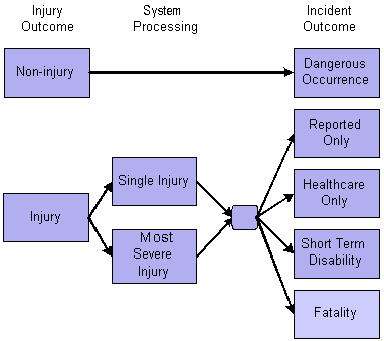
Injury outcome and incident outcome
Processing Data for British Columbia Workers’ Compensation Board Electronic Data Interface Reporting
This section provides an overview of the steps for preparing reports for electronic transmission and discusses how to:
Enter data for BC WCB reporting.
Create an EDI file for BC WCB reporting.
 Preparatory Steps for Report Transmission
The Electronic Data Interface (EDI) report that you prepare using Human Resources meets the BC WCB specifications and contains reporting data designed to cover all three of the WCB reports: Injury/Illness, First Aid, and Accident. Once you create the EDI file and have the necessary approvals, send it by email to the designated WCB office.
Here’s how to prepare a report for electronic transmission:
Enter the required data.
Run the CAN Collect BC WCB EDI Data process (OHS501BC).
Run the CAN Create BC WCB EDI File process (OHS701BC).
Pages Used to Process Data for BC WCB EDI Reporting
|
Page Name |
Object Name |
Navigation |
Usage |
|
RUNCTL_OHS501BC |
Workforce Monitoring, Health and Safety, Collect Health/Safety Data, WCB EDI Data CAN, Collect WCB EDI Data |
Enter the data required for British Columbia WCB electronic data reporting. |
|
|
PRCSRUNCNTL |
Workforce Monitoring, Health and Safety, Collect Health/Safety Data, Create WCB EDI File CAN, Create WCB EDI File |
Create an EDI data file for submission to the local BC WCB office. |
Entering Data for BC WCB ReportingGenerating usable EDI files requires careful and complete data entry. You normally complete the following categories of information:
Incident/injury data.
Corrective preventative actions.
Non-employee information.
Employee information.
Employment information.
Claims information.
Much of the information captured in the EDI file concerns people associated with the incident. Identify them by employee or non-employee identification number(s). The WCB is concerned primarily about employees’ injuries. Non-employees’ injuries are reported in the case where they are witnesses or investigators.
The WCB also requires contact information, such as phone numbers and addresses. For instance, note that there are a number of Canadian-specific extra address information pages throughout this book. Fill out these pages for everyone involved in the incident. This information is used to generate records in the EDI file that are required by the WCB.
Warning! We have associated a series of data-entry checks and warning messages with key fields to remind you about key information that you must complete to meet British Columbia WCB reporting requirements. You activate these data-entry checks and warnings during data entry by applying the regulatory region and setID CANBC to an incident. If you do not use the proper regulatory region and setID, you could produce an EDI file that is formatted correctly but is rejected by the WCB due to missing or invalid information.
Creating an EDI File for BC WCB ReportingOnce you collect the data necessary for EDI reporting, run the CAN Create BC WCB EDI File (OHS701BC) process to create and send the EDI file. A combination of SQRs and EDI Manager generates the ASCII file. This diagram shows how the process works:
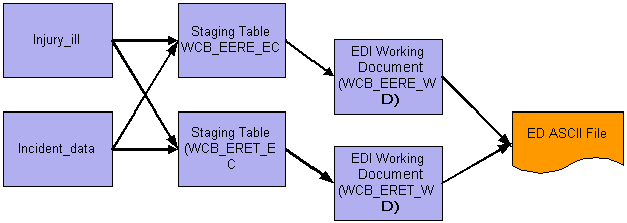
EDI file creation process
You enter and change the data on the pages and the original tables. There is no way to edit the data in the intermediate, or staging, tables. The system uses SQRs to perform the processing required to move data from its normal application table into staging tables that have an EC suffix. The staging tables in turn have a one-to-one correspondence with the working document tables that have a WD suffix. These tables define the precise record format necessary in the EDI ASCII file. The EDI manager runs an SQR to produce the actual EDI ASCII file. The name of the ASCII file is defined by WCB in the form of xxxxxyyy.yyb, where xxxx is the electronic correspondence ID, yyyyy represents the last five digits of the message number, and b is an identifier that is used to show whether compression or encryption is used. The file is compressed in ZIP format before email submission to WCB.
PeopleSoft Process Scheduler runs the Create WCB EDI File (BC) process at user-defined intervals. After the system creates the file, it saves it in the C:\Temp directory of the client workstation unless you specify otherwise. If the data is wrong in the ASCII file, then change the data on the original pages and rerun the EDI SQR to produce another ASCII file.