 Scorecard Overview
This chapter discusses:
Scorecard overview.
Scorecard business processes.
Scorecard integrations.
Scorecard implementation.
Scorecard OverviewScorecard communicates strategic goals to your organization and monitors their progress. With Scorecard, you establish specific strategic goals for key areas within your organization, define how to measure their success, and communicate that information across your entire organization. Because all employees are aware of the goals, they can understand their impact on achieving them and align their actions accordingly. As they use Scorecard to measure the outcome of their actions, they can quickly make further adjustments as needed to successfully achieve the goals. Put simply, using Scorecard you can manage and measure key performance indicators (KPIs) and communicate strategic direction and results to your organization. The scorecard shows how well the strategy is working and provides the information that you need to determine what changes are required to improve performance results. With this information, your organization can adjust, respond, and proactively manage the changing business environment.
Scorecard enables you to:
Provide a framework that organizes strategic thinking and performance measurement.
Clarify and build consensus on strategic direction.
Communicate strategy and measures of success.
Align behavior and increase focus on priority initiatives.
Support strategic planning through metric relationship analysis and organizational learning.
The main tasks that you perform while using the application are:
Define your organization's strategic goals.
Establish your strategy.
Establish key performance indicators.
Run the jobstreams that calculate KPIs and assess KPIs and scorecards.
Monitor scorecards.
Override assessments if necessary.
Communicate status to key individuals within your organization.
While the foundation behind the application is the balanced scorecard theory developed by Robert S. Kaplan and David P. Norton, Scorecard can be used to align with any management theory, such as Baldrich or total quality management, or it can be used as a purely operational measurement reporting tool; it truly is an information delivery and communication tool.
This diagram illustrates, at a very high level, the tasks that you complete when you implement Scorecard:
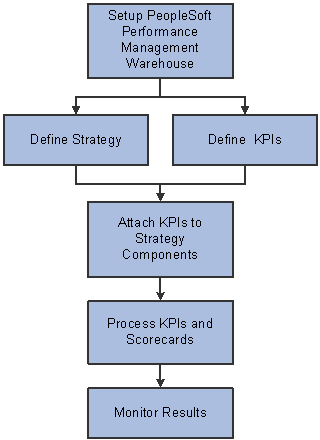
Scorecard implementation tasks
Most of these tasks include several steps, and require that you complete multiple pages in the application. These details are covered in the subsequent chapters of this documentation.
See Also
Understanding PeopleSoft Enterprise Scorecard
Scorecard Business Processes
This application is part of the Strategic Planning and Performance Management business process, and is applicable to the Plan to Act phase.
Scorecard IntegrationsScorecard interacts with other PeopleSoft Enterprise Performance Management (EPM) applications. The application can:
Support sophisticated analysis through links to Performance Management Warehouse certified reporting tools.
Integrate with enterprise resource planning (ERP), legacy, or external data through the Performance Management Warehouse.
Use other PeopleSoft analytic applications for complex calculations.
Publish KPI information.
Other applications can subscribe to the published KPI data using PeopleSoft Application Messaging.
Analyze strategic data across your PeopleSoft systems with the PeopleSoft Enterprise Performance Management suite of applications.
This table lists the PeopleSoft applications that interact with Scorecard and their corresponding data sources:
|
PeopleSoft Enterprise Performance Management Application |
PeopleSoft Data Source |
|
Supplier Rating System |
PeopleSoft Enterprise Supplier Relationship Management application data. |
|
Workforce Scorecard |
PeopleSoft Enterprise Workforce Analytics application data. |
|
Customer Scorecard |
PeopleSoft Enterprise Customer Relationship Management application data. |
|
Project Portfolio Management |
PeopleSoft Enterprise Project Costing. PeopleSoft Enterprise Program Management. |
Note. KPIs for the CFO and Government Portal solutions are also delivered as part of the Enterprise Performance Management Portal Pack.
See PeopleSoft Enterprise Performance Management Portal Pack 9.0 PeopleBook.
Scorecard ImplementationPeopleSoft Setup Manager enables you to generate a list of setup tasks for your organization based on the features that you are implementing. The setup tasks include the components that you must set up, listed in the order in which you must enter data into the component tables, and links to the corresponding PeopleBook documentation.
Other Sources of Information
In the planning phase of your implementation, take advantage of all PeopleSoft sources of information, including the installation guides and troubleshooting information. A complete list of these resources appears in the preface in About These PeopleBooks with information about where to find the most current version of each.
See Also
About These PeopleBooks
Enterprise PeopleTools PeopleBook: Setup Manager
Enterprise PeopleTools PeopleBook: PeopleSoft Component Interfaces