Introduction
Before you can begin to work with FML fielded buffers, or use the VIEWS functions that move fields between structures and fielded buffers, certain details must be taken care of, such as:
- defining fields
- making field definitions available to applications programs (through field table files and mapping functions at run-time, or C header files at compile time)
- compiling source view descriptions into object view descriptions, and generating corresponding C header files and COBOL COPY files
These and related activities are described in this chapter.
Defining Fields
This section discusses
- how fields are defined in field tables for run-time use
- the available functions for run-time use with the field table files
Field Names and Identifiers
A field identifier (fieldid) is defined (typedef'd) as a FLDID (FLDID32 for FML32), and is composed of two parts: a field type and a field number (the number uniquely identifies the field).
Field numbers are restricted to be between 1 and 8191, inclusive, for FML, and between 1 and 33,554,431, inclusive, for FML32. Field number 0 and the corresponding field identifier 0 is reserved to indicate a bad field identifier (BADFLDID). When FML is used with other software that also uses fields, additional restrictions may be imposed on field numbers.
The numbering convention adopted by the BEA TUXEDO System software is as follows:
- field numbers 1-100 are reserved for system use
- field numbers 101-8191 are for application-defined fields with FML, and field numbers 101-33,554,431 for FML32.
The mappings between field identifiers and field names are contained in either field table files or field header files. Using field table files requires that you convert field name references in C programs with the mapping functions described later in this chapter; field header files allow the C preprocessor ( cpp(1)) to resolve name-to-fieldid mappings when a program is compiled.
The functions and programs that access field tables use the environment variables FLDTBLDIR and FIELDTBLS to specify the source directories and field table files, respectively, which are to be used (FLDTBLDIR32 and FIELDTBLS32 are used for FML32). These should be set as described in Chapter 3.
The use of multiple field tables allows you to establish
separate directories and/or files for separate groups of fields.
Note that field names and field numbers should be unique across
all field tables, since such tables are capable of being
converted into C header files, and multiply occurring field
numbers could cause unpredictable results.
Field Table Files
Field table files are created using a standard text editor, such as vi. They have the following format:
- blank lines and lines beginning with # are ignored
- lines beginning with $ are ignored by the mapping functions but are passed through (without the $) to header files generated by mkfldhdr(1); for example, this would allow the application to pass C comments, what strings, etc. to the generated C header file; they are not passed through to the COBOL copy files
- lines beginning with the string *base contain a base for offsetting subsequent field numbers; this optional feature provides an easy way to group and renumber sets of related fields
- all other lines should have the form:
name rel-number type flag comment
where:
- name is the identifier for the field. It should not exceed the C preprocessor identifier restrictions (that is, it should only contain alphanumeric characters and the underscore character). Internally, the name is truncated to 30 characters, so names must be unique within the first 30 characters.
- rel-number is the relative numeric value of the field; it is added to the current base, if *base is specified, to obtain the field number of the field
- type is the type of the field, and is specified as one of: char, string, short, long, float, double, carray
- the flag field is reserved for future use; use a dash (-) in this field
- comment is an optional field that can be used for clarifying information
Note that these entries must be separated by white space (blanks or tabs).
Field Table Example
The following is an example field table in which the base shifts from 500 to 700. The first fields in each group will be numbered 501 and 701, respectively.
Fig. 1: A UNIX Field Table File
# following are fields for EMPLOYEE service
# employee ID fields are based at 500
*base 500
#name           rel-number      type           flags   comment
#----           ----------      ----           ------  -------
EMPNAME         1               string         -       emp name
EMPID           2               long           -       emp id
EMPJOB          3               char           -       job type
SRVCDAY         4               carray         -       service date
*base 700
# all address fields are now relative to 700
EMPADDR         1               string         -       street address
EMPCITY         2               string         -       city
EMPSTATE        3               string         -       state
EMPZIP          4               long           -       zip code
Mapping Functions
Run-time mapping is done by the Fldid() and Fname() functions that consult the set of field table files specified by the FLDTBLDIR and FIELDTBLS environment variables (Fldid32() and Fname32() reference FLDTBLDIR32 and FIELDTBLS32 for FML32).
Fldid maps its argument, a field name, to a fieldid:
char *name;
extern FLDID Fldid();
FLDID id;
 . . .
id = Fldid(name);
Fname does the reverse translation by mapping its argument, a fieldid, to a field name:
extern char *Fname();
name = Fname(id);
 . . .
The identifier-to-name mapping is rarely used; that is, it is
rare that one has a field identifier and wants to know the
corresponding name. One place where the field identifier-to-field
name mapping could be used is in a buffer print routine where you
want to display, in an intelligible form, the contents of a
fielded buffer.
Loading the Field Tables
Upon the first call, Fldid() loads the field table files and performs the required search. Thereafter, the files are kept loaded. Fldid() returns the field identifier corresponding to its argument on success, and returns BADFLDID on failure, with Ferror set to FBADNAME (Ferror32 is set for FML32).
To recover the data space used by the field tables loaded by Fldid(), the user may unload all of the files by a call to the Fnmid_unload() function.
The function Fname() acts in a fashion similar to Fldid(), but provides a mapping from a field identifier to a field name. It uses the same environment variable scheme for determining the field tables to be loaded, but constructs a separate set of mapping tables. On success, Fname() returns a pointer to a character string containing the name corresponding to the fldid argument. On failure, Fname() returns NULL.
Note: The pointer is valid only as long as the table remains loaded.
As with Fldid(), failure includes either the inability to find or open a field table (FFTOPEN), bad field table syntax (FFTSYNTAX), or a no-hit condition within the field tables (FBADFLD). The table space used by the mapping tables created by Fname() may be recovered by a call to the function Fidnm_unload().
Both mapping functions and other FML functions that use
run-time mapping require FIELDTBLS and FLDTBLDIR
be set properly. Otherwise, default values are used (see Chapter
3 for the defaults).
Field Header Files
The command mkfldhdr(1) (or mkfldhdr32) converts field tables, as described above, into header files suitable for processing by the C compiler. Each line of the generated header file is of the form: mkfldhdr32(1)
#define fname fieldid
where fname is the name of the field, and fieldid is its field-id. The field-id has both the field type and field number encoded in it. The field number is an absolute number, that is, base plus rel-number. The resulting file is suitable for inclusion in a C program.
The header file need not be used if the run-time mapping functions are used as described in the next sub-section. The advantage of compile-time mapping of names to identifiers is speed and a decrease of data space requirements. The disadvantage is that changes made to field name/identifier mappings after, for instance, a service routine has been compiled will not be propagated to the service routine (that is, it will use the mappings it has already compiled).
mkfldhdr(1) translates each field-table specified in the FIELDTBLS environment variable to a corresponding header file, whose name is formed by concatenating a .h suffix to the field-table name. The resulting files are created, by default, in the current directory. The user may specify a creation directory to mkfldhdr(1) by specifying a -d option followed by the name of the directory in which you want the header files to reside. For example,
FLDTBLDIR=/project/fldtbls
FIELDTBLS=maskftbl,DBftbl,miscftbl
export FLDTBLDIR FIELDTBLS
mkfldhdr
or
FLDTBLDIR32=/project/fldtbls
FIELDTBLS32=maskftbl,DBftbl,miscftbl
export FLDTBLDIR32 FIELDTBLS32
mkfldhdr32
will produce the include files maskftbl.h, DBftbl.h and miscftbl.h in the current directory by processing ${FLDTBLDIR}/maskftbl, ${FLDTBLDIR}/DBftbl and ${FLDTBLDIR}/miscftbl. The command
mkfldhdr -d${FLDTBLDIR}
will process the sample input field-table files and produce the same output files, but will place them in the directory given by ${FLDTBLDIR}.
You may override the environment variables (or avoid setting them) when using mkfldhdr by specifying on the command line the names of the field tables to be converted (this does not apply to the run-time mapping functions). In this case, FLDTBLDIR is assumed to be the current directory and FIELDTBLS is assumed to be the list of parameters that the user specified on the command line. For example,
mkfldhdr myfields
will convert the field table file myfields to a
field header file myfields.h, and place it in the
current directory.
Mapping Fields to C Structures and COBOL Records
As mentioned in Chapter 2, FML VIEWS is a mechanism that allows the exchange of data between fielded buffers and C structures or COBOL records. This capability is provided since it is usually more efficient to perform lengthy manipulations on C structures with C functions than on fielded buffers with FML functions. It also provides a way for a COBOL program to send and receive messages with a C program that handles FML fielded records.
This section discusses VIEWS and how to use it to provide fielded buffer/structure mappings. The figure below shows the various components of VIEWS and how they relate to one another. Each component is explained in the following sections.
Fig. 2: VIEWS
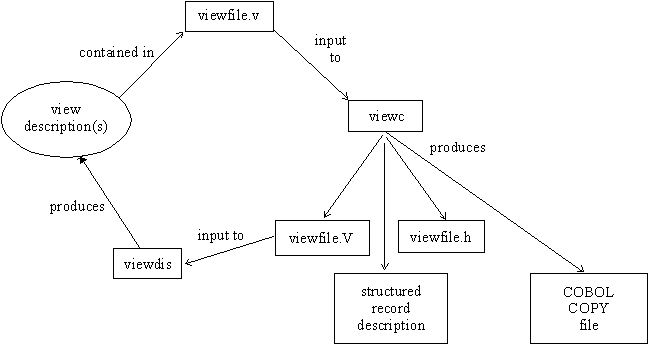
Viewfiles
Source viewfiles are standard text files (created through any standard text editor, such as vi) that contain one or more source view descriptions (the actual field-to-structure mappings).
The view compiler produces (among other things) object viewfiles containing the compiled object view descriptions. These object viewfiles can in turn be used as input to the view disassembler (viewdis or viewdis32), which translates the object view descriptions back into their source format (for verification or editing).
You create and edit the source view descriptions (or edit the output of viewdis) only; compiled view descriptions are not readable by an editor.
Besides the actual view description(s), viewfiles can contain
comment lines, beginning with # or $. Blank
lines and lines beginning with # are ignored by the
view compiler, while lines beginning with $ are passed
by the view compiler to any header files generated. This lets you
pass C comments, what strings, etc., to C header files
produced by the view compiler; they are not passed through to the
COBOL copy files.
View Descriptions
Each source view description in a source viewfile consists of three parts:
- a line beginning with the keyword "VIEW" (never
with a "32" suffix), followed by the name of
the view description; the name can have a maximum of 33
alphanumeric characters (including the underscore
character); when used with
tpalloc (3), the maximum number of characters is 16 - a list of member descriptions
- a line beginning with the keyword "END"
The first line of each view description must begin with the keyword "VIEW" followed by the name of the view description. A member description (or mapping entry) is a line with information about a member in the C structure or COBOL record. A line with the keyword "END" must be the last line in a view description.
Thus, a source view description has the general structure shown in Figure 3.
Fig. 3: Source View Description
VIEW vname
# type   cname   fbname   count   flag   size   null
# ----   -----   ------   -----   ----   ----   ----
--------------member descriptions-------------------
 .
 .
 .
END
In Figure 3:
- vname is the name of the view description, and should be a valid C identifier name, since it is also used as the name of a C structure; underscores are mapped automatically to dashes in the COBOL COPY file
- type is the type of the member, and is specified as one of the following: int, short, long, char, float, double, string, carray, dec_t; if type is '-', the type of the member is defaulted to the type of fbname.
- cname is the identifier for the structure member, and should be a valid C identifier name, since it is the name of a C structure member; underscores are mapped automatically to dashes in the COBOL COPY file
- fbname is the name of the field in the fielded buffer; this name must appear in a field table file.
- count is the number of elements to be allocated (that is, the maximum number of occurrences to be stored for this member); must be less than or equal to 65,535 for FML, and less than or equal to 2,147,483,647 for FML32.
- flag is a list of options, separated by commas, or '-' meaning no options are set; see below for a discussion of flag options.
- size is the size of the member if the type is string, carray, or dec_t; otherwise '-' should be specified, and the view compiler will compute the size. For string or carray, it must be less than or equal to 65,535 for FML and less than or equal to 2,147,483,647 for FML32. For the dec_t type, size is two numbers separated by a comma, the first being the number of bytes in the decimal value (it must be greater than 0 and less than 10) and the second being the number of decimal places to the right of the decimal point (it must be greater than 0 and less than two times the number of bytes minus one).
- null is the user-specified null value or '-' to indicate the default null value for that field; see below for a discussion of null values.
flag Options
The following is a list of the options that can be specified as the flag element of a member description in a view description:
- C
- This option specifies that an additional structure
member, called the associated count member (ACM), be
generated, in addition to the structure member described
in the member description. When transferring data from a
fielded buffer to a structure, each ACM in the structure
is set to the number of occurrences transferred to the
associated structure member. A value of 0 in an ACM
indicates that no fields were transferred to the
associated structure member; a positive value indicates
the number of fields actually transferred to the
structure member array; a negative value indicates that
there were more fields in the buffer than could be
transferred to the structure member array (the absolute
value of the ACM equals the number of fields not
transferred to the structure). During a transfer of data
from a structure member array to a fielded buffer, the
ACM is used to indicate the number of array elements that
should be transferred. For example, if the ACM of a
member is set to N, then the first N non-null fields are
transferred to the fielded buffer. If N is greater than
the dimension of the array, it then defaults to the
dimension of the array. In either event, after the
transfer takes place, the ACM is set to the actual number
of array members transferred to the fielded buffer. The
type of an ACM in the C header file is declared to be
short for FML and long for FML32, and its name is
generated as "C_cname", where cname
is the cname entry for which the ACM is
declared. For example, an ACM for a member named parts
would be declared as follows:
short C_parts;
For the COBOL COPY file, the type is declared to be PIC S9(4) USAGE COMP-5 for FML and PIC S9(9) USAGE COMP-5 for FML32, and its name is generated as "C-cname".
Note: It is possible for the generated ACM name to conflict with structure members whose names begin with a "C_" prefix. Such conflicts will be reported by the view compiler, and are considered fatal errors by the compiler. For example, if a structure member has the name "C_parts", it would conflict with the name of an ACM generated for the member "parts".
- F
- Specifies one-way mapping from structure or record to fielded buffer. The mapping of a member with this option is effective only when transferring data from structures to fielded buffers. This option is ignored if the -n command line option is specified.
- L
- This option is used only for member descriptions of type
carray or string to indicate the number of bytes
transferred for these possibly variable length fields. If
a string or carray field is always used as a fixed length
data item, then this option provides no benefit. The L
option generates an associated length member (ALM) for a
structure member of type carray or string. When
transferring data from a fielded buffer to a structure,
the ALM is set to the length of the corresponding
transferred fields. If the length of a field in the
fielded buffer exceeds the space allocated in the mapped
structure member, only the allocated number of bytes is
transferred. The corresponding ALM is set to the size of
the fielded buffer item. Therefore, if the ALM is greater
than the dimension of the structure member array, the
fielded buffer information was truncated on transfer.
When transferring data from a structure member to a field
in a fielded buffer, the ALM is used to indicate the
number of bytes to transfer to the fielded buffer, if it
is a carray type field. For strings, the ALM is ignored
on transfer, but is set afterwards to the number of bytes
transferred. Note that since carray fields may be of zero
length, an ALM of 0 indicates that a zero length field
should be transferred to the fielded buffer, unless the
value in the associated structure member is the null
value.
An ALM is defined in the C header file to be an unsigned short for FML and an unsigned long for FML32, and has a generated name of "L_cname", where cname is the name of the structure for which the ALM is declared. If the number of occurrences of the member for which the ALM is declared is 1 (or defaults to 1), then the ALM is declared as:
unsigned short L_cname;
whereas if the number of occurrences is greater than 1, say N, the ALM is declared as:
unsigned short L_cname[N];
and is referred to as an ALM Array. In this case, each element in the ALM array refers to a corresponding occurrence of the structure member (or field). For the COBOL COPY file, the type is declared to be PIC 9(4) USAGE COMP-5 for FML and PIC 9(9) USAGE COMP-5 for FML32, and its name is generated as "L-cname". The COBOL OCCURS clause is used to define multiple occurrences if the member occurs multiple times.
Note: It is possible for the generated ALM name to conflict with structure members whose names begin with a "L_" prefix. Such conflicts will be reported by the view compiler, and are considered fatal errors by the compiler. For example, if a structure member has the name "L_parts", it would conflict with the name of an ALM generated for the member "parts".
- N
- Specifies zero-way mapping (no fielded buffer is mapped to the structure). This can be used to allocate fillers in C structures or COBOL records. This option is ignored if the -n command line option is specified.
- P
- This option can be used to affect what VIEWS interprets as a null value for string and carray type structure members. If this option is not used, a structure member is null if its value is equal to the user-specified null value (without considering any trailing null characters). If this option is set, however, a member is null if its value is equal to the user-specified null value with the last character propagated to full length (without considering any trailing null character). Note that a member whose value is null will not be transferred to the destination buffer when data is transferred from the C structure or COBOL record to the fielded buffer. For example, a structure member TEST is of type carray[25] and a user-specified null value "abcde" is established for it. If the P option is not set, TEST is considered null if the first five characters are a, b, c, d, and e, respectively. If the P option is set, TEST is null if the first four characters are a, b, c, and d, respectively, and the rest of the carray contains the character 'e' (that is, 21 e's). This option is ignored if the -n command line option is specified.
- S
- Specifies one-way mapping from fielded buffer to structure or record. The mapping of a member with this option is effective only when transferring data from fielded buffers to structures. This option is ignored if the -n command line option is specified.
Null Values
Null values are used in VIEWS to indicate empty C structure or COBOL record members. Default null values are provided, and you may also define your own.
The default null value for all numeric types is 0 (0.0 for dec_t); for char types, it is "\0"; and for string and carray types, it is "".
Escape convention constants can also be used to specify a null value. The view compiler recognizes the following escape constants: \ddd (where d is an octal digit), \0, \n, \t, \v, \b, \r, \f, \\, \', and \".
String, carray, and char null values may be enclosed in double or single quotes. Unescaped quotes within a user-defined null value are not accepted by the view compiler.
Alternatively, an element is null if its value is the same as the null value for that element, except in the following cases:
- if the P option is set for the structure member, and the structure member is of string or carray type; see the preceding section for details on the P option flag
- if a member is of type string, its value must be the same string as the null value
- if a member is of type carray, and the null value is of length N, then the first N characters in the carray must be the same as the null value
You can also specify the keyword "NONE" in the null field of a view member description, which means there is no null value for the member.
The maximum size of default values for string and character array members is 2660 characters.
Note: Note that for string members, which usually end with a "\0", a "\0" is not required as the last character of a user-defined null value.
View Compiler
Viewc is a view compiler program for FML and viewc32 is used for FML32. It takes a source viewfile and produces an object viewfile, which is interpreted at runtime to effect the actual mapping of data. At runtime, a C compiler must be available for viewc. The command line looks like:
viewc [-n] [-d viewdir] [-C] viewfile [viewfile ...]
where viewfile is the name of a source viewfile containing source view descriptions. You may specify one or more viewfiles on the command line.
If the -C option is specified, then one COBOL COPY file is created for each VIEW defined in the viewfile. These copy files are created in the current directory.
The -n option can be used when compiling a view description file for a C structure or COBOL record that does not map to an FML buffer.
By default, all views in viewfile are compiled and two or more files are created: an object viewfile (suffixed with ".V"), and a header file (suffixed with ".h") for each viewfile (see Figure 2).
The name of the object viewfile is viewfile.V. It is created in the current directory. The -d option can be used to specify an alternate directory. Header files are created in the current directory.
Note: Users of the System/T /Workstation feature in a MS-DOS environment will notice that the object viewfile is given a .vv suffix.
viewc C Header Files
Header files created by the view compiler (viewc) can be used in any C application programs to declare a C structure described by views. For example, the C header file for this view description:
VIEW test
#TYPE   CNAME    FBNAME    COUNT    FLAG    SIZE     NULL
int     empid    EMPID       1        -       -      -1
float   salary   EMPPAY      1        -       -      0
long    phone    EMPPHONE    4        -       -      0
string  name     EMPNAME     1        -       32     "NO NAME"
END
will look like this:
struct test {
        long    empid;                 /* null=-1 */
        float   salary;                /* null=0.000000 */
        long    phone[4];              /* null=0 */
        char    name[32];              /* null="NO NAME" */
};
COBOL COPY Files
COBOL COPY files created by the view compiler with the -C option can be used in any COBOL application programs to declare COBOL records described by views. For example, the COBOL COPY file for the previous view description will look like this in the file TEST.cbl:
 *       VIEWFILE: "test.v"
 *       VIEWNAME: "test"
     05 EMPID                  PIC S9(9) USAGE IS COMP-5.
     05 SALARY                 USAGE IS COMP-1.
     05 PHONE OCCURS 4 TIMES   PIC S9(9) USAGE IS COMP-5.
     05 NAME                   PIC X(32).
Note that the COPY file name is automatically converted to upper case by the view compiler. The COPY file would be included in a COBOL program as follows.
01 MYREC COPY TEST.
The output in the resulting COPY files is more fully described
in the BEA TUXEDO COBOL
Guide.
View Disassembler
The view disassembler disassembles an object viewfile produced by the view compiler and displays view information in source viewfile format. In addition, it displays the offsets of structure members in the associated structure. It is usually used to verify the correctness of an object view description.
The command line looks like this:
viewdis objviewfile...
By default, objviewfile in the current directory is disassembled. If this file is not found in the current directory, an error message is displayed. You can specify one or more view object files on the command line.
The output of viewdis looks similar to the original source view description(s), and can be edited and re-input to viewc. The order of the lines in the output of viewdis may be different from the order of the original source view description, but this does not affect the correctness of the object file.