The material in this chapter describes how services, servers and server groups are defined in the configuration file so that the application is effectively deployed.
Three sections at the end of the chapter describe internationalization of an application, building servers, and utilities that are provided with the System/T software.
The material is organized into the following sections:
The relationship between services, servers & groups
Defining services in the configuration file
Defining servers in the configuration file
Server groups and their significance
Internationalization
Building servers
System/T Utilities
Organizing services into servers and servers into groups
is probably the central part of configuring an application.
There are approximately 30 parameters in the
*SERVICES,
*SERVERS
and
*GROUPS
sections, plus a few more in the
*ROUTING
section that have a bearing on how this task is done.
This chapter is designed to help you get a handle on
this problem.
Most of the detailed discussion of
*GROUPS
and
*ROUTING
parameters is held for later chapters on
DTP
and buffer types, but the basic relationship between
services, servers and groups is covered here.
A service is code written by an application programmer
to perform some task of the application.
Once written the service is compiled and link edited
to form an executable server.
A service name can be
advertised in the bulletin board of the application.
Service requests for an advertised service
are added to the message queue of a server
that contains the service.
An application server must be a member of a
server group.
A runnable configuration must have at least one group defined;
the
*GROUPS
section must follow the
*RESOURCES
and
*MACHINES
sections.
A server group is made up of one or more
servers that use the same instance of
a given resource manager (and
process on the same LMID).
The fact that all servers in the group use the same
instance of a resource manager
is very important and should strongly
influence how you organize servers into a group
and services within servers.
Specifically, you should make sure that none of
the services associated with a group depend on
finding another instance of the resource manager.
This relationship argues for groupings that have a logical
coherence.
In
bankapp,
for example, this leads to servers such as
ACCT,
which includes services for opening and closing an
account.
If you have services that are unrelated to each other
but that share the common feature that they
do not use an
XA-compliant
interface, that would be sufficient
reason for putting them
all in the same group.
Servers like
FRMPRT(5)
fit this category.
A group can be booted or shut down using the
-g
grpname
option on the
tmboot
or
tmshutdown
command line;
this could be a factor in planning group
specifications.
Another factor that might affect your planning is that
the group is the smallest unit of server migration.
If you are considering using the migration feature,
all servers in a group must be able to migrate to the same
alternate processor.
Listing services in the *SERVICES section is
optional; in fact, the entire section can be omitted.
If a service is specified with the -s option of
buildserver
and included via the CLOPT parameter
of the server (either explicitly or by default),
it will be advertised when the server is booted
even if it is not listed in the configuration file.
However, there are three reasons why the listing
might be desirable:
you can assign values to parameters such as
BUFTYPE
and
ROUTING
that have no defaults
for parameters that do have defaults,
you can assign initial values that differ
from the defaults
you are assured of more complete documentation of the
application configuration
When services are listed in the *SERVICES section
the format is
LOAD is an arbitrary number between 1 and 32,767 that
represents the relative load the service imposes on the
system.
The default value is 50.
If load balancing is enabled
(LDBAL
is set to
Y)
the number is used by the
System/T software
to select the best place to enqueue an incoming request.
Factors that bear on the significance of this
parameter are:
is LDBAL turned on the *RESOURCES section?
The LOAD parameter is irrelevant
when LDBAL is N.
If load balancing is enabled,
the cumulative load of a server is
evaluated before the request is enqueued.
If the service is offered by only one server,
LOAD is irrelevant.
Load balancing is automatic for servers in an MSSQ set,
but still important if a service is offered by more than
one queue.
The fact is, the conditions that
would persuade you to enable load balancing and specify
load values for services occur infrequently.
With servers being organized into groups because of their
use of a specific resource manager instance, servers within the group
tend to have identical sets of services.
When servers are identical the most common strategy is to
let them get messages from a single queue.
If you do specify load values, remember the
assigned value applies when the system is booted.
After the system is booted,
the administrator can change load values with the
changeload
command of
tmadmin(1)
The value for PRIO is
a number between 1 and 100 that assigns a dequeueing
priority to the service request.
The default is 50.
Higher numbers mean higher priority.
This number needs to be considered in relationship to the
priority assigned to other services offered in the same
server.
Don't worry that a service with a low priority will sit
on the queue forever;
the System/T software prevents a low priority service from
remaining enqueued forever behind a continuing stream of
higher priority requests.
After every nth request dequeued by priority, it
takes one off the bottom of the queue.
When
PRIO
is specified it only affects the priority at boot time.
The administrator can change priority for services
with the
changepriority
command in
tmadmin(1).
The SRVGRP parameter specifies one of the group identifiers
from the *GROUPS section.
It permits you
to specify different sets of parameter values when you
have more than one entry for the same service.
If you use SRVGRP,
you should realize that the assignment of
parameters for the service is for all occurrences
of the service within the server group,
so it is only if the service is in more than one
group that you need to consider it.
Only one entry can exist for a service that doesn't
specify a
SRVGRP;
that entry covers a service that is advertised and that
doesn't match any entries that do specify a
SRVGRP.
The BUFTYPE parameter contains a list of types and subtypes
of data buffers accepted by this service.
If no
BUFTYPE
is specified, the service is expected to accept all types and
subtypes.
The parameter is fully described in Chapter 6, ``Buffer
Types.''
If present,
the ROUTING parameter carries the identifier of an
entry in the *ROUTING section.
If not present, data dependent routing is not done for this
service.
If multiple entries exist for this SVCNM
(that is, the same service appears in servers in more than
one server group), the ROUTING parameter must be
the same in all cases.
To put it another way, a service can name only one
routing criterion.
See the section called ``Data Dependent Routing'' in Chapter 6.
There are two parameters that apply only to services that
participate in a DTP environment.
The parameters are AUTOTRAN and TRANTIME.
They are described in Chapter 5,
The *SERVICES section of the
bankapp
application is shown
in Figure 1.
Entries in the *SERVERS section assign parameters to an
application server.
They have the format:
There are two required parameters for each server entry:
SRVGRP and SRVID.
The SRVGRP parameter ties this server to a group
by means of the GRPNAME tag
specified in the *GROUPS section.
The
LMID parameter for the group
tells
tmboot
what machine to bring the server up on.
It is also through this association with a group that
tmboot
knows the resource manager used by this server and what
parameters to pass when opening the resource manager.
The SRVID parameter specifies a number between 1 and 30,000
that identifies this server within its group.
It is required even if the group has only one server.
If multiple occurrences of servers are desired,
do not use consecutive numbers for
SRVIDs;
leave enough room for the system to assign additional
SRVIDs
up to
MAX.
(See ``MIN and MAX'' below)
The optional parameters of the *SERVERS section are
divided into boot parameters and runtime parameters.
Boot parameters are used by
tmboot
when the server is being brought up.
As soon as the server is running, it
checks TUXCONFIG for the runtime
parameters that control its operation.
The CLOPT parameter takes a string of command line options
to be passed to the AOUT when it is booted.
The
servopts(5) page
in Section 5 of the
Some of the available options apply primarily to servers
under development.
For example, the -r option directs the server to
write a record to its standard error file
each time a service request begins or ends.
If stderr is redirected (via the -e option),
these records may later be analyzed with the
txrpt
utility.
(See the description of txrpt later in this chapter)
Other command line options may
to be used to direct the server's
standard out and standard error to specific files,
or to start the server so that
it initially advertises a limited set of its
available services.
The default value for the CLOPT parameter is -A,
which means that the server is started with
all available services advertised.
Note:
Available services are those named
with the -s option on the
buildserver
command line when the server is built.
Other services may be present in the executable AOUT,
but they are not available to be advertised when the server
is booted.
If a subset of available services is named with the
-s option (from
servopts(5))
in the
CLOPT
parameter value,
those services are advertised when the server is booted.
Services not advertised when the server is booted
can be advertised at a later time through the
tmadmin advertise
command or through a call to
tpadvertise(3c).
The maximum length of the CLOPT parameter value is 256
characters; it must be enclosed in double quotes.
The value for the SEQUENCE parameter is a number between 1
and 9999.
It can be used to specify the order in which servers are
booted (and shut down).
If SEQUENCE is not specified, servers are booted in the
order in which they appear in the configuration file (and
shut down in the reverse order).
If some servers have SEQUENCE numbers specified and others
do not, the ones with numbers assigned are booted ahead of
the unnumbered ones.
The unnumbered ones are booted in the order in which they
appear in the configuration file.
If the same SEQUENCE number is assigned to more than one
server,
tmboot
may boot those servers in parallel.
MIN
and
MAX
set the minimum and maximum number of occurrences of the
server to be booted.
You can use these parameters to save having to repeat an
entry for multiple occurrences of the same server.
Here are some things to keep in mind:
tmboot
starts
MIN
occurrences unless you explicitly call for more with the
-i
SRVID
option of
tmboot
if
RQADDR
is specified and
MIN
is greater than one, an
MSSQ
set is formed
if
MIN
is not specified, the default is 1
if
MAX
is not specified, the default is
MIN
MAX
is especially important for conversational servers because
they are spawned automatically as needed
The optional runtime parameters are used by the server
after it has been started by
tmboot.
As indicated above,
tmboot
uses the values found in the
TUXDIR, APPDIR and ENVFILE parameters
of the *MACHINES section when booting the server.
It also sets the PATH for the server to
The ENVFILE parameter for a server can be used to add to
the environment established by
tmboot.
Variables specified in the file named in the *SERVERS
ENVFILE parameter are set after those
in the *MACHINES ENVFILE used by
tmboot.
These files cannot be used to override
TUXDIR, APPDIR,
TUXCONFIG, or TUXOFFSET.
The best policy is to include in the server's ENVFILE only
those variable assignments known to be needed to ensure
proper running of the application.
Within ENVFILE only lines of the form
CONV
takes a
Y
value if a conversational server is being defined.
For a request/response server,
you can either set
CONV=N
or omit the parameter.
RQADDR assigns a symbolic name to the
request queue of this server.
MSSQ sets are established by
using the same symbolic name for more than one server
(or by specifying
MIN
greater than 1).
All members of an MSSQ set must offer an identical
set of services
and must be in the same server group.
If RQADDR is not specified, the system assigns a unique key
to serve as the queue address for this server.
However, tmadmin commands that take a queue address
as an argument
are easier to use if queues are given symbolic names.
The RQPERM parameter is used to assign
permissions to the request queue for this server.
If no parameter is specified, the
permissions of the bulletin board, as specified by PERM
in the *RESOURCES section, is used.
If no value is specified there, the default of 0666 is
used.
This opens your application up to possible use by any login
on the system, which is something you might want to think
twice about.
The REPLYQ parameter specifies (with a Y or N)
whether or not a reply queue, separate from the request queue,
is to be set up for this server.
In cases where only one server is using the
request queue, replies can be picked up from the request
queue without causing problems.
However, if the server is a member of an MSSQ set
and contains services programmed to
receive reply messages,
REPLYQ should be set to Y
so that an individual reply queue is created for this server.
If that is not done,
the reply will be sent to the request queue
shared by all servers of the MSSQ set
and there is no way of assuring that it will be picked up
by the server that is waiting for it.
It should be standard practice to specify REPLYQ=Y
for all member servers of an MSSQ set if replies
are anticipated.
Servers in an MSSQ set are required to have identical
offerings of services, so it is reasonable to expect that
if one server in the set expects replies, any server in the
set may do likewise.
The RPPERM parameter is used to assign permissions to the
reply queue.
This parameter is useful only when REPLYQ=Y.
If requests and replies are read from the same queue, only
RQPERM is needed; RPPERM is ignored.
The RESTART parameter takes a Y or N
to indicate whether or not the server is restartable.
It defaults to N.
If the server is in a group that can be migrated, RESTART
must be Y.
An application's policy on restarting servers
might well vary according to whether the server is in
production or not.
During the test phase of application development it is
reasonable to expect that a server might fail repeatedly,
but server failures should be rarer events once the
application has been put into production.
It may be that you would want to set more stringent
parameters for restarting servers once the application is
in production.
The following three parameters are associated with
RESTART.
The RCMD parameter can be used to specify a command to be
executed in parallel with the restarting of the server.
The command must be an executable UNIX system file residing in a
directory on the server's PATH.
An example of a possible use would be a command that sends
a customized message to the userlog to mark the restarting of the
server.
The MAXGEN parameter specifies a number greater than 0
and less than 256 that controls the number of times the
server can be started within the period specified in the
GRACE parameter.
The default is 1.
If the server is to be restartable, MAXGEN must be
>= 2.
The number of restarts is at most number - 1 times.
RESTART must be Y or MAXGEN is ignored.
If RESTART is Y,
the GRACE parameter specifies the time period
(in seconds) during
which this server can be restarted MAXGEN - 1 times.
The number assigned must be equal to or greater than 0.
The maximum is 2,147,483,648 seconds (or a little better
than 68 years).
If
GRACE
is not specified,
the default is 86,400 seconds (24 hours).
As soon as one
GRACE
period is over the next one begins, so
setting it to 0 removes all limitations;
the server can be restarted an unlimited number of times.
The permissible value for
SYSTEM_ACCESS
is either
FASTPATH
or
PROTECTED.
PROTECTED
means that the shared memory for System/T internal tables is
not accessible to application code outside of System/T
libraries.
If
NO_OVERRIDE
is specified for this parameter in the *RESOURCES section, the
parameter is ignored in the *SERVERS section.
The *SERVERS section of the
bankapp
application is shown
in Figure 3.
Most of
the parameters of the *GROUPS section are used to
implement distributed transaction processing.
For that reason we are deferring the discussion of the
configuration parameters until we get to
Chapter 5,
The designation of server groups ties servers together in
two major ways:
by the processor on which they run, that is, the LMID
that identifies a particular logical machine
by the
instance of the resource manager, including
the database name and location,
and the mode in which the database is opened.
This
information is carried in the OPENINFO parameter
for the group.
A server group is the smallest unit that can be migrated to
an alternate location.
This has to be enabled by specifying
MIGRATE
as an
OPTION
in the
*RESOURCES
section and by providing a second
LMID
value for the group.
(There is also a tmadmin
command to migrate all groups on an LMID, if they all
have the same target machine).
If your design calls for migrating server groups, make sure
that the environment on the secondary location duplicates
the original environment.
The *GROUPS section of the
bankapp
application is shown
in Figure 4.
The format shown for the
OPENINFO
statement is for the TUXEDO System/SQL resource manager;
other resource managers are likely to have different formats.
All system messages for TUXEDO System/T are kept in catalogs located in
directories under
TUXDIR/locale.
The default set of catalogs uses American English
and is located in the directory
TUXDIR/locale/C.
This section covers how you can take advantage of this
capability.
There is a chapter in a TUXEDO guide, the
A parameters in the *SERVERS section of the
configuration file allows you to name an
ENVFILE
for a server.
The
ENVFILE
can contain environment variables that apply to that server
on the logical machine on which it runs.
There are two variables that pertain to language and the
way in which dates and times are represented:
The values that can be set in the variables are defined in
the X/Open standard
ISO
6937:1983, which can be found in X/Open
documents on portability.
They have the following format:
If you want to specify a date and time representation
different from what usually prevails for the locale named
in
LANG,
it can be done like this:
The setting of environment variables described above
for servers
should also be set for clients in a multinational
application.
You can include the variables in the
.profile
of your users or in another file of variables that is
executed to establish their environment.
This section discusses some of the options of
buildserver(1)
that are important to a TUXEDO System/T administrator.
It is assumed that the server in question has been developed
and tested by a programmer, and that the task now is to make
the server part of a TUXEDO System/T application in production.
The default name for the a.out file produced by
buildserver is SERVER.
Clearly, when there may be several different servers,
having them all named SERVER is impractical.
Use the -o option to give the output file an appropriate
name.
Executable servers should reside in
TUXDIR/bin, in the directory
named in APPDIR
or in a directory named in a
PATH
specified in the
ENVFILE
for the machine.
The -s option can appear more than once.
The argument to the -s option consists of one or more
service names.
These are the services that are available to be advertised;
there may be other services contained in the executable
a.out
All services in the server must be of the same mode;
either all conversational
(that is, accessed via
tpconnect())
or all
request/response
mode (accessed via
tpcall(),
tpacall()
or
tpforward()).
Services named via the -s option
are in a comma-separated list, and the presumption is
that the service is processed by a function of the same name.
If this is not the case; that is, if the service(s) is processed
by a function of a different name, then the function name follows
the list of service names to which it applies.
The function name is preceded by a colon to separate it from the
names of the services.
Examples are shown in Figure 5.
There is no conflict between specifying a
subset of services at build-time with the -s option and
specifying -A in the UBBCONFIG
CLOPT parameter for this server.
In such a case, the -A means all the services
specified with the -s option
at build-time are to be initially advertised when the
server is booted.
Services not initially advertised when the server is booted can be
dynamically advertised at a later time by using the
tmadmin advertise
command or by a call to
tpadvertise().
The preceding discussion does not cover all the options of the
buildserver(1) command.
See the
In addition to the standard TUXEDO System/T-supplied administrative servers,
several servers and utility programs
are available to the transaction-system developer.
The FRMPRT(5) server provides the service of producing a
hard copy image of an FML buffer according to
a form specification.
The FORMNAM field within the buffer indicates the name of the
UFORM mask to be used in printing the fielded buffer.
The fielded buffer itself is first formatted in an internal
buffer by FRMPRT.
The formatted image is written to an ordinary
text file, and a command is invoked to
output the file to the printing device.
Requests can be sent to FRMPRT from an application
process with the maskprt( ) function (see
maskprt(3c)).
Requests can be sent from
mio(1) with the
Ctrl-Y keystroke.
The *GROUPS OPENINFO parameter should be
set to NONE for FRMPRT servers.
The TUXEDO System/T driver program,
ud(1),
reads an input packet from its standard input.
The packet consists of lines of the form:
The standard TUXEDO System/T main( ) routine can
optionally produce a log of the services performed
by a server process.
Each log entry gives the service name,
and its starting and stopping time.
The program
txrpt(1) analyzes the resulting log
records and produces a report
showing the number and average
time of each type of service provided by the
server.
Log records of service requests are produced by including
the
-r
option of
servopts(5)
in the argument of a CLOPT
parameter of a server.
The CLOPT parameter can also include the
servopts -e
option to direct the log records to a separate error file.
The ULOGDEBUG variable must be set to 0
in the ENVFILE of the server to prevent other
error messages from being written to the error file.
The file of collected log records of service requests can
later be used as input to the txrpt program
to obtain an analysis.
Each line of the log is of the form:
Options can be used to organize the report by total
elapsed time or by service name.
The report covers activity on a single date; if the
input file contains records from more than one day,
you can use the
-d
mm/dd
option to select the day to be reported.
-s
time
and -e
time
can be used to control the start and end time for the
report.
In Figure 6 we see an example of a command line and
the resulting report.
It shows that SVC1 was requested a
total of six times within the specified period and that
it took an average of 0.37 seconds to process the
request.
The Relationship Between Services, Servers and Server Groups
Defining Services
SVCNM [parameters]
where SVCNM is an identifier (of 15 characters or less)
that is the name used to request the service.
The same SVCNM can appear more than once in
the *SERVICES section.
The reason for multiple entries of the same SVCNM
is so you can
assign different parameters to occurrences
of the service in different server groups.
This will become clearer as the parameters are described.
LOAD
PRIO
SRVGRP
BUFTYPE
ROUTING
DTP Parameters
Example
Figure 1: *SERVICES section, bankapp
#
*SERVICES
DEFAULT:	LOAD=50	AUTOTRAN=N	ROUTING=ACCOUNT_ID
WITHDRAWAL	PRIO=50
DEPOSIT		PRIO=50
TRANSFER	PRIO=50
INQUIRY		PRIO=50
CLOSE_ACCT	PRIO=40
DEFAULT:	ROUTING=BRANCH_ID
OPEN_ACCT	PRIO=40
BR_ADD		PRIO=20
TLR_ADD		PRIO=20
DEFAULT:	ROUTING=b_id
ABAL		PRIO=30
TBAL		PRIO=30
ABAL_BID	PRIO=30
TBAL_BID	PRIO=30
#
Defining Servers
AOUT required parameters [optional parameters]
where AOUT is the name of an application
executable.
If the value of AOUT is not an absolute pathname,
tmboot
looks for the file in
APPDIR
and
TUXDIR/bin
as specified in the *MACHINES section entry
found through the SRVGRP parameter for the server,
and then in /bin.
If an
ENVFILE
is specified for the machine entry and contains a
PATH
variable, directories in the
PATH
are also searched for the server.
(The value of SRVGRP is a GRPNAME
from the *GROUPS section; the GRPNAME
value is associated with an LMID, which is one of those
assigned in the *MACHINES section.
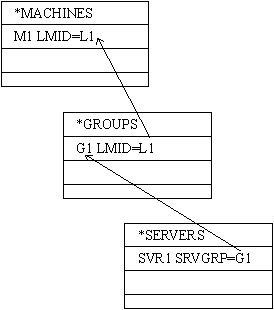
Figure 2 shows the chain.)
An alternate LMID can be specified for a group in the
*GROUPS section;
the reason for doing that is to enable migration.
Figure 2: The chain from server to group to LMID
SRVGRP
SRVID
Boot Parameters
CLOPT
SEQUENCE
MIN and MAX
Runtime Parameters
"APPDIR:TUXDIR/bin:/bin:<path>"
where <path> is the value of the last
PATH= line appearing
in the ENVFILE file.
ENVFILE
VARIABLE=string
are allowed.
VARIABLE
must start with an underscore or alphabetic character
and can contain only underscore or alphanumeric
characters.
If the server can be migrated, its ENVFILE must be in the
same location on both processors.
CONV
RQADDR
RQPERM
REPLYQ
RPPERM
RESTART
RCMD
MAXGEN
GRACE
SYSTEM_ACCESS
Example
Figure 3: *SERVERS section, bankapp
*SERVERS
#
DEFAULT: RESTART=Y MAXGEN=5 REPLYQ=Y CLOPT="-A"
TLR	SRVGRP=BANKB1	SRVID=1		RQADDR=tlr1	CLOPT="-A -- -T 100"
TLR	SRVGRP=BANKB1	SRVID=2		RQADDR=tlr1	CLOPT="-A -- -T 200"
TLR	SRVGRP=BANKB2	SRVID=3		RQADDR=tlr2	CLOPT="-A -- -T 600"
TLR	SRVGRP=BANKB2	SRVID=4		RQADDR=tlr2	CLOPT="-A -- -T 700"
XFER	SRVGRP=BANKB1	SRVID=5
XFER	SRVGRP=BANKB2	SRVID=6
ACCT	SRVGRP=BANKB1	SRVID=7
ACCT	SRVGRP=BANKB2	SRVID=8
BAL	SRVGRP=BANKB1	SRVID=9
BAL	SRVGRP=BANKB2	SRVID=10
BTADD	SRVGRP=BANKB1	SRVID=11
BTADD	SRVGRP=BANKB2	SRVID=12
AUDITC	SRVGRP=BANKB1	SRVID=13 CONV=Y MIN=1 MAX=10
BALC	SRVGRP=BANKB1	SRVID=24
BALC	SRVGRP=BANKB2	SRVID=25
#
Some Key Points about Server Groups
Group Migration
Example
Figure 4: *GROUPS section, bankapp
*GROUPS
		# Substitute values appropriate for your application
		# for items enclosed in angle brackets <>
#
DEFAULT:	TMSNAME=TMS_SQL	TMSCOUNT=2
# For NT/NetWare, :bankdb: becomes ;bankdb;
BANKB1		LMID=SITE1	GRPNO=1
	OPENINFO="TUXEDO/SQL:<APPDIR>/bankdl1:bankdb:readwrite"
BANKB2		LMID=SITE2	GRPNO=2
	OPENINFO="TUXEDO/SQL:<APPDIR>/bankdl2:bankdb:readwrite"
Internationalization
Environment for Servers
Environment Variables for Locales
LANG LC_TIME
The variables are interrelated.
LC_TIME
specifies the date and time representation for a locale
and overrides
LANG,
which
specifies the language catalog directory.
language [_territory [.codeset]]
For example, to represent the French language as spoken in
Switzerland, specify
LANG=Fr_CH.6937
LANG=Fr_CH.6937
LC_TIME=C
The above setting specifies the American format for date
and time representation and everything else in Swiss
French.
Environment for Clients
Building Servers
Naming the a.out: the -o Option
Specifying Services: the -s Option
Figure 5: Examples of the buildserver -s option
/* Services BUY and SELL performed by functions BUY() and SELL() */
buildserver -o BROKER -s BUY,SELL -f broker.c
/* Services BUY and SELL performed by function stocks() */
buildserver -o BROKER -s BUY,SELL:stocks -f broker.c
Other Buildserver Options
Utility Programs
Printed Masks (FRMPRT)
Batch Input Program (ud)
[flag]fldname<tab>fldval
A packet is terminated by a line containing only a
<CR>.
In one line of the packet,
fldname
must be the literal string,
SVCNM.
When
SVCNM
is detected,
fldval
is interpreted as the name of a service to which the
buffer should be sent.
ud converts the packet to an FML
fielded buffer and sends it to the specified service.
Normally,
ud
waits for a reply unless the
-r
option is specified.
ud
then continues processing until there is no more input.
The
-d
option can be used to specify a delay between requests.
If the -t timeout option is specified,
a transaction is started in ud before the request is sent
and is committed when a reply indicating success
is returned.
The reply comes in a fielded buffer,
which
ud
writes in a printable format to its standard output.
If the -t option is used, the
-r
and
-d
options
are not allowed.
Transaction Analysis Program (txrpt)
@svcname pid sdate stime edate etime
where
Figure 6: Example of txrpt output
txrpt -nSVC1 -d10/15 -s11:01 -e14:18  <newr>
START AFTER:	Thu Oct 15 11:01:00 1992
END BEFORE:	Thu Oct 15 14:18:00 1992
            TRANSACTION SUMMARY REPORT
TRNAME    11a-12n     13p-14p     14p-15p     	TOTALS
          Num/Avg     Num/Avg     Num/Avg     	Num/Avg
------    --------    --------    --------    	-------
SVC1      2/0.25      3/0.25      1/0.96      	6/0.37
-------   -------     -------     -------     	-------
TOTALS    2/0.25      3/0.25      1/0.96      	6/0.37