What this Chapter is About
This chapter describes the administration issues for TUXEDO System/T applications that use the /Workstation. The administration of /Workstation clients, /Workstation handlers and the listener are all performed in the TUXEDO System/T administrative domain, not at the workstation. The issues discussed here are /Workstation specific; they do not include topics such as client naming and authentication that apply to native clients as well as /Workstation clients. For a complete discussion of TUXEDO System/T application administration, please refer to the BEA TUXEDO Administrator's Guide.
Issues covered here include
- defining /Workstation clients in the configuration file
- defining the /Workstation listener in the configuration file
Configuring /Workstation
The UBBCONFIG file contains important /Workstation parameters
in the *RESOURCES and *MACHINES sections. The /Workstation
listener is defined as a system-supplied server in the *SERVERS
section, with a reference to an entry in the *GROUPS section. We
will examine the pertinent sections in the order in which they
appear in the configuration file.
*RESOURCES Section and *MACHINES Section
MAXWSCLIENTS
The MAXWSCLIENTS parameter can be specified in the *MACHINES section of the configuration file to apply to specific machines. MAXWSCLIENTS is the only parameter that has special significance for /Workstation. If MAXWSCLIENTS is not specified, the default value is 0.
MAXWSCLIENTS tells TUXEDO System/T, at boot time, how many "accesser slots" to reserve exclusively for workstation clients. For native clients, each accesser slot requires one semaphore. However, the /Workstation handler process (executing on the native platform on behalf of workstation clients) multiplexes /Workstation client accesses through a single accesser slot and therefore requires only one semaphore. This points out an additional benefit of the /Workstation extension. By putting more clients out on workstations and off the native platform, an application reduces its IPC resource requirements. To repeat, although MAXWSCLIENTS is optional, if it is not specified the default is 0.
MAXWSCLIENTS takes its specified number of accesser
slots from the total set in MAXACCESSERS. This is
important to remember when specifying MAXWSCLIENTS;
enough slots must be left to accommodate native clients as well
as servers. If you happen to specify a value for MAXWSCLIENTS
greater than MAXACCESSERS, native clients and servers
will fail at tpinit() time.
*GROUPS Section
A *GROUPS entry is required for the group that includes the /Workstation listener; the listener need not be the only member of the group. The GROUPNAME is a name selected by the application. The following two parameters must be specified for each entry:
- LMID =
- the identifier(s) given as the value of the LMID parameter must be among those specified in the *MACHINES section.
- GRPNO=
- the value is a number between 1 and 30,000 and must be unique among all entries in the *GROUPS section.
No other parameters of the *GROUPS section need be specified
for the group that includes the /Workstation listener, in fact,
none of the other parameters make any sense for the listener. If
you choose, you can specify other servers in the group, but our
recommendation is that you should not include any that expect to
open a resource manager.
*SERVERS Section
/Workstation clients access your application through the services of:
- a /Workstation listener process
- one or more /Workstation handler processes
The /Workstation listener (WSL) and /Workstation handler (WSH) are specified in one entry as a System/T-supplied server, although they are separate processes. The WSL can support multiple /Workstation clients. It acts as the single point of contact for all the /Workstation clients that connect to your application at the network address specified on the WSL command line. The listener schedules work for one or more /Workstation handler processes. A /Workstation handler process acts as a surrogate within the administrative domain of your application for /Workstation clients on remote workstations. The WSH uses a multiplexing scheme to support multiple /Workstation clients concurrently.
The tag, or AOUT, value for a /Workstation listener entry in the *SERVERS section is WSL.
Each entry must have the following parameters:
- SRVGRP=
- this will be the previously defined GROUPNAME value from the *GROUPS section.
- SRVID=
- is a number between 1 and 30,000 that identifies a server within its group.
- CLOPT=
- are the command line options for the WSL. They are described in the section that follows and also on the WSL(5) manual page in the BEA TUXEDO Reference Manual: Section 5.
Other *SERVERS section parameters that are useful for WSL entries are:
- SEQUENCE=
- gives control over the order in which servers are booted (also used by tmshutdown).
- RESTART=
- should be specified as Y to permit restarts.
- GRACE=
- should be specified as 0 to permit an infinite number of restarts.
None of the other optional *SERVERS parameters are useful.
The WSL CLOPT Parameter
The command line options specified via the CLOPT parameter tell the system
- what services the server will offer. This must be specified as -A
- the network address where /Workstation clients connect to the listener
- what device /Workstation listener uses (for example /dev/tcp or /dev/starlan)
- the name of the /Workstation handler process
- how many /Workstation handlers to start (minimum and maximum)
- how many /Workstation clients are to be multiplexed through each /Workstation handler
- timeout factor for slow networks delays.
- timeout for inactive client processes.
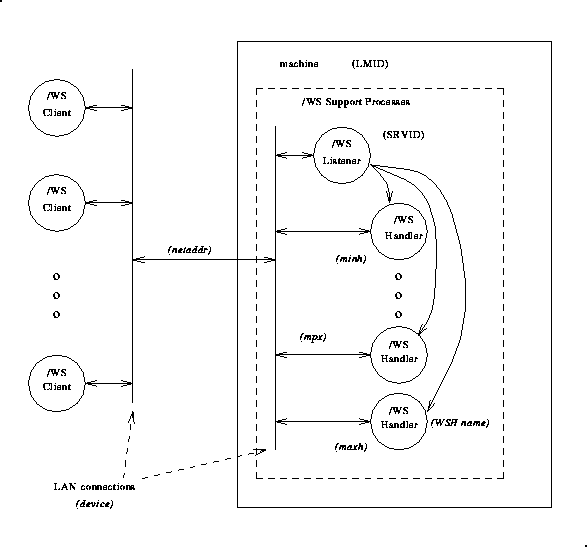
Figure 1 illustrates the relationship between /Workstation clients and the support processes on the machine serving as the administrative domain. The words in parenthesis are substitutables in the command line options of the WSL or server entry parameters.
Fig. 1: /Workstation Feature: Support Processes
The format of the CLOPT parameter is as follows:
    CLOPT="[ -A ] [ servopts options  ] -- -n netaddr [ -d device ]
           [ -w WSHname ] [ -t timeout-factor ] [ -T Client-timeout ]
           [ -m minh ] [ -M maxh ] [ -x mpx-factor ]
           [ -p minwshport ] [ -P maxwshport ]
           [ -I init-timeout ] [-c compression-threshold] [-k compression-threshold]
           [ -z bits ] [ -Z bits ] [-H external netaddr ]"
As noted above the -A value indicates that the WSL is to be booted offering all its services. This is a default value, but it is shown in the example to emphasize the distinction between system-supplied servers and application servers. The latter may be booted offering only a subset of their available services.
The -- syntax marks the beginning of parameters
that are passed to the WSL after it has been booted.
The -n netaddr Option
This is required. netaddr is the network address
/Workstation clients use to connect to your application. The
/Workstation listener process uses this address to listen for
clients attempting to connect at this address.
The -d device Option
The device value is the device name the /Workstation
listener uses to access the network. In the example above the
option is shown as optional, but it is required for TLI-based
networks. For Sockets-based networks, it need not be specified.
The -w WSHname Option
WSHname is the name of the /Workstation handler process
started by the /Workstation listener. You should specify the name
of the executable created by buildwsh(1). The default name assumed for
that a.out is WSH, the /Workstation handler
that is delivered with the /Workstation. That name is used if the
-w option is omitted. If you customize a /Workstation
handler make certain that it resides in either $APPDIR
or $TUXDIR/bin. If your customized /Workstation
handler is used by only one application, we recommend putting the
handler in the directory specified by the APPDIR
environment variable. If the handler is used by many
applications, we recommend putting it in the bin
directory under $TUXDIR.
The -t timeout-factor Option
When a large number of workstation clients attempt to connect
simultaneously, some of the requests may time out due to a
blocking condition. The -t timeout-factor is
provided to guard against this possibility. timeout-factor
is a number that, when multiplied by SCANUNIT,
specifies the amount of time in seconds that should be allowed
for a workstation client to complete initialization processing
through the WSH before being timed out by the WSL. The default
value for this parameter is 3 in a non-security application and 6
in a security application.
The -m minh Option
The minh value is the minimum number of /Workstation
handler processes to be started by this /Workstation listener
when the listener is booted. If specified, the -m
option takes a value from 0 to 255. The default is 0.
The -M maxh Option
maxh is the maximum number of /Workstation handler
processes to be started by this /Workstation listener. If
specified, the -M option takes a value from 1 to
32,767. The default is MAXWSCLIENTS for the machine
divided by the multiplexing factor MPX. For example, let's say
you specify MAXWSCLIENTS=100 in the *MACHINES section
and -x10 for the CLOPT of the listener. The
default value for -M maxh is 100/10 or 10. maxh
must be greater than or equal to minh.
The -x mpx-factor Option
The mpx-factor value specifies the number of
/Workstation clients you want each /Workstation handler to
support simultaneously. If specified, the -x option
takes a value from 1 to 32,767. The default value is 10.
The -T inactive-client-timeout option
The inactive client timeout is the time in minutes allowed for
a client to stay idle. If a client does not make any requests
within this time period, the WSH disconnects the
client. If this argument is not given or is set to 0 then the
timeout is infinite.
Example
The entries related to /Workstation as specified in the configuration file for the bankapp application are shown in Figure 2.
Fig. 2: Excerpts from bankapp configuration file
#
# ubbconfig file for /WS example, SHM mode
#
"mach1"	LMID="SITE1"
	TUXCONFIG="/tuxroot/tuxapp/tuxconfig"
	TUXDIR="/tuxroot"
	APPDIR="/tuxroot/tuxapp"
	TLOGDEVICE="/tuxroot/tuxapp/TLOG"
	TLOGNAME="TLOG"
	TLOGSIZE=100
	MAXACCESSERS=100
	MAXWSCLIENTS=50
#
*GROUPS
"GRP1"	LMID="SITE1"	GRPNO=4
#
*SERVERS
"WSL"	SRVGRP="GRP1"	SRVID=2
	CLOPT=" -- -n //wsl.beasys.com:3107 -d /dev/tcp"
	RQPERM=0660	REPLYQ=Y	RPPERM=0660
	MIN=1	MAX=1	CONV=N
	SYSTEM_ACCESS=FASTPATH
	MAXGEN=5	GRACE=86400	RESTART=Y
#