 Delivered Branding Themes
This section discusses the branding themes and HTML layouts delivered with PeopleSoft Enterprise Portal
Delivered Branding ThemesPeopleSoft delivers nine configured themes with Enterprise Portal Branding to provide the ability to quickly implement your own branding. By simply making a copy of a delivered theme, header or footer, and placing your own logo and your own choice of links on them, you can have a styled brand right out of the box without any developer effort.
Note. Do not change delivered data. When using any of the delivered branding themes or theme elements, make a copy of the theme or element before adding your own logo or links.
The following table lists the themes delivered with Enterprise Portal:
|
Theme Name |
Theme ID |
Comments |
|
Collaborative Workspace Theme. |
PAPPBR_THEME_CW |
None. |
|
Sample Blue. |
PAPPBR_THEME1_BLUE |
None. |
|
Sample Green. |
PAPPBR_THEME1_GREEN |
None. |
|
Theme 1 Blue Simple. |
PAPPBR_THEME1S_BLUE |
None. |
|
Sample GBI. |
PAPPBR_THEME2_GBI |
None. |
|
Branding Blue Curve. |
PAPPBR_THEME3__IEONLY_CURVED |
PeopleSoft recommends that you use this theme only with Internet Explorer browsers, due to style recognition and image alignment issues with other browsers. |
|
Tools 8.4x Delivered. |
PAPPBR_THEME4_TOOLS |
Delivered as the database default theme and assigned as the portal default theme for the EMPLOYEE, CUSTOMER and SUPPLIER portals. Very similar to the hard-coded PeopleTools header. The Search box appears in the header rather than with the Menu. |
|
Tools 8.4x Guest. |
PAPPBR_THEME4G_TOOLS |
Contains a homepage header configured without homepage tabs or the Personalization bar. My Links will not appear for Guest users due to lack of security permissions. |
|
Tools 8.4x Classic. |
PAPPBR_THEME5_TOOLSCLASSIC |
Very similar to the hard-coded PeopleTools header prior to version 8.42. The Search box appears in the header rather than with the Menu. The target page header is configured without the persistent homepage tabs. |
|
Tools 8.4x Classic Guest. |
PAPPBR_THEME5G_TOOLSCLASSIC |
Contains a homepage header configured without homepage tabs or the Personalization bar. My Links will not appear for Guest users due to lack of security permissions. |
The headers delivered with each branding theme display the date and time in the format of the sign-in language.
 Sample Blue Theme
The following graphic shows the homepage for the Sample Blue theme.
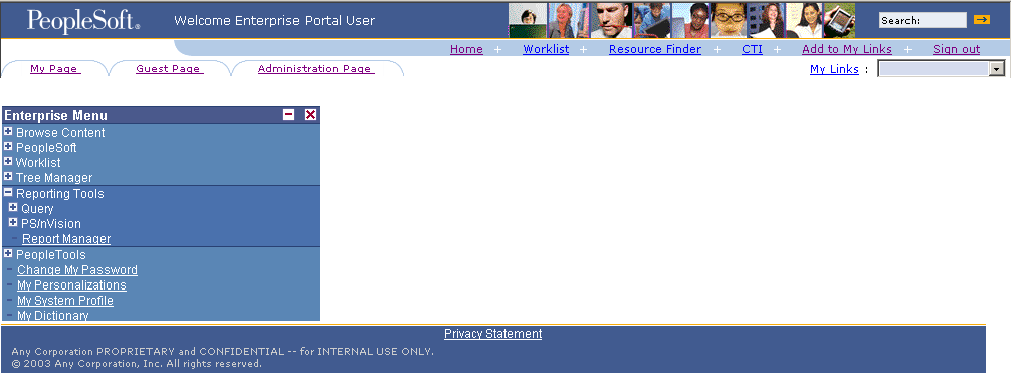
Homepage-Sample Blue theme
As delivered, the target page header for this theme is the same as the homepage header.
The Theme ID for the Sample Blue theme is PAPPBR_THEME1_BLUE. The theme consists of the following components.
|
Theme Component |
Component ID or Object Name |
|
Homepage header. |
PAPPBR_HEADER1_BASIC |
|
Target page header. |
PAPPBR_HEADER1_BASIC |
|
Menu override. |
PAPPBR_MENU1_BLUE |
|
Homepage footer. |
PAPPBR_FOOTER1_BASIC |
|
Style sheet. |
EPPBR_BLUESTYLEDEF |
Sample Green ThemeThe following graphic shows the homepage for the Sample Green theme.
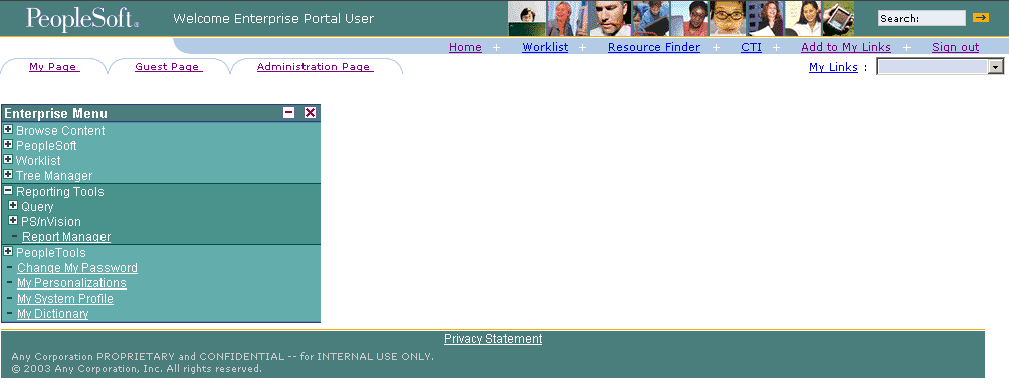
Homepage-Sample Green theme
As delivered, the target page header for this theme is the same as the homepage header.
Note. This theme is the same as the Sample Blue theme (PAPPBR_THEME1_BLUE), except that the colors have been switched from blue to green by the application of a different theme style sheet and a green styled menu.
The Theme ID for the Sample Green theme is the PAPPBR_THEME1_GREEN. This theme consists of the following components.
|
Theme Component |
Component ID or Object Name |
|
Homepage header. |
PAPPBR_HEADER1_BASIC |
|
Target page header. |
PAPPBR_HEADER1_BASIC |
|
Menu override. |
PAPPBR_MENU1_GREEN |
|
Homepage footer. |
PAPPBR_FOOTER1_BASIC |
|
Style sheet. |
EPPBR_GREENSTYLEDEF |
Theme 1 Blue SimpleThe following graphic shows the homepage for the Theme 1 Blue Simple theme.
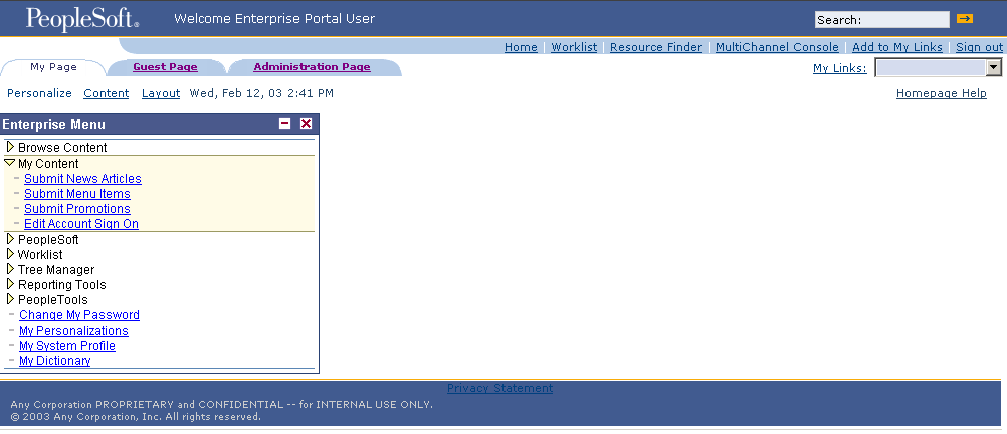
Homepage-Theme 1 Blue Simple
As delivered, the target page header for this theme is the same as the homepage header.
The Theme ID for the Theme 1 Blue Simple theme is PAPPBR_THEME1S_BLUE . This theme consists of the following components.
|
Theme Component |
Component ID or Object Name |
|
Homepage header. |
PAPPBR_HEADER1_SIMPLE |
|
Target page header. |
PAPPBR_HEADER1_SIMPLE |
|
Menu override. |
PAPPBR_MENU2_GBI |
|
Homepage footer. |
PAPPBR_FOOTER1_BASIC |
|
Style sheet. |
EPPBR_BLUESTYLEDEF |
Sample GBI ThemeThe following graphic shows the homepage for the Sample GBI theme.
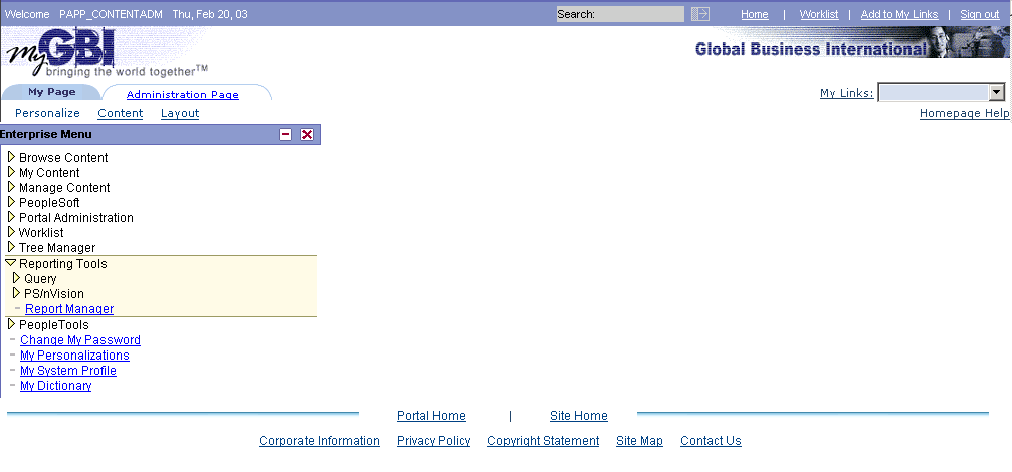
Homepage-Sample GBI theme
The following graphic shows the target page for the theme. Note that it was configured without the homepage tabs (My Page and Administration) persisting on the header.
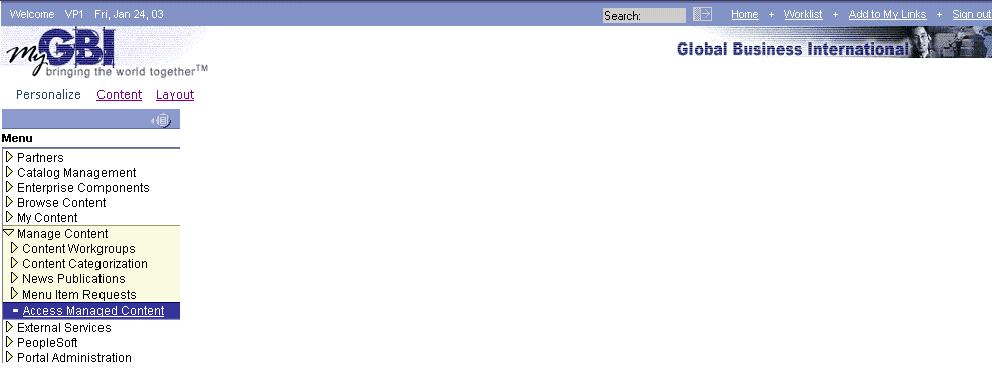
Target page-Sample GBI theme
The Theme ID for the Sample GBI theme is PAPPBR_THEME2_GBI. This theme consists of the following components.
|
Theme Component |
Component ID or Object Name |
|
Homepage header. |
PAPPBR_HEADER2_GBI |
|
Target page header. |
PAPPBR_HEADER2_GBINOTAB |
|
Menu override. |
PAPPBR_MENU2_GBI |
|
Homepage footer. |
PAPPBR_FOOTER2_GENERIC |
|
Style sheet. |
EPPBR_BLUE_GBI_STYLEDEF |
Branding Blue Curve ThemeThe following graphic shows the Branding Blue Curve theme. PeopleSoft recommends that you use this theme with Microsoft Internet Explorer browsers only due to style recognition and image alignment issues with other browsers.
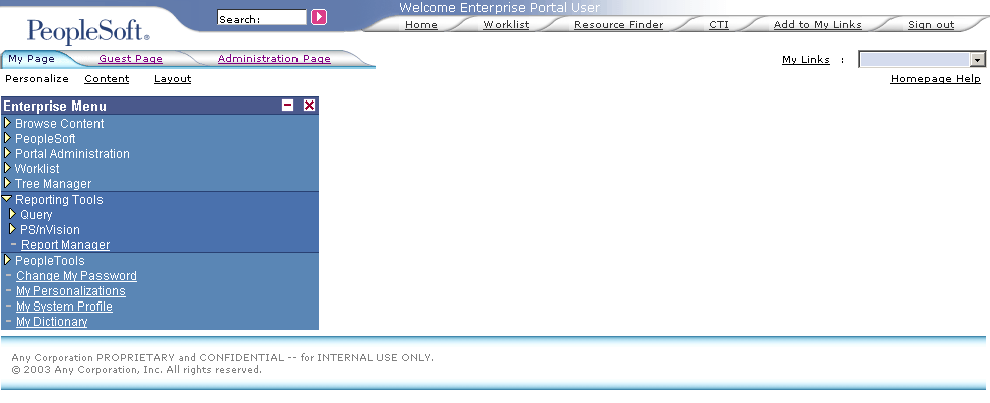
Homepage-Branding Blue Curve theme
As delivered, the target page header for this theme is the same as the homepage header.
The Theme ID for the Branding Blue Curve theme is PAPPBR_THEME3__IEONLY_CURVED. This theme consists of the following components.
|
Theme Component |
Component ID or Object Name |
|
Homepage header. |
PAPPBR_HEADER3_IEONLY_CURVED |
|
Target page header. |
PAPPBR_HEADER3_IEONLY_CURVED |
|
Menu override. |
PAPPBR_MENU3_CURVED |
|
Homepage footer. |
PAPPBR_FOOTER3_IEONLY_CURVED |
|
Style sheet. |
EPPBR_BLUE_CURVE_STYLEDEF |
Tools 8.4x Delivered ThemeThe following graphic shows the Tools 8.4x Delivered theme. This theme is delivered as the database default theme and also as the portal site default theme. This design is closest to the header delivered by PeopleTools that appears when Enterprise Portal Branding is not active. The Tools 8.4x Delivered theme design has two additions: Search in the header rather than in the Menu, and My Links instead of Favorites.
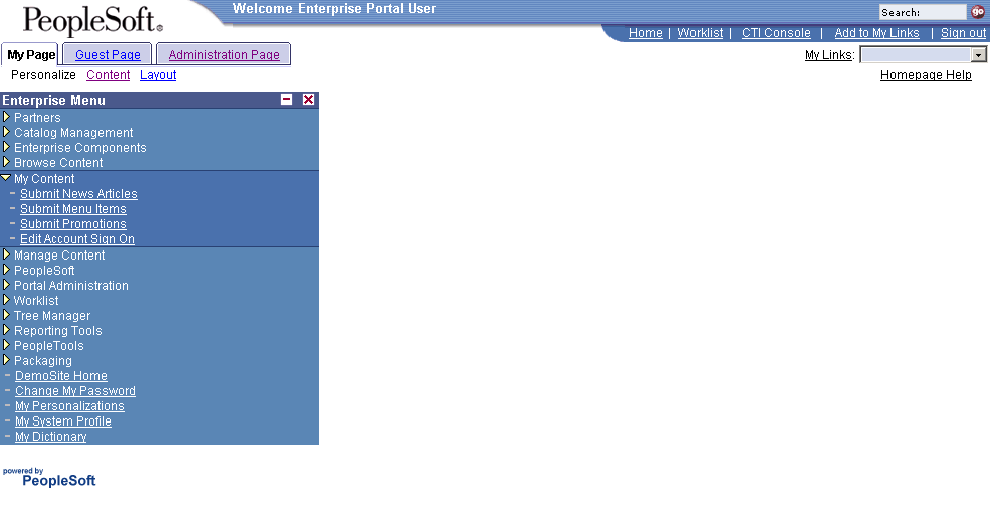
Homepage-Tools 8.4x Delivered theme
As delivered, the target page header for this theme is the same as the homepage header.
The Theme ID for the Tools 8.4x Delivered theme is PAPPBR_THEME4_TOOLS. This theme consists of the following components.
|
Theme Component |
Component ID or Object Name |
|
Homepage header. |
PAPPBR_HEADER4_TOOLS |
|
Target page header. |
PAPPBR_HEADER4_TOOLS |
|
Menu override. |
No overrides applied. PeopleTools default menu applies. |
|
Homepage footer. |
PAPPBR_FOOTER4_POWERED |
|
Style sheet. |
EPPBR_TOOLSSTYLEDEF |
Tools 8.4x Guest ThemeThe following graphic shows the Tools 8.4x Guest theme.
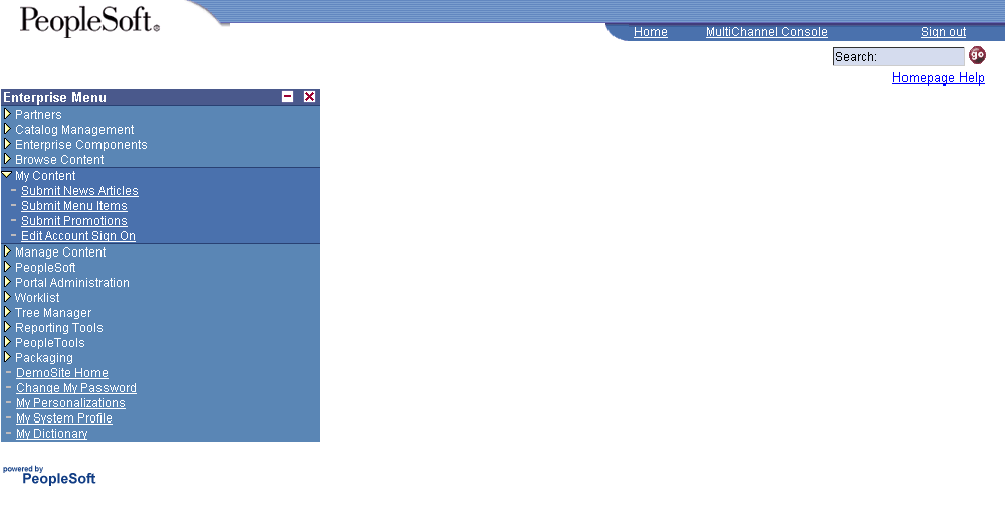
Homepage-Tools 8.4x Guest theme
As delivered, the target page header for this theme is the same as the homepage header. The header does not include homepage tabs or Personalization and will not display My Links to Guests due to lack of security permissions.
The Theme ID for the Tools 8.4x Guest theme is PAPPBR_THEME4G_TOOLS. This theme consists of the following components.
|
Theme Component |
Component ID or Object Name |
|
Homepage header. |
PAPPBR_HEADER4_TOOLS_NOTAB |
|
Target page header. |
PAPPBR_HEADER4_TOOLS_NOTAB |
|
Menu override. |
No overrides applied. PeopleTools default menu applies. |
|
Homepage footer. |
PAPPBR_FOOTER4_POWERED |
|
Style sheet. |
EPPBR_TOOLSSTYLEDEF |
Tools 8.4x Classic ThemeThe following graphic shows the Tools 8.4x Classic theme.
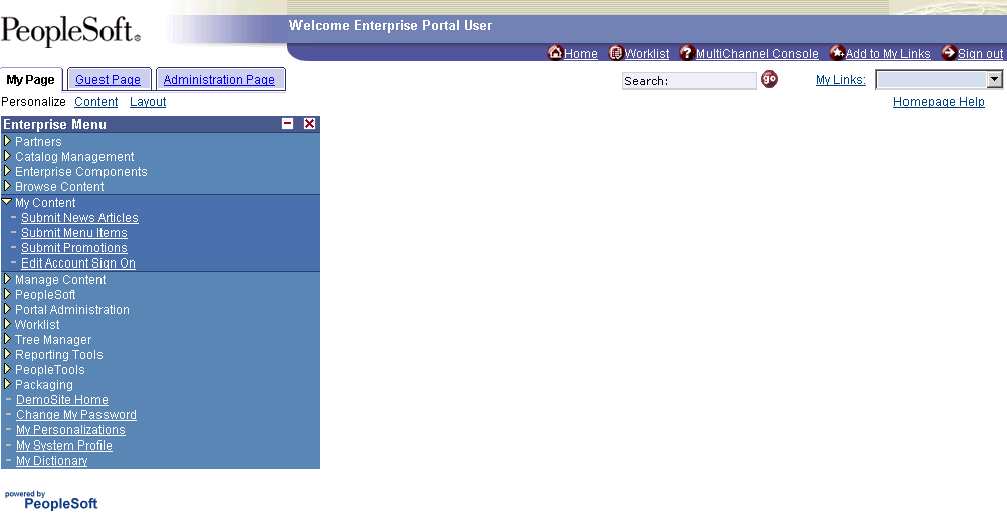
Homepage-Tools 8.4x Classic theme
The target page header for this theme is shown in the following graphic. It does not include persistent homepage tabs.
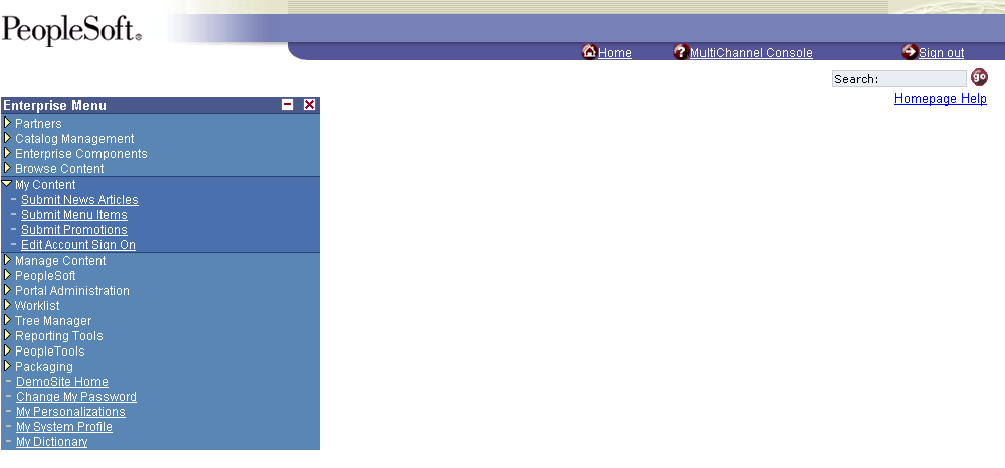
Target page-Tools 8.4x Classic theme
The Theme ID for the Tools 8.4x Classic theme is PAPPBR_THEME5_TOOLSCLASSIC. This theme consists of the following components.
|
Theme Component |
Component ID or Object Name |
|
Homepage header. |
PAPPBR_HEADER5_TOOLSCLASSIC |
|
Target page header. |
PAPPBR_HEADER5_TOOLSNOTAB |
|
Menu. |
No overrides applied. PeopleTools default menu applies. |
|
Homepage footer. |
PAPPBR_FOOTER4_POWERED |
|
Style sheet. |
EPPBR_TOOLSSTYLEDEF |
Tools 8.4x Classic Guest ThemeThe following graphic shows the Tools 8.4x Classic Guest theme.
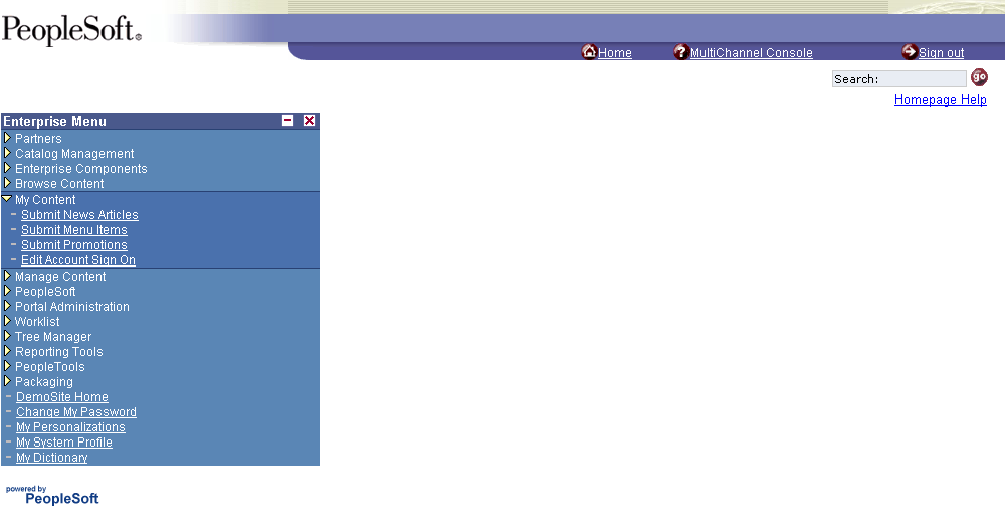
Homepage-Tools 8.4x Classic Guest theme
As delivered, the target page header for this theme is the same as the homepage header.
The Theme ID for the Tools 8.4x Classic Guest theme is PAPPBR_THEME5G_TOOLSCLASSIC. This theme consists of the following components. The header does not include homepage tabs or Personalization and will not display My Links to Guests due to lack of security permissions.
|
Theme Component |
Component ID or Object Name |
|
Homepage header. |
PAPPBR_HEADER5_TOOLSNOTAB |
|
Target page header. |
PAPPBR_HEADER5_TOOLSNOTAB |
|
Menu. |
No overrides applied. PeopleTools default menu applies. |
|
Homepage footer. |
PAPPBR_FOOTER4_POWERED |
|
Style sheet. |
EPPBR_TOOLSSTYLEDEF |