 Intercompany Settlements
This chapter provides overviews of intercompany settlements and the hub, detail, and configured hub methods.
Intercompany Settlements
If your organization has transactions between companies, the companies will be out of balance unless you create and post intercompany balancing entries. You create intercompany settlements to ensure that each company's net balance equals zero (that is, debits equal credits). You can either create these settlements yourself or have the system create them automatically. You can choose from these methods of intercompany settlements:
Hub method
Detail method
Configured hub method
When you post transactions using one of these methods, the system creates journal entries for intercompany settlements based on automatic accounting instructions (AAIs). Two AAI items exist for intercompany settlements. Depending on the method that you choose, you must set up one or both of the AAIs.
The system tracks settlements through subledgers. Each company that is involved in an intercompany settlement has an automatic offset to the appropriate intercompany account with the subledger equal to the address book number of the offsetting company. The system uses the subledger field to record the other company that is involved in the transaction. The subledger type is A (address book), and the companies must be set up in the JD Edwards EnterpriseOne Address Book system.
It is recommended that you manually reconcile intercompany settlements on a periodic basis. To do this, run the Companies in Balance and Intercompany Accounts in Balance integrity reports.
If your organization uses multiple currencies, you must use either the detail or configured hub method for intercompany settlements.
See Setup for Multicurrency Intercompany Settlements.
Hub Method
When you choose the hub method, the system creates summarized journal entries by batch and GL date between a hub (main) company and related subsidiary companies. You can have only one hub company. The system reconciles transactions between subsidiary companies through the hub company.
 Examples for the Hub Method
This section shows three examples of how the system creates the automatic entries for intercompany settlements using the hub method. This information applies to the three examples:
The entries to the hub company use a subledger that is equal to the offsetting company number and use subledger type A (address book) so that you have an audit trail.
The business units (1, 50, 60, and 200) and object account (1291) are determined by AAI items ICCC and ICH.
The system creates the automatic entries with a document type of AE (automatic entry), a document number equal to the batch number of the journal entry, and a GL date equal to the last day of the accounting period.
Example: Journal Entry Between Two Companies
This example shows the entries that the system creates when you enter a journal entry between two companies.
In this example, company 200 accrues a liability incurred by company 50. Accounts for these companies are cleared through the hub, company 1, as illustrated:
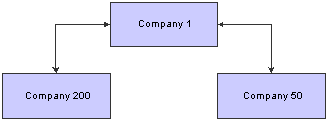
Hub method: example of a journal entry between two companies
For the journal entries, assume that the business unit on the balance sheet matches the company number. You enter this information for the journal entry:
|
Document |
Company |
Account |
Description |
Debit |
Credit |
|
JE 1000 |
50 |
50.8150 |
Expenses |
500 |
Blank |
|
JE 1000 |
200 |
200.4110 |
Accounts Payable |
Blank |
500 |
When you post the journal entry, the system automatically generates these intercompany entries:
|
Document |
Company |
Account/Sub/Type |
Description |
Debit |
Credit |
|
AE 1212 |
50 |
50.1291/00000001/A |
Intercompany Receivables/Payables |
Blank |
500 |
|
AE 1212 |
1 |
1.1291/00000050/A |
Intercompany Receivables/Payables |
500 |
Blank |
|
AE 1212 |
200 |
200.1291/0000001/A |
Intercompany Receivables/Payables |
500 |
Blank |
|
AE 1212 |
1 |
1.1291/00000200/A |
Intercompany Receivables/Payables |
Blank |
500 |
The second and fourth rows are entries to the hub (company 1) from companies 50 and 200.
Example: Journal Entry Among Three Companies
This example shows the entries that the system creates when you enter a journal entry among three companies.
In this example, company 200 accrues liabilities incurred by companies 50 and 60. Accounts for these companies are cleared through the hub, company 1, as illustrated:
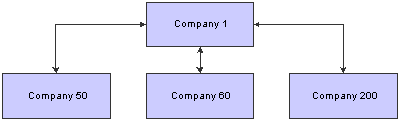
Hub method: example of a journal entry among three companies
For the journal entries, assume that the business unit on the balance sheet matches the company number. You enter one journal entry that involves more than two accounts, but does not involve the hub company:
|
Document |
Company |
Account |
Description |
Debit |
Credit |
|
JE 2000 |
50 |
50.8150 |
Expenses |
300 |
Blank |
|
JE 2000 |
60 |
60.1800 |
Prepaid Expenses |
200 |
Blank |
|
JE 2000 |
200 |
200.4110 |
Accounts Payable |
Blank |
500 |
When you post the entry, the system automatically generates these intercompany entries:
|
Document |
Company |
Account/Sub/Type |
Description |
Debit |
Credit |
|
AE 1213 |
60 |
60.1291/00000001/A |
Intercompany Receivables/Payables |
Blank |
200 |
|
AE 1213 |
1 |
1.1291/00000060/A |
Intercompany Receivables/Payables |
200 |
Blank |
|
AE 1213 |
50 |
50.1291/00000001/A |
Intercompany Receivables/Payables |
Blank |
300 |
|
AE1213 |
1 |
1.1291/00000050/A |
Intercompany Receivables/Payables |
300 |
Blank |
|
AE 1213 |
200 |
200.1291/00000001/A |
Intercompany Receivables/Payables |
500 |
Blank |
|
AE 1213 |
1 |
1.1291/00000200/A |
Intercompany Receivables/Payables |
Blank |
500 |
The second, fourth, and six rows are entries to the hub (company 1) from companies 60, 50, and 200. Although the hub company (1) is not in the original journal entry, all intercompany settlements are cleared through the hub company.
Example: Two Journal Entries in One Batch
This example shows how the system creates summarized entries when you enter two journal entries in one batch. In this example, company 1 transfers cash to company 60 and prepays an expense on behalf of company 60.
You enter two journal entries in one batch:
|
Document |
Company |
Account |
Description |
Debit |
Credit |
|
JE 3000 |
1 |
1.1110.BEAR |
Cash |
Blank |
100 |
|
JE 3000 |
60 |
60.1110 |
Cash |
100 |
Blank |
|
JE 4000 |
1 |
1.1110.BEAR |
Cash |
Blank |
100 |
|
JE 4000 |
60 |
60.1800 |
Prepaid Expense |
100 |
Blank |
When you post the entries, the system automatically generates these intercompany entries:
|
Document |
Company |
Account/Sub/Type |
Description |
Debit |
Credit |
|
AE 1214 |
60 |
60.1291/00000001/A |
Intercompany Receivables/Payables |
Blank |
200 |
|
AE 1214 |
1 |
1.1291/00000060/A |
Intercompany Receivables/Payables |
200 |
Blank |
The second row is the entry to the hub (company 1) from company 60. The hub method summarizes the four lines of the two documents by account and by subledger and subledger type.
Detail Method
When you choose the detail method, the system creates detailed journal entries by document between companies, using the company on the first line of a journal entry as the hub company. Because no designated hub company exists, the system reconciles transactions between the companies involved.
When you post entries, the detail method could create more records in the F0911 table than the hub method. The detail method is commonly used by companies and government agencies that want or need a detailed audit trail.
Note. For JD Edwards EnterpriseOne Accounts Receivable and Accounts Payable, the system uses the company number on the invoice or voucher as the hub company.
Examples for the Detail MethodThis section shows three examples of how the system creates the automatic entries for intercompany settlements using the hub method. This information applies to the three examples:
The entry to the hub company uses a subledger that is equal to the offsetting company number and uses subledger type A (address book) so that you have an audit trail.
The business units (1, 50, 60, and 200) and object account (1291) are determined by AAI item ICCC.
The system creates the automatic entries with a document type (AE).
The automatic entries have the same document number and GL date as the journal entries.
Example: Journal Entry Between Two Companies
This example shows how the system creates entries when you enter a journal entry between two companies. In this example, company 200 accrues a liability incurred by company 50, as illustrated:

Detail method: example of a journal entry between two companies
For the journal entries, assume that the business unit on the balance sheet matches the company number. You enter one journal entry with two lines:
|
Document |
Company |
Account |
Description |
Debit |
Credit |
|
JE 5000 |
50 |
50.8150 |
Expenses |
500 |
|
|
JE 5000 |
200 |
200.4110 |
Accounts Payable |
500 |
The company on the first line of the journal entry determines the hub company.
When you post the entry, the system automatically generates these intercompany entries:
|
Document |
Company |
Account/Sub/Type |
Description |
Debit |
Credit |
|
AE 5000 |
200 |
200.1291/0000050/A |
Intercompany Receivables/Payables |
500 |
|
|
AE 5000 |
50 |
50.1291/00000200/A |
Intercompany Receivables/Payables |
500 |
The second row is the entry to the hub (company 50) from company 200.
Example: Journal Entry Among Three Companies
This example shows how the system creates entries when you enter a journal entry among three companies. In this example, company 200 accrues liabilities incurred by companies 50 and 60, as illustrated:
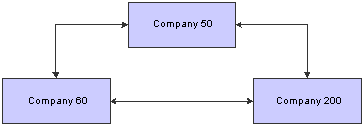
Detail method: example of a journal entry among three companies
For the journal entry, assume that the business unit on the balance sheet matches the company number. You enter a journal entry that involves more than two accounts:
|
Document |
Company |
Account |
Description |
Debit |
Credit |
|
JE 6000 |
50 |
50.8150 |
Expenses |
300 |
Blank |
|
JE 6000 |
60 |
60.1800 |
Prepaid Expenses |
200 |
Blank |
|
JE 6000 |
200 |
200.4110 |
Accounts Payable |
Blank |
500 |
The company on the first line of the journal entry determines the hub company. When you post the entry, the system automatically generates these intercompany entries:
|
Document |
Company |
Account/Sub/Type |
Description |
Debit |
Credit |
|
AE 6000 |
60 |
60.1291/00000050/A |
Intercompany Receivables/Payables |
Blank |
200 |
|
AE 6000 |
50 |
50.1291/00000060/A |
Intercompany Receivables/Payables |
200 |
Blank |
|
AE 6000 |
200 |
200.1291/00000050/A |
Intercompany Receivables/Payables |
500 |
Blank |
|
AE 6000 |
50 |
50.1291/00000200/A |
Intercompany Receivables/Payables |
Blank |
500 |
The second and fourth rows are entries to the hub (company 50) from companies 60 and 200.
Example: Two Journal Entries in One Batch
This example shows how the system creates entries when you enter two journal entries in one batch:
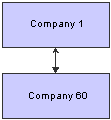
Detail method: example of two journal entries in one batch
In this example, company 1 transfers cash to company 60 and prepays an expense on behalf of company 60. You enter two journal entries:
|
Document |
Company |
Account |
Description |
Debit |
Credit |
|
JE 7000 |
1 |
1.1110.BEAR |
Cash |
Blank |
100 |
|
JE 7000 |
60 |
60.1110 |
Cash |
100 |
Blank |
|
JE 8000 |
1 |
1.1110.BEAR |
Cash |
Blank |
100 |
|
JE 8000 |
60 |
60.1800 |
Prepaid Expense |
100 |
Blank |
When you post the entries, the system automatically generates these intercompany entries:
|
Document |
Company |
Account/Sub/Type |
Description |
Debit |
Credit |
|
AE 7000 |
60 |
60.1291/00000001/A |
Intercompany Receivables/Payables |
Blank |
100 |
|
AE 7000 |
1 |
1.1291/00000060/A |
Intercompany Receivables/Payables |
100 |
Blank |
|
AE 8000 |
60 |
60.1291/00000001/A |
Intercompany Receivables/Payables |
Blank |
100 |
|
AE 8000 |
1 |
1.1291/00000060/A |
Intercompany Receivables/Payables |
100 |
Blank |
The second and fourth rows are entries to the hub (company 1) from company 60. Unlike the hub method, the detail method creates separate entries for each document in the batch.
Configured Hub Method
Your organization might need to settle transactions across companies in a manner that does not conform to the detail method or the hub method of intercompany settlements. For example, you might have two hub companies in the same environment at the same time. Each hub company would have its own set of companies within its hub. Or, you might need to designate one hub company for certain intercompany settlements and a different hub company for other settlements.
Configured hubs are groups of companies that you can define, or configure, to accommodate intercompany settlements. When you configure a hub, you define the relationships between the companies in the hub. You also designate which company in the hub can settle transactions with other hubs. The designated hub company is the only company that can make intercompany settlements with other hub companies. The system uses your configured hub definitions to ensure that only authorized intercompany settlements occur.
The two methods of settlement within the relationship for a configured hub are:
Modified Hub.
All companies in the hub settle only through a single company (designated as the hub company) in the hub
Modified Detail.
All companies in the hub settle through any other company in the hub. A hub company is not designated in this method.
When you use the configured hub method for intercompany settlements, the system validates the user defined intercompany settlement relationships at the document level. The system maintains configured hub information in the Inter/Intra Company Account Relationships table (F09190).
Examples for the Configured Hub MethodThis section shows two examples of how the system creates the automatic entries for intercompany settlements using the configured hub method. This information applies to the two examples:
You designate the hub company in the Configured Hub Companies program (P09190).
The entries use a subledger that is equal to the offsetting company number and use subledger type A (address book) so that you have an audit trail.
The business units (50, 100, 7) and object account (1291) are determined by AAI item the ICCC.
The system creates the automatic entries with a document type of AE (automatic entry) and assigns a document number and a GL date that are the same as the journal entry.
Example: Configured Hub with Hub Company
This example shows how the system creates the entries when you use the configured hub method with a designated hub company (modified hub). In this example, Denver is set up as a configured hub in the Intercompany Hub UDC table 09/HB. One company (company 7) accrues a liability incurred by two companies (companies 50 and 100). The designated hub company in the Denver configured hub is company 50, as illustrated:
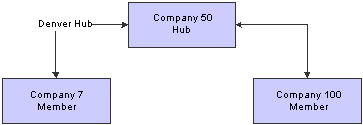
Configured hub: example of configured hub with hub company
You enter one journal entry involving the three companies:
|
Document |
Company |
Account |
Description |
Debit |
Credit |
|
JE 9000 |
100 |
100.8150 |
Expenses |
200 |
Blank |
|
JE 9000 |
50 |
50.8110 |
Expenses |
300 |
Blank |
|
JE 9000 |
7 |
7.4110 |
Accounts Payable |
Blank |
500 |
When you post the entry, the system automatically generates these intercompany entries:
|
Document |
Company |
Account/Sub/Type |
Description |
Debit |
Credit |
|
AE 9000 |
100 |
100.1291/00000050/A |
Intercompany Receivables/Payables |
Blank |
200 |
|
AE 9000 |
50 |
50.1291/00000100/A |
Intercompany Receivables/Payables |
200 |
Blank |
|
AE 9000 |
7 |
7.1291/00000050/A |
Intercompany Receivables/Payables |
500 |
Blank |
|
AE 9000 |
50 |
50.1291/00000007/A |
Intercompany Receivables/Payables |
Blank |
500 |
The second and forth rows show the entries to the hub (company 50) from companies 100 and 7. The automatic entries are identical to those created using the detail method. However, with configured hubs, the designated hub remains the same regardless of which company is on the first line of the journal entry.
Example: Configured Hub without Hub Company
This example shows the entries that the system creates when you have not designated a hub company (modified detail). In this example, one company (7) accrues a liability incurred by two companies (50 and 100). No hub company is designated, as illustrated:
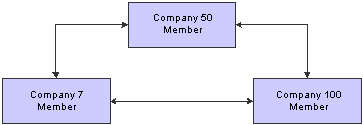
Configured hub: example of configured hub without hub company
You enter a journal entry that involves three companies:
|
Document |
Company |
Account |
Description |
Debit |
Credit |
|
JE 9100 |
50 |
50.8150 |
Expenses |
300 |
Blank |
|
JE 9100 |
100 |
100.8110 |
Expenses |
200 |
Blank |
|
JE 9100 |
7 |
7.4110 |
Accounts Payable |
Blank |
500 |
When you post the entry, the system automatically generates these intercompany entries:
|
Document |
Company |
Account/Sub/Type |
Description |
Debit |
Credit |
|
AE 9100 |
100 |
100.1291/00000050/A |
Intercompany Receivables/Payables |
Blank |
200 |
|
AE 9100 |
50 |
50.1291/00000100/A |
Intercompany Receivables/Payables |
200 |
Blank |
|
AE 9100 |
7 |
7.1291/00000050/A |
Intercompany Receivables/Payables |
500 |
Blank |
|
AE 9100 |
50 |
50.1291/00000007/A |
Intercompany Receivables/Payables |
Blank |
500 |
The second and fourth rows show the entries to the hub company (50) from companies 100 and 7. The automatic entries are identical to those that the system creates using configured hubs with a designated hub company. However, the company that is on the first line of the journal entry becomes the designated hub for the transaction.