 Understanding Integrating JD Edwards EnterpriseOne Procurement with Oracle Transportation Management
This chapter provides and overview and discusses:
Procurement Freight Request.
Purchase Order Close/Cancel.
Understanding Integrating JD Edwards EnterpriseOne Procurement with Oracle Transportation ManagementThe Oracle Transportation Management system delivers robust transportation planning and execution capabilities for manufacturers, retailers, distributors, and third-party logistics providers. The JD Edwards EnterpriseOne Procurement system communicates with the Oracle Transportation Management through the Procurement Freight Request integration point:
|
Integration Point |
Description |
|
|
Procurement Integration Process Flow
The procurement integration process flow is represented by the following diagrams:
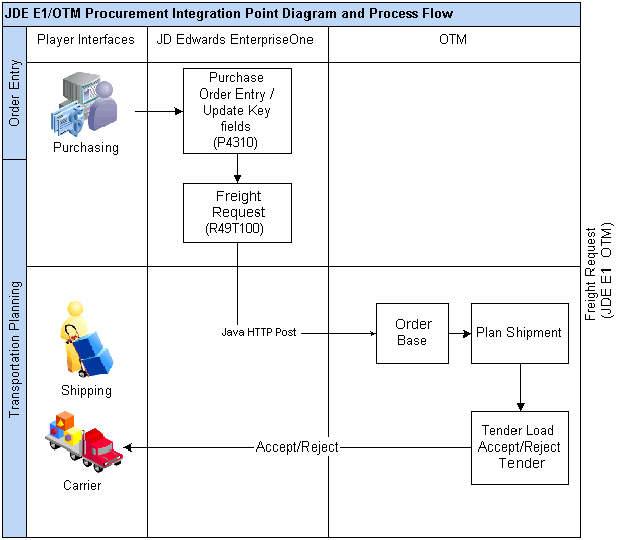
JD Edwards EnterpriseOne Procurement Integration to Oracle Transportation Management (1 of 2

JD Edwards EnterpriseOne Procurement Integration to Oracle Transportation Management (2 of 2)
 Oracle Transportation Management Eligibility and Filter Criteria
This section discusses eligibility and filter criteria for:
Purchase order types.
Purchase order lines.
Document type and line type combinations.
Items.
The JD Edwards EnterpriseOne purchase order types that are eligible for processing with Oracle Transportation Management include:
Purchase orders.
Credit orders.
Direct ship orders.
Transfer orders.
Note. For direct ship orders and transfer orders, it is a good practice to include only one order type in UDC table 49/TP. For example, enter sales transfer order type or procurement direct ship order type but not both. If you include both order types you will get two freight requests and two shipments for the same transportation movement of goods.
The JD Edwards EnterpriseOne purchase order types that are ineligible for processing with Oracle Transportation Management include:
Requisition orders.
Blanket orders.
eRequisition orders.
Purchase order quotes.
You determine JD Edwards EnterpriseOne purchase order lines as eligible for processing within Oracle Transportation Management by entering the document type and line type combination into the user-defined code UDC table 49/TP.
The purchase order lines that are eligible for processing within Oracle Transportation Management include:
New order lines on purchase orders that are not already sent to Oracle Transportation Management for freight request.
Transportation critical fields modified lines that may or may not have been sent to Oracle Transportation Management.
Canceled, closed or reopened order lines that Oracle Transportation Management received prior to cancellation, closure, or reopened.
Orders in which the order-line requested dates fall within a specified date and time period as designated by the Procurement Freight Request processing options.
Order lines that include item number, quantity, weight, and volume.
The purchase order lines that are ineligible for processing within Oracle Transportation Management include:
Those previously processed as procurement freight request, unless they are modified again.
Service order lines without item numbers
Lump sum lines without quantity.
Bulk lines.
Text lines.
Kit children.
Lines without weight and volume.
Held order lines.
Stock items, non stock items, and kit items are eligible for processing within Oracle Transportation Management. The JD Edwards EnterpriseOne system sends parent kit items to Oracle Transportation Management.
Procurement Freight Request
This section provides an overview of Procurement Freight Request and discusses:
Procurement Freight Request prerequisites.
Procurement Freight Request process flow.
Procurement Freight Request data processing.
Running the Procurement Freight Request Extract program.
Setting processing options for Procurement Freight Request Extract (R49T100).
Understanding Procurement Freight RequestThe Procurement Freight Request process enables the JD Edwards EnterpriseOne system to extract eligible purchase order lines and place them in the Procurement OTM Freight Request Staging table (F49T100), which then enables XML request for transportation planning to Oracle Transportation Management. This occurs when purchase orders have been added or updated within the JD Edwards EnterpriseOne Procurement system.
Apart from newly entered or modified purchase order lines, the JD Edwards EnterpriseOne system also extracts purchase order detail lines that were closed or canceled through other JD Edwards EnterpriseOne applications such as Purchase Order Entry (P4310), Purchase Order Receipts (P4312), and Voucher Match (P4314).
When Oracle Transportation Management receives the freight request lines it creates order base lines for transportation planning. When Oracle Transportation Management receives the closed or canceled status updates, it sets the order base line’s release control status to RELEASE CONTROL_CLOSED or RELEASE CONTROL_CANCELED respectively. This means no further order releasing can be done on this order base line. However, the status change does not affect existing shipments or order releases. If the line is reopened, Oracle Transportation Management receives the transmission to update the release control status on the order base line's RELEASE CONTROL ALLOW_RELEASING. Oracle Transportation Management can then create order releases and shipments because the JD Edwards EnterpriseOne purchase order is reopened.
Note. When you use any of the JD Edwards EnterpriseOne programs to partial receive, two-way match, close, or cancel the Oracle Transportation Management eligible purchase order lines without the message from Oracle Transportation Management you must access Oracle Transportation Management to manually correct the order base. In other words, if the open quantity on purchase order and the order base differ in some exceptional cases (for example, when a partial purchase order is received without Oracle Transportation Management arranging shipments) Oracle Transportation Management's open quantities may be updated manually to match up with JD Edwards EnterpriseOne.
PrerequisitesThese prerequisites apply for Procurement Freight Request. You must:
Set up the parent address book data for all suppliers that the JD Edwards EnterpriseOne Procurement system sends to Oracle Transportation Management.
Ensure that calendars in the JD Edwards EnterpriseOne system are set up such that they mirror the calendar setup in the Oracle Transportation Management system. This setup is based on the ship to and ship from combinations.
Note. This is optional and only required if the Oracle Transportation Management calendaring system is preferred.
Set up the base weight and volume unit of measure conversions for all items.
Define the purchase order document type and line type combinations in UDC table 49/TP.
Enable system SY49T (Use Transportation Integration Module).
Procurement Freight Request AssumptionsThese assumptions apply to the Freight Request integration point:
When closing or canceling a line in JD Edwards EnterpriseOne, the release status for the remaining quantity only is updated in Oracle Transportation Management. If there are open shipments or order releases, you must cancel them manually before the purchase order line is closed or canceled.
The cancel date transmitted to Oracle Transportation Management may not actually reflect the date of the closed or canceled order.
The JD Edwards EnterpriseOne system extracts to Oracle Transportation Management units that are open on the purchase order. In some cases the open quantity in JD Edwards EnterpriseOne may differ from the open quantity in Oracle Transportation Management; especially when reversing an Oracle Transportation Management-eligible purchase order. Check Oracle Transportation Management to make sure the open quantities are correct.
Procurement Freight Request Process FlowThe following diagram depicts the process flow for the JD Edwards EnterpriseOne to Oracle Transportation Management Procurement Freight Request integration point:
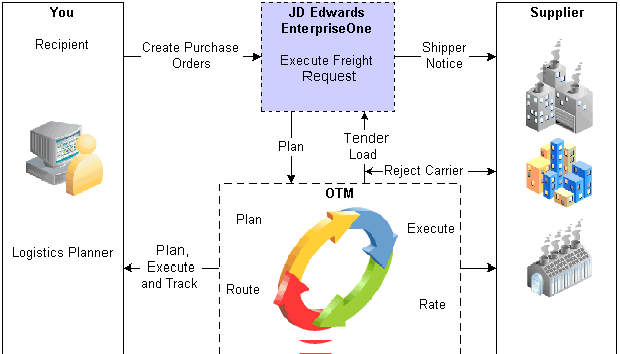
Procurement Freight Request Process Flow
The process is twofold:
The system filters purchase order header and detail data. This includes purchase order document types, line types, item types, date and time, and a new integration state indicating the state of the order line within the integration process.
Data processing. This includes the retrieval of required data to be mapped to Oracle Transportation Management data, evaluation of suppliers sets to determine ship-to, override address consideration, date/time evaluation, shipping unit of measure processing, item-level shipment compatible consolidation, and credit order processing.
Procurement Freight Request Data Processing
This section discusses data mapping clarifications and data processing:
The JD Edwards EnterpriseOne system transmits some data to Oracle Transportation Management at the transactional level, which is freight request execution. This data is not provided as initial master data and includes:
|
Data |
Description |
|
Oracle Transportation Management receives item descriptions. |
|
|
The JD Edwards EnterpriseOne system overrides address book information based upon the override order address information (F4006) or address book effective date (F0116) and sends it to Oracle Transportation Management. The system determines the ship-to address book based on customer sets and sends it to Oracle Transportation Management. |
|
|
The system extracts the Oracle Transportation Management ID for the ship-from and ship-to address book from the new workday calendar setup application. |
Data processing occurs in these functional areas:
|
Functional Area |
Comments |
|
The destination (ship to) address book number is derived from the purchase order detail business unit (MCU) value. |
|
|
If the JD Edwards EnterpriseOne system has designated an override ship-to or deliver-to address in the Order Address Information table (F4006), then the system sends the override address information to the Oracle Transportation Management system. The system also takes the valid address book information from the Address by Date table (F0116) and stages it for transport to the Oracle Transportation Management system. |
|
|
The JD Edwards EnterpriseOne system performs bypass processing of order lines with line types that are not eligible to process using the Oracle Transportation Management system or are defined as text. |
|
|
To qualify for processing, the JD Edwards EnterpriseOne request date on the purchase order line must fall within a specified Oracle Transportation Management date and time window that is designated in the Procurement Freight Request processing options. The purchase order line also qualifies for processing if the request date is changed to a date and time that falls outside the parameters of the Oracle Transportation Management date and time window and the Oracle Transportation Management system state flag indicates a previously freight-request processed order line. |
|
|
The JD Edwards EnterpriseOne system assumes standard unit of measure (UOM) conversions for volume and weight on each order line. The JD Edwards EnterpriseOne system sends this information to the Oracle Transportation Management system. If extended weight and volume are missing, the system will bypass processing the record and send an error message to the work center. The JD Edwards EnterpriseOne system concatenates the item with the transaction UOM to enable a package item designation in Oracle Transportation Management and sends this information to Oracle Transportation Management. |
|
|
The JD Edwards EnterpriseOne system sends the declared value (purchase order extended cost) of the goods to Oracle Transportation Management in the supplier's currency. |
|
|
Credit order quantities and ship from becomes ship to and vice versa are reversed upon extraction. |
|
|
Each system, JD Edwards EnterpriseOne and Oracle Transportation Management, is the source by which to review errors generated from each system. Errors from the respective systems are not sent to or received by the other system. However, when JD Edwards EnterpriseOne receives an HTTP post from Oracle Transportation Management and the transmission fails to write to the JD Edwards EnterpriseOne Inbound Transmissions table (F49T90), JD Edwards EnterpriseOne sends the exception information back to Oracle Transportation Management. If the Oracle Transportation Management report indicates that Oracle Transportation Management did not process the data received from JD Edwards EnterpriseOne, you must make corrections in JD Edwards EnterpriseOne and submit the data again. The purchase order lines are not extracted when errors are detected during processing. The freight request process ensures that Oracle Transportation Management-required values are supplied. The system sends an error message to the work center if any values are missing. Upon failure of the freight request process, the system publishes a work center message that identifies the order line key from which the error originated along with the errors responsible for the failure. This report displays:
|
Running the Procurement Freight Request Extract ProgramSelect Purchase Order Processing (G49T12), Freight Request.
Setting Processing Options for Procurement Freight Request Extract (R49T100)
Processing options enable you to specify the default processing for programs and reports.
Process
|
1. Transportation Planning Date Range Factor |
Indicate the number of days the that system looks forward from the date of procurement freight request execution. The system uses this number to determine the latest requested date that the system exports. |
|
2. Freight Request XML Directory Path |
Indicate the path to the location where the release XML document is stored when the system executes Procurement Freight Request. |
|
3. Generate XML files |
Specify whether to generate XML documents. Values are: Blank: Do not generate XML files. 1: Generate XML files. |
Domains
|
1. Transportation Planning Domain |
Designate the domain in which transportation planning is planned. Note. A domain is a unique name that typically identifies a company. The purpose of a domain is to enable you to keep company data separate and secure from other company data in a shared, web-based environment. |
|
2. Location Domain |
Designate the domain in which transportation planning locations are stored. |
|
3. Item Domain |
Designate the domain in which items are stored. |