 PeopleSoft Workforce Communications Overview
This chapter provides an overview of PeopleSoft Enterprise Workforce Communications and discusses:
PeopleSoft Workforce Communications business processes.
PeopleSoft Workforce Communications integration.
PeopleSoft Workforce Communications implementation.
PeopleSoft Workforce Communications OverviewHR organizations are under growing pressure to produce better results at a time when budget, personnel and other critical resources are limited. Success in this environment can be challenging and requires organizations to focus resources on the most strategic initiatives – those that provide the greatest value to the organization and align with organizational goals and objectives. PeopleSoft Workforce Communications 9.1 is a comprehensive solution for planning and delivering HR programs and surveys to the workforce and can help HR organizations address these challenges.
PeopleSoft Workforce Communications is the first and only solution in the market that enables HR organizations to:
Deliver the right message to the right audience.
Capture workforce feedback and take action.
Gain program insight and quantify success.
Examples of HR programs and surveys that can be managed end-to-end using Workforce Communications 9.1 include:
Organizational change management communications.
Cultural brand awareness.
Open enrollment communications.
Policy and compliance communications.
Manager assessed workforce planning.
Health and wellness programs.
Alumni community communications and development.
Workforce Communications includes functionality from the PeopleSoft Online Marketing and PeopleSoft Marketing applications, allowing users to:
Create audiences.
Create and update profiles.
Create and execute Online Marketing dialogs for the purpose of sending email communications and of sending or posting on a web page links to Online Marketing surveys.
Report on Online Marketing dialogs.
Administer Online Marketing and related components.
With Workforce Communications, users will have the ability to target Workers and Person of Interests as recipients or targets of the email communications and web pages.
Delivering the Right Message to the Right Audience
Whether a HR program’s objectives are to increase employee participation in health and wellness programs, strengthen the organizational brand or ensure timely compliance with HR policies, if the program and message are not communicated to the right people at the right time it will not be successful. To maximize HR program success and achieve the best possible outcome, HR organizations can plan and deliver targeted, coordinated HR programs and the necessary communications, aligning employee behavior with organizational goals using PeopleSoft Workforce Communications 9.1.
Successful HR program planning and execution involves various people who need to work together as a unit. With PeopleSoft Workforce Communications, programs can be planned and run collaboratively in which stakeholders can set budgets, track costs, develop task lists and assign owners with ease. All HR team members participating in the planning and deployment of the program can stay in sync through various stages of the life cycle, helping to keep the program on track.
Communicating HR programs and messages effectively requires the right communication methods or channels and the right level of workforce exposure to the message being communicated. PeopleSoft Workforce Communications enables you to plan and deploy multi-channel, multi-stepped HR program communications, ensuring maximum reach and assured message delivery.
Messaging in HR programs needs to be relevant and reach the right workforce population. PeopleSoft Workforce Communications includes a wizard-based component that enables you to target defined groups of individuals. The content of the communication can be personalized to the recipient, delivering relevant content that they are more likely to read and benefit from. Additional tools allow you to identify groups that have previously received communications and avoid “spamming” your workforce.
Capturing Workforce Feedback and Taking Action
HR organizations can create a direct line of communication with the workforce via surveys using PeopleSoft Workforce Communications 9.1. HR organizations can build and roll out surveys to targeted groups of individuals for the purpose of assessment, feedback, satisfaction, preferences and more. Survey responses can be used by HR for organizational decision-making, enabling HR to be more strategic. Surveys used in combination with HR programs provide the instant feedback necessary for continuous improvement of HR programs.
Insight gained from workforce survey results can provide HR with the information needed to develop a more successful HR strategy and to play an important role in influencing decision making at a corporate level. PeopleSoft Workforce Communications delivers a scoring framework to quickly assess satisfaction, engagement and comprehension—all critical components to developing a robust strategy.
Surveys are a great mechanism to capture feedback for your HR programs to improve the quality of HR programs, to reduce the cost of programs and to assess whether the target audience of your program gets the message. With PeopleSoft Workforce Communications, you can assess the success of programs throughout their life cycles, resulting in higher-quality and lower-cost programs because you know what works and what doesn’t.
Personalization in surveys helps keep workers engaged and motivated about their participation. With PeopleSoft Workforce Communications, survey questions can be dynamically displayed so that individuals answer only the questions that are relevant to them. Follow-up actions can also be automated to be based on how an individual responds to a survey or interacts with an email or web page. Employees feel connected and informed, and that their opinions and concerns are being heard and addressed, which improves engagement and ultimately customer satisfaction and loyalty.
Gaining Program Insight and Quantifying Success
HR programs need to be analyzed to understand their effectiveness and to measure returns on investment. PeopleSoft Workforce Communications 9.1 enables you to put more decision and support tools in the hands of the decision makers, enabling them to make informed recommendations and take appropriate action. Analysts and managers at all levels can review, analyze and quantify their HR initiatives.
Monitoring a program’s execution in real time can help HR organizations gauge program effectiveness and change course if needed, saving both time and money. PeopleSoft Workforce Communications-delivered analytics enable analysts and managers to understand program performance immediately and modify the program or target workforce population while it is in progress to ensure the best outcome.
HR programs that are run without tight oversight can quickly lead to cost overruns. With PeopleSoft Workforce Communications, costs incurred can be tracked against their allocated budgets, helping to identify areas in which costs could be cut or services could be modified.
Survey results could reveal risks and under-performing areas of the organization. PeopleSoft Workforce Communications can help HR understand trends in workforce engagement, make sense of critical feedback or data captured, and identify workforce populations that are the most and least engaged.
PeopleSoft Workforce Communications FeaturesPeopleSoft Workforce Communications 9.1 features have been grouped into the following categories:
HR Programs and Communications.
Surveys.
Reporting and Analytics.
Integration and Security.
HR Programs and Communications
In PeopleSoft Workforce Communications 9.1, HR initiatives are represented by programs. A program is an initiative planned by the HR organization to achieve a specific objective such as launch a career development and training program, increase worker productivity or reduce worker medical claims. You can define the following types of programs in PeopleSoft Workforce Communications 9.1:
Dialog: A dialog is defined when an HR organization needs to conduct personalized, online (email or web) communications with the workforce.
Campaign: A campaign is defined when an HR organization needs to perform a coordinated set of manual or automated actions to accomplish the shared objectives of an initiative. These actions are called activities of the campaign.
Roll Up: A roll up program serves as the common parent to one or more campaign or dialog programs. It is defined when several individual programs need to be managed together as part of a “master” HR initiative.
Surveys
In today’s competitive world, HR organizations need to constantly collect information from the workforce with the intent of improving their skills, satisfaction and productivity. Online surveys provide an inexpensive and effective mechanism to gather such information. With PeopleSoft Workforce Communications 9.1, surveys can be designed and rolled out to targeted groups of individuals to collect feedback, understand preferences, assess skills or identify training needs. Surveys can be deployed independently in a dialog, or as part of a bigger HR program. Results of surveys are recorded and available for reporting purposes for the life of the dialog. Survey feedback is critical to assess a program’s reach and comprehension as well as to identify improvement areas, enabling organizations to develop a plan of action. In cases in which respondent privacy is important, surveys can be run anonymously.
Surveys in a dialog flow are web documents with built-in surveying features. In addition to general read-only text, surveys contain user-enterable fields such as text boxes or a set of questions, each requiring one of the different types of answers – single choice, multiple choices, yes/no, and so on. When a survey is deployed online, respondents can complete the required information and then submit it. A built-in Scoring Framework allows survey designers to add weights to survey questions and their answer choices.
Each organization can define and deploy its own surveys. Some examples of how surveys can be used include:
Career development and skill assessment.
Employee engagement and satisfaction
New hire and exit Interviews.
Health and wellness programs.
Equal opportunity compliance programs.
Reporting and Analytics
PeopleSoft Workforce Communications 9.1 provides a number of operational and analytic reports allowing decision makers to view survey results, gauge the effectiveness of HR initiatives, make informed recommendations and take appropriate action.
PeopleSoft Workforce Communications 9.1 reports help you answer the following types of questions:
Which initiatives were most successful?
Has the initiative resulted in the committed goal of cost reduction?
What % of recipients responded to the survey?
How many people opened the email communication? Who didn’t open it?
Which workforce demographic is the most and least satisfied or engaged?
How are satisfaction and engagement related to other factors?
How do you get the right talent in the right position?
How many contractors have we hired as a result of alumni programs?
Reports available for use with PeopleSoft Workforce Communications 9.1 include:
Configurable Workforce Search: HR survey responses received from the workforce can contain certain information that needs to be preserved for future use. For example, an exit interview survey question could ask workers if they would likely consider rejoining the organization in the future. The answer received from each respondent could be stored in a custom profile field associated with workers and then reviewed by HR if the need to target alumni in a recruitment effort arises. PeopleSoft Workforce Communications provides a powerful, configurable search mechanism by which profile fields created to store survey responses can be used as workforce search criteria.
Dialog Performance Report: The success of an HR communications initiative rolled out as a dialog greatly depends on how effectively it reaches its target audience and how well the audience responds to it. The Dialog Performance interactive report displays key reach and response-related performance measures by dimensions such as dialog actions and audiences. Dialog reach measurements such as email hard and soft bounces, click through counts, ratio of emails opened to emails delivered, and so on are available for reporting purposes. Dialog response measurements such as response count, page visits, number of people submitting a survey, and so on can also be displayed.
Survey Analysis Report: A HR survey could be sent out to an audience consisting of a large number of workers. Every respondent of the survey has unique attributes: age, gender, experience level, job title, location, and so on. The Survey Analysis interactive report enables HR management to slice and dice results of a scored survey across respondents simply by dragging and dropping these attributes onto the report.
Survey Overall Responses Report: The distribution of answer choices selected by respondents for each question in a survey (for example, how many employees use a particular benefit program, or how many people are extremely dissatisfied with their manager) can be seen in the Overall Responses report.
Survey Individual Responses Report: Answers to every individual question in a survey for a respondent (for example, the reason she gave for leaving in her exit interview) can be viewed in the Individual Response report. HR can use this report in cases in which a detailed review of every response must be performed.
PeopleSoft Workforce Communications Business ProcessesUsing Workforce Communications to create and analyze employee surveys requires that you perform a number of tasks. This section guides you in creating a dialog and provides a brief overview of the specific tasks involved. They include:
Design and roll out
Participation and feedback
Insight and action.
Analyzing survey results.
The following process flow illustrates the PeopleSoft Workforce Communications business processes, from the initial access and setup through final survey analysis:
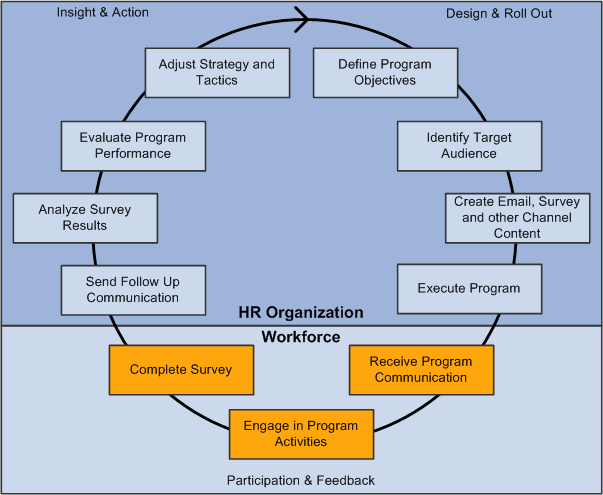
Workforce Communications business process
Note. Because Workforce Communications bundles functionality from both PeopleSoft Online Marketing and PeopleSoft Marketing, you should familiarize yourself with the business processes and functionality of these applications as well.
Design and Roll Out
In this phase, the HR organization designs an HR program and rolls it out to the workforce. The phase consists of the following steps:
Define Program Objectives: Specify the measurable goals and objectives that the HR program is intended to accomplish.
Identify Target Audience: Identify the specific workforce population that the HR program is designed to serve.
Create Email, Survey, and other Channel Content: Compose rich, personalized email communications and interactive surveys for email or intranet deployment. Create other channel content like posters, postcards, flyers and so on.
Execute Program: Send out communications and deploy intranet web pages and surveys.
Participation and Feedback
In this phase, the targeted workforce population participates in the HR program and then provides feedback to the HR organization. The phase consists of the following steps:
Receive Program Communication: Received personalized email communications, links to web surveys, and other channel content.
Engage in Program Activities: Participate in program activities as outlined by the communication—for example, join an activity group or attend an HR-conducted event.
Complete Survey: Answer personalized, dynamic survey questions to provide feedback and other inputs regarding program effectiveness.
Insight and Action
In this phase, the HR organization evaluates program performance and survey results, and acts on the information. The phase consists of the following steps:
Send Follow Up Communication: Depending on how a respondent answered the survey, send follow-up emails and surveys if required.
Analyze Survey Results: Use analytic reporting tools to analyze survey results across the targeted workforce population.
Evaluate Program Performance: Gauge program effectiveness by evaluating metrics: for example, number of employees who opened an email, clicked on a survey link, completed the survey, and so on. Compare program results with intended goals.
Adjust Strategy and Tactics: Based on all information gathered during program execution, modify the current HR program or redesign it for its next iteration.
See Also
PeopleSoft Enterprise Online Marketing Preface
PeopleSoft Enterprise Marketing Applications Preface
PeopleSoft Workforce Communications IntegrationsPeopleSoft Workforce Communications integrates with versions 8.8, 8.9, and 9.1 of PeopleSoft HCM using EIPs.
The purpose of this integration is to synchronize worker, Person of Interest (POI) and worker job information from HR to CRM. The HR information can be used in the following areas:
To build audiences based on HR criteria.
For personalization of content in email and web documents.
As criteria for determining the dynamic content displayed in email and web documents.
Logic in the dynamic branching of dialogs.
Note. Some of the HR data can only be used for creating audiences.
Some of the data synchronized from HR into CRM tables is made available as CRM Profiles, which enables the data to be used for the purposes previously described. This profile data is also used for reporting—the Survey Analysis Report, delivered with Workforce Communications, leverages HR information to allow analysis of the data based on HR criteria and profile information.
Before you can use Workforce Communications, you must set up the appropriate EIPs to move data into your CRM system. For a description of these EIPs, refer to the “Managing Enterprise Integration for PeopleSoft Enterprise CRM” chapter of the PeopleSoft Enterprise CRM 9.1 Business Object Management PeopleBook. The relevant EIPs appear in the table in the “PeopleSoft Enterprise CRM Foundation EIPs” section and include HCM or HRMS in the Direction of Integration column.
We discuss integration considerations in the implementation chapters of this PeopleBook.
See Also
PeopleSoft Enterprise Customer Relationship Management Business Object Management Preface
PeopleSoft Workforce Communications ImplementationPeopleSoft Setup Manager enables you to generate a list of setup tasks for your organization based on the features you are implementing. The setup tasks include the components that you must set up, listed in the order in which you must enter data into the component tables, and links to the corresponding PeopleSoft documentation.
This table lists all of the components that have component interfaces:
|
Component |
Component Interface |
Reference |
|
Dimension Value Groups RY_SVY_GROUP |
RY_SVY_GROUP_CI |
|
|
Survey Ratings RY_SVY_RATING |
RY_SVY_RATING_CI |
|
|
Role to Dimension Mapping RY_SVY_ROLE_DIM |
RY_SVY_ROLE_DIM_CI |
|
|
Survey Setup Options RY_SVY_SETUP |
RY_SVY_SETUP_CI |
Other Sources of Information
In the planning phase of your implementation, take advantage of all PeopleSoft sources of information, including the installation guides, data models, business process maps, and troubleshooting guidelines. A complete list of these resources appears in the preface in the PeopleSoft Enterprise CRM 9.1 Application Fundamentals PeopleBook, PeopleSoft Enterprise CRM 9.1 Business Object Management PeopleBook, and PeopleSoft Enterprise CRM 9.1 Product and Item Management PeopleBook with information on where to find the most up-to-date version of each.
See Also
Enterprise PeopleTools 8.50 PeopleBook: Setup Manager
Enterprise PeopleTools 8.50 PeopleBook: PeopleSoft Component Interfaces