| Oracle® TimesTen In-Memory Database TimesTen to TimesTen開発者および管理者ガイド リリース11.2.1 B56053-02 |
|


 戻る |
 次へ |
| Oracle® TimesTen In-Memory Database TimesTen to TimesTen開発者および管理者ガイド リリース11.2.1 B56053-02 |
|
戻る |
次へ |
この章では、サンプルのレプリケーション・スキームを構成および開始する方法について説明します。内容は次のとおりです。
この章の手順を実行するには、ADMIN権限が必要です。
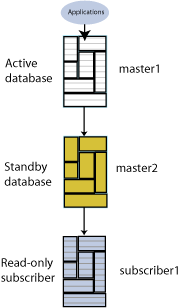
この項では、1つのサブスクライバを持つアクティブ・スタンバイ・ペアの作成方法について説明します。アクティブ・データベースはmaster1です。スタンバイ・データベースはmaster2です。サブスクライバ・データベースはsubscriber1です。わかりやすくするために、すべてのデータベースは同じコンピュータserver1に存在することとします。
図2-1にこの構成を示します。
この項の内容は次のとおりです。
『Oracle TimesTen In-Memory Databaseオペレーション・ガイド』のTimesTenデータベースの管理に関する説明に従って、master1、master2およびsubscriber1というDSNを作成します。
UNIXおよびLinuxシステムの場合は、テキスト・エディタを使用して次のodbc.iniファイルを作成します。
[master1]
DRIVER=install_dir/lib/libtten.so
DataStore=/tmp/master1
DatabaseCharacterSet=AL32UTF8
ConnectionCharacterSet=AL32UTF8
[master2]
DRIVER=install_dir/lib/libtten.so
DataStore=/tmp/master2
DatabaseCharacterSet=AL32UTF8
ConnectionCharacterSet=AL32UTF8
[subscriber1]
DRIVER=install_dir/lib/libtten.so
DataStore=/tmp/subscriber1
DatabaseCharacterSet=AL32UTF8
ConnectionCharacterSet=AL32UTF8
Windowsの場合は、ODBCアドミニストレータを使用して同じ接続属性を設定します。他のすべての設定には、デフォルト値を使用します。
ttIsqlユーティリティを使用して、master1データベースに接続します。
% ttIsql master1

Copyright (c) 1996-2009, Oracle.  All rights reserved.
Type ? or "help" for help, type "exit" to quit ttIsql.

connect "DSN=master1";
Connection successful: DSN=master1;UID=terry;DataStore=/tmp/master1;
DatabaseCharacterSet=AL32UTF8;ConnectionCharacterSet=AL32UTF8;TypeMode=0;
(Default setting AutoCommit=1)
Command>
列aおよびbを持つtabという表を作成します。
Command> CREATE TABLE tab (a NUMBER NOT NULL,
       > b CHAR(18),
       > PRIMARY KEY (a));
master1で、アクティブ・スタンバイ・ペアを定義します。
Command> CREATE ACTIVE STANDBY PAIR master1, master2
       > SUBSCRIBER subscriber1;
アクティブ・スタンバイ・ペアの定義の詳細は、第3章「アクティブ・スタンバイ・ペアのレプリケーション・スキームの定義」を参照してください。
master1で、レプリケーション・エージェントを起動します。
Command> CALL ttRepStart;
アクティブ・スタンバイ・ペアの新しいデータベースの状態は、アクティブ・データベースが設定されるまでIDLE状態になります。
ttRepStateSet組込みプロシージャを使用して、master1をアクティブ・データベースとして指定します。
Command> CALL ttRepStateSet('ACTIVE');
master1の状態を確認します。
Command> CALL ttRepStateGet;
< ACTIVE, NO GRID >
1 row found.
terryというパスワードを持つユーザーterryを作成し、terryにADMIN権限を付与します。ADMIN権限を持つユーザーの作成は、次の手順のアクセス制御で必要です。
Command> CREATE USER terry IDENTIFIED BY terry;
User created.
Command> GRANT admin TO terry;
ttIsqlを終了し、-duplicateオプションを指定してttRepAdminユーティリティを使用し、スタンバイ・データベースにアクティブ・データベースを複製します。
% ttRepAdmin -duplicate -from master1 -host server1 -uid terry -pwd terry "dsn=master2"
ttIsqlを使用してmaster2に接続し、レプリケーション・エージェントを起動します。
% ttIsql master2
Copyright (c) 1996-2009, Oracle.  All rights reserved.
Type ? or "help" for help, type "exit" to quit ttIsql.

connect "DSN=master2";
Connection successful: DSN=master2;UID=terry;DataStore=/tmp/master2;
DatabaseCharacterSet=AL32UTF8;ConnectionCharacterSet=AL32UTF8;TypeMode=0;
(Default setting AutoCommit=1)
Command> CALL ttRepStart;
スタンバイ・データベースのレプリケーション・エージェントを起動すると、状態が自動的にSTANDBYに設定されます。master2の状態を確認します。
Command> CALL ttRepStateGet;
< STANDBY, NO GRID >
1 row found.
ttRepAdminユーティリティを使用して、スタンバイ・データベースをサブスクライバ・データベースに複製します。
% ttRepAdmin -duplicate -from master2 -host server1 -uid terry -pwd terry "dsn=subscriber1"
ttIsqlを使用してsubscriber1に接続し、レプリケーション・エージェントを起動します。subscriber1の状態を確認します。
% ttIsql subscriber1

Copyright (c) 1996-2009, Oracle.  All rights reserved.
Type ? or "help" for help, type "exit" to quit ttIsql.

connect "DSN=subscriber1";
Connection successful: DSN=subscriber1;UID=terry;DataStore=/stmp/subscriber1;
DatabaseCharacterSet=AL32UTF8;ConnectionCharacterSet=AL32UTF8;TypeMode=0;
(Default setting AutoCommit=1)
Command> CALL ttRepStart;
Command> call ttRepStateGet;
< IDLE, NO GRID >
1 row found.
master1のtab表に行を挿入します。
Command> INSERT INTO tab VALUES (1,'Hello');
1 row inserted.
Command> SELECT * FROM tab;
< 1, Hello              >
1 row found.
master2およびsubscriber1に挿入がレプリケートされたことを確認します。
Command> SELECT * FROM tab;
< 1, Hello              >
1 row found.
各データベースでレプリケーション・エージェントを停止します。
Command> CALL ttRepStop;
各データベースでアクティブ・スタンバイ・ペアを削除します。その後、アクティブ・スタンバイ・ペアを削除した任意のデータベースにある表tabを削除できます。
Command> DROP ACTIVE STANDBY PAIR;
Command> DROP TABLE tab;
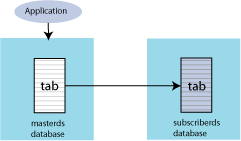
この項では、マスター・データベース(masterds)内の単一表の内容をサブスクライバ・データベース(subscriberds)の表にレプリケートするレプリケーション・スキームの構成方法について説明します。わかりやすくするために、両方のデータベースは同じコンピュータに存在することとします。
この項の内容は次のとおりです。
『Oracle TimesTen In-Memory Databaseオペレーション・ガイド』のTimesTenデータベースの管理に関する説明に従って、masterdsおよびsubscriberdsというDSNを作成します。
UNIXおよびLinuxシステムの場合は、テキスト・エディタを使用して各データベースで次のodbc.iniファイルを作成します。
[masterds]
DataStore=/tmp/masterds
DatabaseCharacterSet=AL32UTF8
ConnectionCharacterSet=AL32UTF8
[subscriberds]
DataStore=/tmp/subscriberds
DatabaseCharacterSet=AL32UTF8
ConnectionCharacterSet=AL32UTF8
Windowsの場合は、ODBCアドミニストレータを使用して同じ接続属性を設定します。他のすべての設定には、デフォルト値を使用します。
ttIsqlユーティリティを使用して、masterdsに接続します。
% ttIsql masterds
Copyright (c) 1996-2009, Oracle.  All rights reserved.
Type ? or "help" for help, type "exit" to quit ttIsql.

connect "DSN=masterds";
Connection successful: DSN=masterds;UID=ttuser;
DataStore=/tmp/masterds;DatabaseCharacterSet=AL32UTF8;
ConnectionCharacterSet=AL32UTF8;TypeMode=0;
(Default setting AutoCommit=1)
Command>
列a、bおよびcを持つtabという名前の表を作成します。
Command> CREATE TABLE tab (a NUMBER NOT NULL,
       > b NUMBER,
       > c CHAR(8),
       > PRIMARY KEY (a));
tab表をmasterdsからsubscriberdsにレプリケートする、repschemeというレプリケーション・スキームを作成します。
Command> CREATE REPLICATION repscheme
       > ELEMENT e TABLE tab
       > MASTER masterds
       > SUBSCRIBER subscriberds;
masterdsおよびsubscriberdsでレプリケーション・エージェントを起動します。
Command> call ttRepStart;
ttIsqlを終了します。ttStatusユーティリティを使用して、両方のデータベースのレプリケーション・エージェントが稼働していることを確認します。
% ttStatus
TimesTen status report as of Thu Jan 29 12:16:27 2009

Daemon pid 18373 port 4134 instance ttuser
TimesTen server pid 18381 started on port 4136
------------------------------------------------------------------------
Data store /tmp/masterds
There are 16 connections to the data store
Shared Memory KEY 0x0201ab43 ID 5242889
PL/SQL Memory KEY 0x0301ab43 ID 5275658 Address 0x10000000
Type            PID     Context     Connection Name              ConnID
Process         20564   0x081338c0  masterds                          1
Replication     20676   0x08996738  LOGFORCE                          5
Replication     20676   0x089b69a0  REPHOLD                           2
Replication     20676   0x08a11a58  FAILOVER                          3
Replication     20676   0x08a7cd70  REPLISTENER                       4
Replication     20676   0x08ad7e28  TRANSMITTER                       6
Subdaemon       18379   0x080a11f0  Manager                        2032
Subdaemon       18379   0x080fe258  Rollback                       2033
Subdaemon       18379   0x081cb818  Checkpoint                     2036
Subdaemon       18379   0x081e6940  Log Marker                     2035
Subdaemon       18379   0x08261e70  Deadlock Detector              2038
Subdaemon       18379   0xae100470  AsyncMV                        2040
Subdaemon       18379   0xae11b508  HistGC                         2041
Subdaemon       18379   0xae300470  Aging                          2039
Subdaemon       18379   0xae500470  Flusher                        2034
Subdaemon       18379   0xae55b738  Monitor                        2037
Replication policy  : Manual
Replication agent is running.
Cache Agent policy  : Manual
PL/SQL enabled.
------------------------------------------------------------------------
Data store /tmp/subscriberds
There are 16 connections to the data store
Shared Memory KEY 0x0201ab41 ID 5177351
PL/SQL Memory KEY 0x0301ab41 ID 5210120 Address 0x10000000
Type            PID     Context     Connection Name              ConnID
Process         20594   0x081338f8  subscriberds                      1
Replication     20691   0x0893c550  LOGFORCE                          5
Replication     20691   0x089b6978  REPHOLD                           2
Replication     20691   0x08a11a30  FAILOVER                          3
Replication     20691   0x08a6cae8  REPLISTENER                       4
Replication     20691   0x08ad7ba8  RECEIVER                          6
Subdaemon       18376   0x080b1450  Manager                        2032
Subdaemon       18376   0x0810e4a8  Rollback                       2033
Subdaemon       18376   0x081cb8b0  Flusher                        2034
Subdaemon       18376   0x08246de0  Monitor                        2035
Subdaemon       18376   0x082a20a8  Deadlock Detector              2036
Subdaemon       18376   0x082fd370  Checkpoint                     2037
Subdaemon       18376   0x08358638  Aging                          2038
Subdaemon       18376   0x083b3900  Log Marker                     2040
Subdaemon       18376   0x083ce998  AsyncMV                        2039
Subdaemon       18376   0x08469e90  HistGC                         2041
Replication policy  : Manual
Replication agent is running.
Cache Agent policy  : Manual
PL/SQL enabled.
ttIsqlを使用して、マスター・データベースに接続し、tab表にいくつかの行を挿入します。
% ttIsql masterds
Command> INSERT INTO tab VALUES (1, 22, 'Hello');
1 row inserted.
Command> INSERT INTO tab VALUES (3, 86, 'World');
1 row inserted.
サブスクライバ用に、2番目のコマンド・プロンプト・ウィンドウを開きます。サブスクライバ・データベースに接続し、tab表の内容を確認します。
% ttIsql subscriberds
Command> SELECT * FROM tab;
< 1, 22, Hello>
< 3, 86, World>
2 rows found.
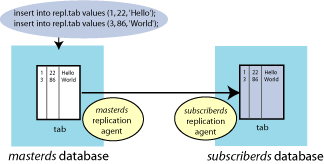
図2-3は、masterdsに挿入された行がsubscriberdsにレプリケートされたことを示します。