 Understanding Retroactive Adjustments
This chapter provides an overview of retroactive adjustments and discusses how to:
Generate retroactive adjustments.
Work with retroactive adjustments.
Understanding Retroactive Adjustments
Retroactive adjustments enable you to update the rules and rates that affect cost, billing, and revenue amounts, such as burdening rules and rates or billing rates, and reprocess the transactions after the transaction has completed invoicing or revenue recognition. Retroactive adjustments are important for government contractors who typically adjust billing rates many times throughout the life of a contract and who must respond to changing reconciliation and billing settlement agreements during the project’s life and several years after its completion.
To process retroactive adjustments, you update the appropriate rates and rules and then run the Create Retroactive Adjustments program (R48S781) to recalculate cost, invoice, and revenue amounts for selected transactions from the Workfile History Table (F4812H). The system creates a negative record in the Billing Detail Workfile table (F4812) to reverse the original record and creates a new record with the adjusted amounts. The adjusted records are eligible for costing, invoicing, and revenue using the existing functionality.
For example, suppose you billed an invoice for 100 USD. You later changed the burdening rates, which caused the invoice to be recalculated for 110 USD. In the Billing Detail Workfile table, the system creates a transaction for –100 USD to reverse the original transaction and creates a new transaction for 110 USD. The net effect of these two transactions is 10 USD. That amount can then be billed.
You can use the Review Retroactive Adjustment Groups program (P4812G) to review the adjusted records in the Billing Detail Workfile table.
If the rates change again between the time that the adjusted records are created and those transactions are invoiced, you can update the rules or rates again and run the Recalculate Retroactive Adjustment Records program (R48S222). This program recalculates the amounts on the adjusted records and replaces the adjusted records with new adjusted records in the Billing Detail Workfile table (F4812).
If a retroactive adjustment record is incorrect, for example if it has incorrect rates or if incorrect records were selected, you can delete the retroactive adjustment group, which returns the records in the Billing Workfile History table (F4812H) to the condition that they were in before the Create Retroactive Adjustments program was run.
Generating Retroactive Adjustments
This section provides an overview of retroactive adjustment generation and discusses how to:
Run the Create Retroactive Adjustments program (R48S781).
Set processing options for Create Retroactive Adjustments (R48S781).
 Understanding Retroactive Adjustment Generation
When you run the Create Retroactive Adjustments program (R48S781), the system:
Retrieves records from the Billing Workfile History table based on the data selection.
The system retrieves the most recent record to have completed the billing cycle for each selected billing control ID.
Retrieves burdening rates and markup information and recalculates amounts for the selected records from the Billing Workfile History table.
For each record from Billing Workfile History table for which the amounts have changed, creates a corresponding adjustment record in the F4812 table with a negative amount and with:
G in the Transaction Classification field to identify the record as a retroactive reversal record.
0 in the Journal Status Code field to indicate that accounting journals have not been created for the transaction.
A retro adjustment group number, which is determined by next numbers, in the Retro Adjustment Group field .
1 in the Retro Adjustment Status field to indicate that the record is not available for subsequent retroactive adjustments.
Updates the selected records from Billing Workfile History table with:
1 in the Retro Adjustment Status field to indicate that the record is not available for retroactive adjustments.
The group number in the Retro Adjustment Group field .
Creates records in the Billing Detail Workfile table with the newly calculated amounts and:
H in the Transaction Classification field to identify the records as retroactive adjustment records.
0 in the Journal Status Code field to indicate that accounting journals have not been created for the transaction.
The group number in the Retro Adjustment Group field .
A blank value in the Retro Adjustment Status field to indicate that the records are available for subsequent retroactive adjustments.
Creates a record in the Retro Adjustment Workfile table (F4812G) to record the group number and index of the billing detail workfile transactions.
The group number and index are used to locate the records that were processed in a retroactive adjustment group.
Prints a summarized report of processed records.
This diagram illustrates the retroactive adjustment generation process:
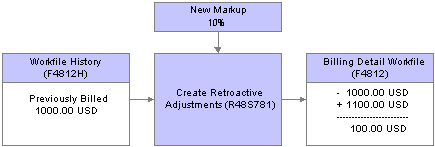
Retroactive adjustment generation process
Running the Create Retroactive Adjustments Program (R48S781)
Select Retroactive Adjustment Processing (G5233), Create Retroactive Adjustments.
Setting Processing Options for Create Retroactive Adjustments (R48S781)
Processing options enable you to specify the default processing for programs and reports.
Process
These processing options enable you to select records to be processed based on dates and enable you to specify whether the markup should be reapplied for invoicing, revenue, or both, and the reason for the adjustment.
|
1. Adjustment From Date |
Enter the beginning date to use to select billing detail transactions for the retroactive adjustment process. If you leave this processing option blank, all billing detail transactions with a table basis date less than or equal to the date in the Adjustment Through Date processing option are selected for retroactive adjustment. |
|
2. Adjustment Through Date |
Enter the ending date to use to select billing detail transactions for the retroactive adjustment process. If you leave this processing option blank, all billing detail transactions with a table basis date less than or equal to the system date are selected for retroactive adjustment. |
|
3. Re-apply Markup option |
Enter 1 to reapply markup information to the invoice amount only or enter 2 to reapply markup information to the revenue amount only. Leave this processing option blank to reapply markup information to both the invoice and the revenue amounts. |
|
4. Adjustment Reason Code |
Specify an adjustment reason code to be updated on the retroactive adjustment records in the Billing Detail Workfile table (F4812). Values are stored in user-defined code (UDC) table 48/AR. |
Working with Retroactive Adjustments
This section provides overviews of the recalculation of retroactive adjustments and the deletion of retroactive adjustments and discusses how to:
Run Recalculate Retroactive Adjustment Records (R48S222).
Set processing options for Recalculate Retroactive Adjustment Records (R48S222).
Delete retroactive adjustment groups.
Understanding the Recalculation of Retroactive Adjustments
If the markup rules or rates change between the time that the adjusted records are created and those transactions are invoiced, you can update the rules or rates again and run the Recalculate Retroactive Adjustment Records program (R48S222). This program recalculates the amounts on the adjusted records and replaces the adjusted records with new adjusted records in the Billing Detail Workfile table (F4812).
Note. Reversal records, which have a value of G in the Transaction Classification field , are never recalculated.
When you run the Recalculate Retroactive Adjustment Records program, the system:
Retrieves markup and burdening information and recalculates amounts for the retroactive adjustment records in the Billing Detail Workfile table.
For any transactions for which the amounts have changed, creates records in the Billing Detail Workfile table with the newly calculated amounts and a blank value in the Retro Adjustment Status field to indicate that the records are available for retroactive adjustments.
Deletes the previous retroactive adjustment records that were replaced by new transactions from the Billing Detail Workfile table.
Understanding the Deletion of Retroactive Adjustments
When you delete a retroactive adjustment group, the system runs the Delete Retro Adjustment Group program (R48S910). This program determines whether the workfile records in the adjustment group have been included in an invoice or revenue batch. If they have been included in an invoice or revenue batch, the system returns an error message. If they have not been included in an invoice or revenue batch, the system:
Deletes the reversal and recalculated retroactive adjustment workfile records that are associated with the group from the Billing Detail Workfile table.
Deletes recalculated records that belong to the adjustment group from the Billing Workfile History table.
Deletes records that belong to the adjustment group from the Retro Adjustment Workfile table.
Returns the original workfile history records in the Billing Workfile History table to the original state by resetting the value in the Retro Adjustment Status field.
Forms Used to Work with Retroactive Adjustment Groups
|
Form Name |
FormID |
Navigation |
Usage |
|
W4812GA |
Retroactive Adjustment Processing (G5233), Review Retroactive Adjustment Groups |
Locate retroactive adjustment records that were created by the Create Retroactive Adjustments program. From this form, you can use the options on the Row menu to view the workfile records, recalculate the retroactive adjustment group, or delete the retroactive adjustment group. |
|
|
W4812C |
Select a record on the Review Retroactive Adjustment Groups form and then click Select or select Workfile Revisions from the Row menu. |
Review the workfile transactions that were created by the Create Retroactive Adjustments program (R48S781). |
Running Recalculate Retroactive Adjustment Records (R48S222)
Select Retroactive Adjustment Processing (G5233), Recalculate Retroactive Adjustment Records.
You can run the Recalculate Retroactive Adjustment Records program by running it from a menu, or you can select it from the Row menu on the Review Retroactive Adjustment Groups form.
Setting Processing Options for Recalculate Retroactive Adjustment Records (R48S222)
Processing options enable you to specify the default processing for programs and reports.
Process
These processing options enable you to specify whether the markup should be reapplied for invoicing, revenue, or both, and the reason for the adjustment.
|
Re-Apply Markup Option |
Enter 1 to reapply markup information to the invoice amount only or enter 2 to reapply markup information to the revenue amount only. Leave this processing option blank to reapply markup information to both the invoice and the revenue amounts. |
|
Adjustment Reason Code |
Specify an adjustment reason code to be updated on the retroactive adjustment records in the Billing Detail Workfile table (F4812). Values are stored in UDC 48/AR. |
Deleting Retroactive Adjustment Groups
Access the Review Retroactive Adjustment Groups form.
Select the retroactive adjustment group that you want to delete, and then select Delete Group from the Row menu.