| Oracle® Database PL/SQL Language Reference 11g Release 2 (11.2) Part Number E17126-03 |
|


|
View PDF |
| Oracle® Database PL/SQL Language Reference 11g Release 2 (11.2) Part Number E17126-03 |
|
|
View PDF |
The SELECT INTO statement retrieves values from one or more database tables (as the SQL SELECT statement does) and stores them in variables (which the SQL SELECT statement does not do).
By default, the SELECT INTO statement retrieves one or more columns from a single row and stores them in either one or more scalar variables or one record variable. With the BULK COLLECT clause, this statement retrieves an entire result set and stores it in one or more collection variables.
Caution:
TheSELECT INTO statement with the BULK COLLECT clause is vulnerable to aliasing, which can cause unexpected results. For details, see "SELECT BULK COLLECT INTO Statements and Aliasing".Topics:
Syntax

See:
select_item ::=
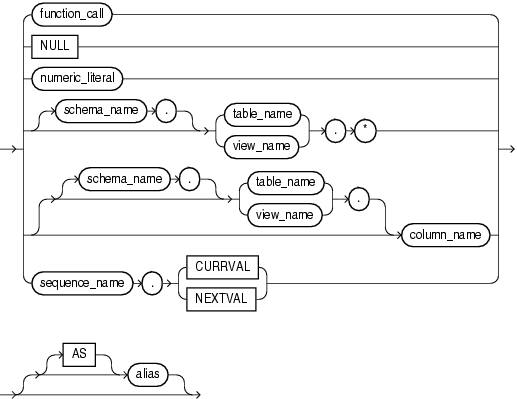
See "function_call ::=".
table_reference ::=
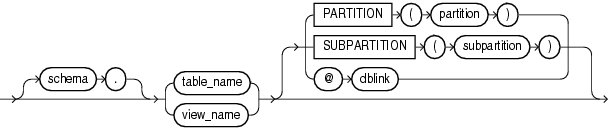
Semantics
select_into_statement
DISTINCT or UNIQUE
Causes the database to return only one copy of each set of duplicate rows selected. These two keywords are synonymous. Duplicate rows are those with matching values for each select_item.
Restrictions on DISTINCT and UNIQUE
The total number of bytes in all select_item expressions is limited to the size of a data block minus some overhead. This size is specified by the initialization parameter DB_BLOCK_SIZE.
No select_item expression can contain a LOB column.
ALL
Causes the database to return all rows selected, including all copies of duplicates. This is the default.
*
Selects all columns.
BULK COLLECT
Enables the SELECT INTO statement to return multiple rows, which it stores in one or more collections (which must exist). You can declare associative arrays or nested tables that grow as needed to hold the entire result set.
Without BULK COLLECT, the SELECT INTO statement must return only one row. Otherwise, PL/SQL raises the predefined exception TOO_MANY_ROWS and the values of the variables in the INTO clause are undefined.
variable_name
The name of a variable into which a select_item value is fetched. For each select_item value returned by the query, there must be a corresponding, type-compatible variable in the list. With BULK COLLECT, variable_name can be the name of a collection of records.
Restriction on variable_name You cannot select into a BOOLEAN variable.
record_name
A user-defined or %ROWTYPE record into which rows of values are selected. The record must have a corresponding, type-compatible field for each select_item.
subquery
A SQL SELECT statement (not a PL/SQL SELECT INTO statement) that provides a set of rows for processing.
alias
Another (usually short) name for the referenced column, table, or view.
rest_of_statement
Anything that can follow the FROM clause in a SQL SELECT statement (except the SAMPLE clause). For the syntax of the SQL SELECT statement, see Oracle Database SQL Language Reference.
select_item
If the SELECT INTO statement returns no rows, PL/SQL raises the predefined exception NO_DATA_FOUND. To guard against this exception, select the result of the aggregate function COUNT(*), which returns a single value even if no rows match the condition.
numeric_literal
A literal of a numeric data type.
schema_name
The name of the schema that contains the table or view. The default is your own schema.
table_name
The name of a database table.
view_name
The name of a database view.
column_name
The name of a column of the table or view.
*
Selects all columns of the table or view.
sequence_name
The name of a sequence.
CURRVAL
The current value in the sequence.
NEXTVAL
The next value in the sequence.
alias
Another (usually short) name for the referenced column, table, or view.
table_reference
A reference to a table or view for which you have the SELECT privilege, which is accessible when you run the SELECT INTO statement.
Examples
Example 2-25, "SELECT INTO Assigns Values to Scalar Variables"
Example 5-43, "SELECT INTO Assigns Values to Record Variable"
Example 6-44, "Declaring an Autonomous Function in a Package"
Example 7-13, "Validation Checks Guarding Against SQL Injection"
Example 12-15, "Bulk-Selecting Two Database Columns into Two Nested Tables"
Example 12-16, "Bulk-Selecting into Nested Table of Records"
Example 12-20, "Limiting Query Results with Pseudocolumn ROWNUM"
Related Topics
In this chapter:
In other chapters:
|
 Copyright © 1996, 2010, Oracle and/or its affiliates. All rights reserved. Legal Notices |
|

