Release 7.3
Part Number E26760-06

Contents

Previous

Next
| Oracle Demantra Implementation Guide Supplement Release 7.3 Part Number E26760-06 | Contents | Previous | Next |
This chapter covers the following topics:
You can choose whether a level method’s action appears as an icon in the toolbar. By default, all seeded methods except Custom, Open, and ‘Paste from Clipboard’ appear as toolbar icons.
The following settings appear in the General Properties screen in the Level Method wizard (Business Modeler > Configuration > Configure Methods).
Enable Toolbar Display: Indicates whether the selected method appears as a toolbar icon in all worksheets in which the method is available. For custom methods, this option is not selected by default.
Toolbar Icon Path: Path to the location of the icon you want to display on the toolbar which will be associated with this method. This field is enabled, and required, when Enable Toolbar Display is selected.
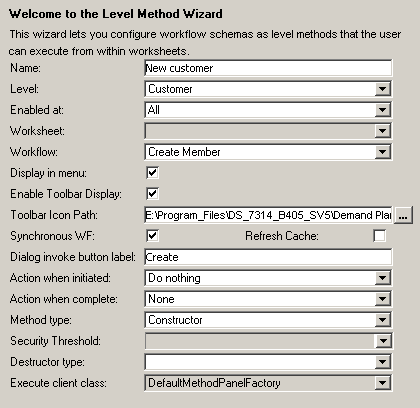
These settings are global and apply to all users and worksheets that access the selected Method.
For more information, see "Configuring a New Level Method" the Oracle Demantra Implementation Guide.

Copyright © 2012, 2013, Oracle and/or its affiliates. All rights reserved.