Oracle® Insurance Rules Palette 9.4.0.0 E18894_01
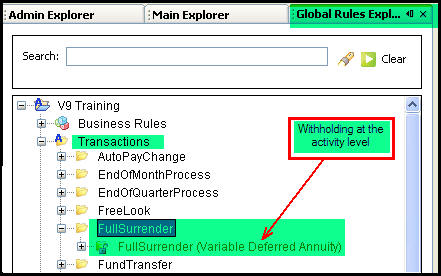
The activity level Withholding screen is configured in the Rules Palette. Activity information can be found using the Global Rules Explorer tab. OIPA activities are listed as transactions in the Rules Palette. Open the Transaction folder and select the transaction from the list.
Transaction in Global Explorer Tab
Open the XML file in the Configuration Area. Click the XML Source tab and make sure withholding is activated for this transaction. The tags can enclose either Yes or Activity.
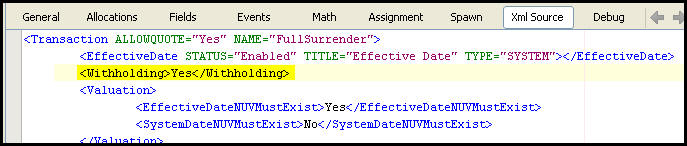
Withholding XML in Transaction
Use the field names in the Math and Spawn sections of the configuration for the transaction. These can be configured using visual editing tools. The values can be passed to a disbursement transaction. Also the disbursement element has a sub-element called <WithholdingFields> that defines the federal or state withholding amounts and writes to AsDisbursementRecord.
Withholding information can be configured at the activity level. The withholding information can be seen in the Oracle Insurance Policy Administration system (OIPA) when the activity details button is clicked on the Activity screen.
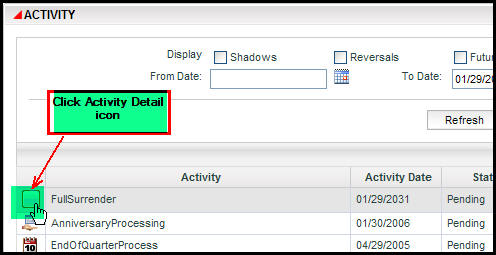
Activity Detail Icon on Activity Screen in OIPA
The Activity Details screen will appear as shown in the image below. Click the withholding link and select Activity from the Withholding type drop down box. Enter the withholding details.
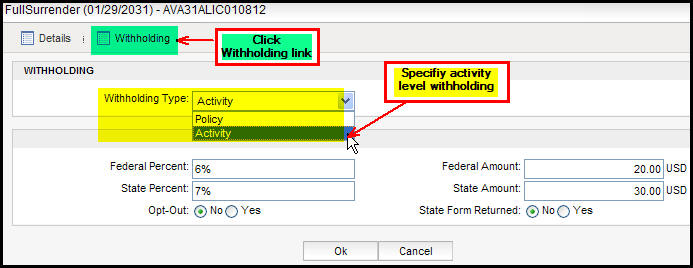
Withholding Details in Activity Details Window
Copyright © 2009, 2011, Oracle and/or its affiliates. All rights reserved. Legal Notices