 . If the search term
is found, the search results will be highlighted in the expanded tree
directory structure and a message will appear beneath the Search field
displaying the number of results found.
. If the search term
is found, the search results will be highlighted in the expanded tree
directory structure and a message will appear beneath the Search field
displaying the number of results found.
Oracle® Insurance Rules Palette 9.4.0.0 E18894_01
Search functionality is available in Main Explorer, Global Rules Explorer and XML Navigator tabs. The Search box at the top of the tab and can be used to enter a specific search term. All locations where that term appears in that tab will be displayed. This is a much easier process than hunting through the tree directory structure for the term.
To perform a search, simply enter the search
term in the Search field and click the search button . If the search term
is found, the search results will be highlighted in the expanded tree
directory structure and a message will appear beneath the Search field
displaying the number of results found.
Select the  button to the right of the search button, to automatically go to the next
result in the list.
button to the right of the search button, to automatically go to the next
result in the list.
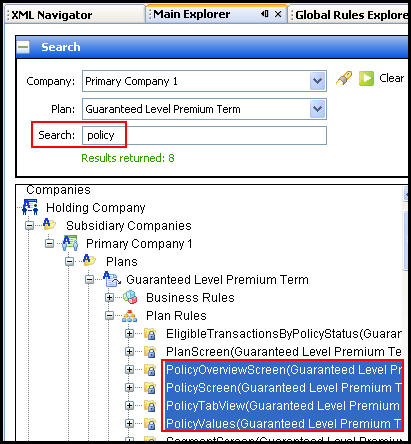
Search Results
Copyright © 2009, 2011, Oracle and/or its affiliates. All rights reserved. Legal Notices