Oracle® Insurance Rules Palette 9.4.0.0 E18894_01
Attached rules are attached to transactions for supplemental processing. On the Main Explorer they are listed under the transaction's Attached Rules node and are also added to the transaction's TransactionBusinessRulePacket.
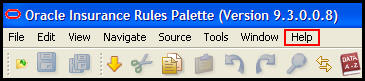
The XML Configuration Guide contains a detailed explanation of the elements, attributes and values used to configure these business rules. Select Help from the Main Menu and open the XML Configuration Guide. Attached Rules are located in the Business Rules | Attached Rules folder.
Help Link on Main Menu
Activity Summary: The ActivitySummary business rule drives the Activity Summary screen. This rule allows for the configuration of the summary screen and summary groups including math calculations, allocation changes and activity results. This rule is also used to display a combo box containing transaction names on the Activity Summary screen. The user can add and quote these transactions from the ActivitySummary screen directly.
Note: This rule should be attached to a transaction but not placed in the TransactionBusinessRulePacket.
AddRoles: This business rule adds existing clients in the database to new roles on an existing policy or segment. This rule can only be attached to a policy-level transaction and can only be used to add roles to the policy on which the activity is being processed.
CopyToClientFields: This business rule allows one or more math variables to be copied from an activity to one or more client fields, upon processing the activity where this CopyToClientFields rule is attached.
CopyToPolicyFields: This business rule allows one or more math variables to be copied from an activity to one or more policy fields. If the fields are displayed on the Policy screen, the values will be viewable. This CopyToPolicyFields rule is attached to a transaction.
CopyToRequirementFields: This business rule is attached to a transaction and allows the results of the activity’s math calculations to write out to a defined group of RequirementGUIDS.
CopyToRoleFields: This business rule is attached to a transaction and allows one or more math variables or activity fields to be copied to one or more specified RoleFields, upon processing the activity to which the CopyToRoleFields business rule is attached. The rule allows updates to multiple roles. This rule must be listed in TransactionBusinessRulePacket.
CopyToScheduledValuationFields: This rule will create fields in the AsScheduledValuationField. It allows a ScheduledValuation activity to store valuation data from various sources in one convenient location. This rule, though attached to a transaction, does not appear in the TransactionBusinessRulePacket business rule.
CopyToSegmentFields: This business rule is used to copy one or more activity values to a segment field. A MathVariable or a field name can be used to place a single value into a segment field and a collection can be used to place multiple values on multiple segments. This rule must be listed in the TransactionBusinessRulePacket
CopytoWithholdingFields: This business rule loads the withholding fields from the database and updates them based on the values specified in the business rule. The <From> element identifies the math variable or field where a value is being obtained. The <To> element identifies the field that is being updated. Only one set of withholdings can be updated by a rule.
CreatePolicy: The business rule is introduced to provide the ability to configure the activity-based creation of a new policy based on events occurring on an existing policy. One or more policies may be generated from a single source policy, although only one new policy per activity will be supported. All policies will be created in a pre-issue status pending user review. CreatePolicy business rule will be attached to a non-reversible activity and must be listed in the TransactionBusinessRulePacket.
CreateSegment: This business rule creates one or more new segments on a policy when attached to a transaction and specific expressed conditions are satisfied. This rule must be listed in the TransactionBusinessRulePacket.
DeliveryRequirements: This business rule defines the fulfillment criteria of the activity’s requirements via its date fields. The rule must be attached to a transaction and needs to be in the TransactionBusinessRulePacket of the transaction.
DoSegmentRecalculations: This business rule can be attached to a transaction that specifies the names and execution orders of segments attached to a policy. When the rule is processed, the segments for the current policy will be loaded and calculated in the order specified.
ExternalProcess: The ExternalProcess business rule provides the capability of calling custom Java code in order to facilitate greater functionality. A common use may be to generate documents in a manner specific to the document generator being employed. This is an attached rule and must be listed in TransactionBusinessRulePacket.
This business rule should be used in conjunction with the GenerateDocument rule.
FundListForAllocation: This business rule is introduced to define controls for the fund dropdown on the Activity add/edit screen. It should not be included in the TransactionBusinessRulePacket.
GenerateDocument: This business rule describes the document that needs creation upon the execution of a transaction. Multiple output file formats are supported and can be created using a single rule. This rule is not included in the TransactionBusinessRulePacket. This business rule should be used in conjunction with the ExternalProcess rule.
GeneratePendingRequirements: GeneratePendingRequirements defines the comparisons of requirement criteria to math variable values. If all conditions identified in the rule are true, then the requirement is generated. This rule must be used in conjunction with DeliveryRequirements and TransactionBusinessRulePacket.
GenerateSuspense: This business rule is used to create a suspense record when a transaction with this attached rule is processed.
MaintainSuspense: This business rule allows suspense field values to be changed and accounting generated through a collection of multiple suspense tickets. This rule is attached to a transaction and must be listed in the TransactionBusinessRulePacket.
PostAssignmentValidateExpressions: This rule processes after the math and assignment processing has completed and can be configured to halt the continued processing of an activity in Pending or NUV Pending status. A warning is given that can be overridden or canceled by the user from a warning icon on the Activity screen. Refer to the XML Configuration Guide for complete details on the elements and attributes supported in this business rule.
PriceCorrection: This rule will accept fields, multi-value fields or math variables as input. The PriceCorrection business rule must be specified in the TransactionBusinessRulePacket and must be attached to the plan or company level transaction.
ReassignAllocations: ReassignAllocations business rule is used to override existing activity allocations. This is useful when the end user is not allowed to select allocations or with automated activities where the user is not involved in an on-line experience with the activity. Allocation records are created when this business rule is processed. The Allocation records contain the funds the money is moving into or out of.
RolesExist: This business rule is used primarily to validate whether or not the specified role codes exist on the policy. Apart from that, this business rule is used to verify whether certain fields are empty and to process the validations for the specified roles.
ScheduledValuation: This business rule allows the transaction to which it is attached to execute valuation for all policies returned by a query contained within the rule without adding policy financial activities to those policies. It is best suited for Plan level transactions. The rule also includes switches to include the PolicyValues business rule during the valuation process, write deposit information and what left-over processes from prior attempts may be deleted.
ShadowPendingActivities: This business rule is used to delete an activity from the Activity screen when the specified condition is satisfied. More than one activity can be deleted, but the activity must be in pending status. The activity will appear shadowed once processed. OIPA will give an error if the user tries to delete an activity that is not in pending status.
Note: Only activities of the same type can be deleted. For example, the rule attached to a policy activity can delete only pending policy activities.
StatusChange: This business rule processes any status changes on a policy bringing the policy up to date. Processing the transaction attached to this business rule will change the status of the policy to the one specified in this rule. For example, changing the policy status from lapse to loan repayment.
TransactionBusinessRulePacket: This business rule controls the order in which the rules attached to the transaction are processed.
TransactionCosmetics: This business rule controls the icon, button and reverse icon for the associated transaction. It also sets amount values from the transaction to display on the Activity screen.
UpdateRoleStatus: The UpdateRoleStatus business rule allows a transaction to update the status of multiple roles. The update is not necessarily to the same status. Each status on a role is updated to its own value. The system supports three status code values from AsCodeRoleStatus:
01: Active
98: Inactive
99: Deleted
The OIPA implementation may develop more role status codes as needed. The rule is attached to a transaction and must be listed in TransactionBusinessRulePacket.
ValidateExpressions: The Validation Expressions section in a screen rule or a transaction supports the ability to configure hard edits or pop-up error messages. The purpose of this business rule is to identify errors, fix and allow overrides.
Note: This business rule is overridden at the Transaction level.
WriteDefaultAllocations: Allocations define how money is applied to a policy. The WriteDefaultAllocation business rule instructs the system to write/copy the default allocations, which are pre-defined funds, to the AsAllocation table for both policy and plan levels. It is customary to establish a level default allocation. The allocation specified in this business rule is used if no other allocation instructions are given or if transaction processing dictates that all funds are deposited into a certain fund or set of funds.
This business rule allows an activity to insert/update default allocation records. It is also used to control and recognize only positive allocations and ignore the negative allocations for all the source funds. The effective date column can be set in AsAllocation table via this business rule when the new allocation records are written/copied. This business rule can be used with any transaction (like RebalanceStart, InitialPremium, SystematicWithdrawalStart, etc.) that performs fund allocations.
Copyright © 2009, 2011, Oracle and/or its affiliates. All rights reserved. Legal Notices