Oracle® Insurance Rules Palette 9.4.0.0 E18894_01
Identifying Source and Target Environments
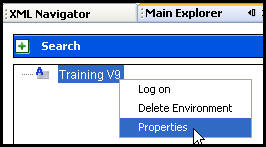
Before information can be moved between databases, the source (originating) environment and the target environment must be identified. This is done by inserting the release management information into the environment properties window in the Rules Palette. This window is accessed by right-clicking on the environment node in the Main Explorer or Global Rules Explorer tab.
Open the Rules Palette in the Source Environment.
Right-click on the environment node in either the Main Explorer or Global Explorer tab.
Select Properties.
Scroll down to the IVS Release Management fields.
Click the  button next to IVS Release Management and
type on.
button next to IVS Release Management and
type on.
Click the button next to IVS Release Management Entry
Env and type true.
Click Finish to close the properties window.
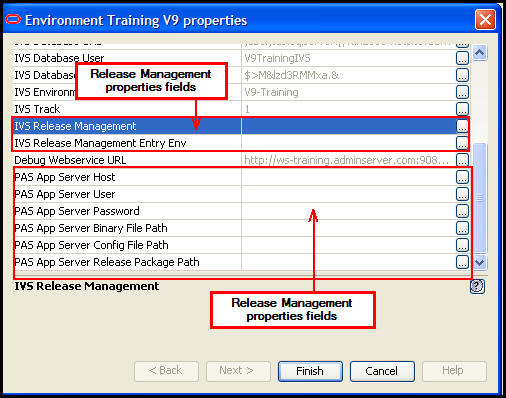
Release Management Properties Fields
Open the Rules Palette in the Target Environment.
Right-click on the environment node in either the Main Explorer or Global Explorer tab.
Select Properties.
Scroll down to the IVS Release Management fields.
Click the button next to IVS Release Management and
type on.
Click the button next to IVS Release Management Entry
Env and type false.
Click Finish to close the properties window.
Note: After you set the Release Management properties, you must log-out of the Rules Palette and then back in to see the Release Management node in Admin Explorer.
Copyright © 2009, 2011, Oracle and/or its affiliates. All rights reserved. Legal Notices