
Enabling Logins When Logins Are Disabled
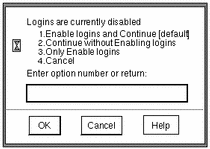
As a security measure, your administrator can configure your site so that all logins are disabled after a reboot. If a reboot has occurred and you are not authorized to enable logins, the dialog box shown in Figure 2-10 appears; you must notify your Trusted Solaris administrator to help you log in. If you are authorized to enable logins, the dialog box shown in Figure 2-11 appears.
Figure 2-10 Disabled Logins Dialog Box for Users Unauthorized to Enable Logins
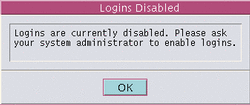
Figure 2-11 Disabled Logins Dialog Box for Users Authorized to Enable Logins
To Enable Logins After a Reboot
-
Select the appropriate Enable logins button (see Figure 2-11):
-
Select the appropriate Login button:
-
Click OK to enable the logins as specified or click Cancel to leave logins in their current state.
Both options dismiss the dialog box and reset logins as specified.
- © 2010, Oracle Corporation and/or its affiliates