
How to Privately Register an Application in the Solstice Launcher
The following procedure describes how to privately register an application in the user's $HOME/.solstice_registry file.
-
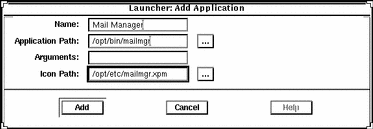
Enter the following application information in the Add Application window.
-
Identify the application name in the Name text box.
This name is displayed in the Launcher window.
-
Identify the application path name in the Application Path text box.
If you are not sure of the application path name, click on the ellipsis (...) button, which displays the Application Path Selection window. See "How to Use the File Selection Window" for information on using this window.
-
Identify any command-line arguments for the application in the Arguments text box.
These arguments are passed to the application when it is started.
-
Identify the application icon path name in the Icon Path text box.
If you are not sure of the icon path name, click on the ellipsis (...) button, which displays the Application Path Selection window. See "How to Use the File Selection Window" for information on using this window.
-
-
Click on Register to add the application.
Example of Registering a Private Application in the Solstice Launcher
The following example registers an application called Mail Manager.
- © 2010, Oracle Corporation and/or its affiliates