Best Practices Guidelines
for
Assigning the Correct Cause Code
 Assigning
a cause code, or event reason, is useful in categorizing the factors that
result in system downtime.
Assigning
a cause code, or event reason, is useful in categorizing the factors that
result in system downtime.
The Configuration and Service Tracker Version 3.0 Customer Installation and Operations Guide explains how to enter the correct cause code for an event. It can be difficult to determine the actual cause for the downtime and sometimes a chain of events and issues result in downtime.
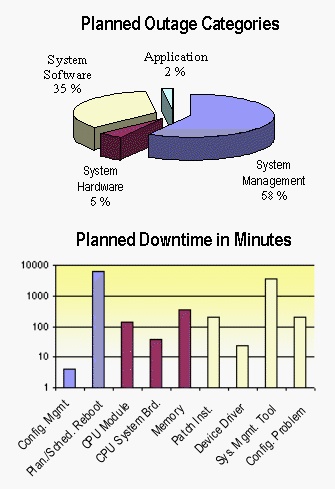
Cause code reports show the amount of downtime for planned and unplanned issues. You can drill down through both categories into subcategories, such as System Management, System Hardware, and System Software, to reach the final Patch Installation level. Since cause code reports show how much downtime is caused by installing patches, it is important to tag the shutdown/reboot after installing a patch with cause code events, as well as proactive pre-work events (such as rebooting) to ensure that the server is healthy before installing a new patch.
Tagging the events enables you to compare different patch and change management policies and their impact on the server downtime.
Which Events Should be Tagged With a Cause Code?
Only two event types are associated with system downtime: System PANIC and System Shutdown. Every System PANIC and System Shutdown event is followed by a System Reboot event. Since System PANIC - Reboot and System Shutdown - Reboot always occur in pairs, assign the cause code for the first event in the pair (the System PANIC or System Shutdown event).To get a list of all System Shutdown and System PANIC events, type the following at a command line:
# set_causecode -lo -p <PERIOD> [-n <HIERARCHY>]
You might want to assign a cause code to every event from each system. In addition, it could be useful to provide more meaningful explanations by using the free-format Comments section. This information can be valuable for later inquiries.
Actions between a Shutdown and a Reboot event should be captured as comments for the Reboot event. Service performed while the system is online should be captured through a separate Service Event. A single Service Event between a Reboot and a subsequent Shutdown can be used to capture all events during that period.
Note: Sun Microsystem's executive management team analyzes weekly information on the longest outages experienced by Sun customers worldwide. It is important to add a comment to document major System Shutdown and System PANIC events. You should include existing Radiance case numbers in your comment.
Hardware Upgrades
Tracked events for upgrading hardware components and replacing components are summarized in categories that are divided into component types; see the Planned - System Hardware section. In order to track statistics about frequency and duration of maintenance for these component types, use these categories exclusively for maintenance events. All customer-driven hardware upgrades and enhancements should be tagged with Planned - System Management - Configuration Management.Cluster of Events
A cluster of events is a set of related outages with a common root cause. You should tag all downtime events with the same appropriate cause code to ensure consistent reporting.Example
An UltraTM 2 workstation has crashed and analysis points to the internal disk as the cause. During a planned downtime the disk is replaced. Some days later the system panics again and more analysis identifies the onboard SCSI adapter as the root cause. The whole system board must be swapped in a fourth downtime.For this series of events you have two Unplanned - System Hardware Failure - CPU System Board and two Planned - System Hardware - CPU System Board events. You can replace assigned cause codes with more appropriate cause codes and the AMS database is updated accordingly.
Multiple Causes
If more than one cause code seems appropriate, choose the cause that had the most impact on the downtime duration.Confused Hierarchy
An example of multiple causes could be an operational error in the facilities department that disrupts the power in the computer room. Working from the server outward, the problem is loss of power, not an operational error, even though the root cause is the operational error in the facilities department.Unknown or Inappropriate Event Reason
If you don't know the precise cause of an outage or if you cannot find an appropriate cause code, each category contains two cause codes at the final level: Undefined and Other. If you can track the problem only to Unplanned - System Hardware Failure, then Undefined, would be an appropriate reason.If you do know the reason (for instance, the clock board), but there is no matching cause code, choose Other as the cause code.
Also, there are two categories and cause codes in the Unplanned section: Known - Undefined and Unknown - Undefined. Do not use these cause codes. In the case of Known - Undefined, the most appropriate category together with the Other cause code should be used. Unknown - Undefined can be completely replaced with Undefined - Undefined, which truly reflects an unknown cause.
How to Use the Explanations for Each Cause Code
The explanations for each cause code are divided into four sections:Description
The Description section contains examples of causes that belong to the selected cause code.Attention
The Attention section contains other cause codes of the same first level cause code hierarchy. These can be helpful when you are reading about a planned cause code and want to view related cause codes.See also
The See also section includes cause codes of the opposite first level hierarchy. This can be helpful when you are reading about an unplanned event and you want the associated planned event. See also includes only the opposite event (such as unplanned) for the planned event you are classifying.Notes
Additional notes are included for some classifications.Technical Support
Support is provided according to your contract level. For technical support, point your browser to:http://www.sun.com/service/support/cst/support.html