Oracle® Insurance XML Configuration Guide Release 9.4.1.0 E23637_01
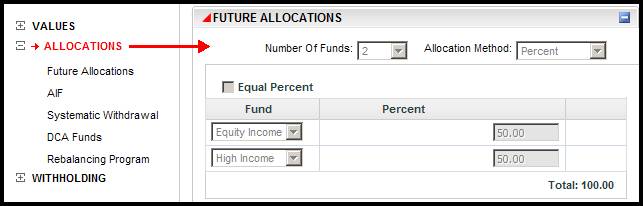
The Allocation screen rule controls plan and policy level allocations. Allocations are used to define how money can be applied to a plan or policy. OIPA uses the AsAllocation table for allocations to the policy.
Note: The Allocation screen is not required for valuation or fund processing; however, it is commonly used to satisfy business workflow processes.
|
Element/Tag |
Definition |
Attribute |
Element/Attribute Value and Description |
|---|---|---|---|
|
<AllocationScreen> |
The opening and closing tag of the AllocationScreen business rule. |
||
|
<Allocations> |
Required element;
|
TYPE |
Optional attribute; ="Policy/Plan/Segment" To indicate the level of allocation. Plan:Defines if Allocation configuration is at the plan level. Policy: Defines if Allocation configuration is at the policy level. Segment ;Defines if Allocation configuration is at the segment level. |
|
AMOUNTPRECISION |
Optional attribute; ="Constant" To specify the maximum number of digits allowed after the decimal point. Used when allocating money. There is no restriction on the maximum or minimum value in the code. If this attribute is not used, the default value, "2" will be used. |
||
| UNITPRECISION |
Optional attribute; ="Constant" To specify the maximum number of digits allowed after the decimal point. |
||
|
PERCENTPRECISION |
Optional attribute; ="Constant" To specify the maximum number of digits allowed after the decimal point. Used when allocations are percentages. There is no restriction on the maximum or minimum value in the code. If this attribute is not used, the default value, "2" will be used. |
||
| ALWAYSEQUALPERCENT |
Optional attribute; ="Yes/No" Yes - When Equal Percent box is checked and this attribute is set to "Yes", then Allocation percents will be calculated irrespective of the number of funds. No - When the Equal the Percent box is checked and this attribute is set to "No", then Allocation percents will be calculated only for the even number of funds. If there are odd number of funds, their percentage boxes will be populated with zeros. |
||
| ALLOCATIONDATE |
Optional attribute; ="PolicyField " When this attribute is used, it indicates that the Funds used in the allocation should be based on the effective date specified in this field and not based on the Policy's effective date. |
||
|
USEEFFECTIVEDATE |
Optional attribute; Used to display different effective dates for a model and allows you to select a group of allocations by model and effective date. Yes: Allows for effective dates. No: Indicates effective dates aren’t used. |
||
|
<FundFamily> |
Optional Element: Fund Family along with Fund Class is used to configure a set of funds that must be used for allocations to satisfy a certain criteria on a policy. FundClass is used to track which funds in the FundFamily Table are in a specific set of funds. FundFamilyGuid defines what funds are in a subset of funds. |
POLICYFIELD |
Optional attribute within <Allocations>; ="PolicyField " This attribute is used to identify a field within the <PolicyScreen> rule. This field will contain a FundClassGUID in the AsFundFamily table |
|
SEGMENTFIELD |
Optional attribute within <Allocations>; ="SegmentField " This attribute is used to identify a field within the <SegmentScreen> rule This field will contain a FundClassGUID in the AsFundFamily table. |
||
|
PLANFIELD |
Optional attribute within <Allocations>; ="PlanField" This attribute is used to identify a field within the <PlanScreen> rule This field will contain a FundClassGUID in the AsFundFamily table. |
||
|
<Allocation> |
Required/RepeatableElement; The Allocation tag is a required sub element that indicates we are configuring a specific allocation. The Allocation tag has specific attributes that help define the allocation further. |
TYPECODE |
Required attribute; ="AllocationTypeCode" Is the Allocation Code number that is defined in AsCodeAllocationType. |
|
MODEL |
Optional Attribute; ="AllocationTypeCode" Models are a group of funds with specific allocations that share in an investment goal. An investor can select a model for their allocations which includes all of fund and the specified amount.A model creates a template of allocations and allocation amounts. |
||
|
AMOUNTPRECISION |
Optional attribute; ="Constant" To specify the maximum number of digits allowed after the decimal point |
||
|
UNITPRECISION |
Optional attribute; ="Constant" To specify the maximum number of digits allowed after the decimal point |
||
|
PERCENTPRECISION |
Optional attribute; ="Constant" To specify the maximum number of digits allowed after the decimal point |
||
|
FUNDLIMIT |
Optional Attribute; ="Integer"* To set the limit on the number of funds that can be made available for allocation. |
||
|
EXCLUDEFUNDSTATUS |
Optional Attribute; ="FundStatus"* To prevent the funds (that are in the specified fund status) from being available for allocation. For example: EXCLUDEFUNDSTATUS="01,03" - Indicates that the funds that are in these statuses should not be available for allocation. 01 & 03 may indicate active and closed fund status, respectively. |
||
|
EXCLUDETYPE |
Optional attribute; ="FundTypeCode" List of Fund Types(comma separated codes) that should be excluded from the Allocation Fund drop down list. |
||
|
<AllocationMethods> |
Required element; Lists the Allocation Methods that are applicable for this allocation type. |
|
Required element value; ="AllocationMethodCode" Defines AllocationMethodCode (percent, amount, units, etc.) |
|
<AllocationTransfer> |
Optional Element;
|
REPEATFUNDS |
Optional attribute; |
|
<AllocationFrom> |
Required Element;
|
FUNDLIMIT |
Optional Attribute; |
| EXCLUDETYPE |
Optional attribute; ="FundTypeCode" List of Fund Types(comma separated codes) that should be excluded from the Allocation Fund drop down list. |
||
|
EXCLUDEFUNDNAME |
Optional Attribute; ="FundName" Name of the Fund to be excluded from the Allocation. |
||
|
EXCLUDEFUNDSTATUS |
Optional Attribute; ="FundStatus" To prevent the Funds (that are in the specified Fund Status) from being available for allocation |
||
|
METHODCODES |
Optional attribute; |
||
|
ALLOWMIXEDMETHODS |
Optional attribute; ="Yes/No" Allows different method codes to be specified for each of the allocations that is moving money out. For e.g.: Fund A can have the MethodCode, Amount. Fund B can have the MethodCode , Percent. |
||
|
AMOUNTMINIMUM |
Optional attribute; ="Constant" Validation to determine if the Fund amount is at least equal to the specified minimum amount. |
||
|
PERCENTMINIMUM |
Optional attribute; ="Constant" Validation to determine if the Fund percentage is at least equal to the specified minimum amount. |
||
|
UNITMINIMUM |
Optional attribute; ="Constant" Validation to determine if the Fund Units are at least equal to the specified minimum amount. | ||
|
MODEL |
Optional Attribute;
="AllocationTypeCode"
Models are a group of funds with specific allocations that share in an investment goal. An investor can select a model for their allocations which includes all of fund and the specified amount.A model creates a template of allocations and allocation amounts. |
||
|
INCLUDEFUNDFIELD |
Optional attribute: ="FieldName from the FundScreen" This attribute works along with INCLUDEFUNDFIELDVALUE attribute and together acts as a filter to determine the funds that should be available(included) for allocation in the Funds dropdown box in the AllocationScreen. |
||
|
INCLUDEFUNDFIELDVALUE |
Optional attribute: ="Constant" This attribute works along with INCLUDEFUNDFIELD attribute and together acts as a filter to determine the funds that should be available (included) for allocation in the Funds dropdown box in the AllocationScreen. The value of INCLUDEFUNDFIELD specifies a Fund Field in the FundScreen and the value of INCLUDEFUNDFIELDVALUE specifies the value for that particular field. Only those funds that satisfies the condition (that the specified FundField having the specified value ) can become available for Allocation. |
||
|
EXCLUDEFUNDFIELD |
Optional attribute: ="FieldName from the FundScreen" This attribute works along with EXCLUDEFUNDFIELDVALUE attribute and together acts as a filter to determine the funds that should NOT be available (excluded) for allocation in the Funds dropdown box in the AllocationScreen. |
||
|
EXCLUDEFUNDFIELDVALUE |
Optional attribute: ="Constant" EXCLUDEFUNDFIELDVALUE specifies the value for that particular field. If any of the Funds satisfies this condition (i.e.. if the specified Fund Field has the specified value ), then that Fund should not be available for Allocation. |
||
|
IF |
Optional Attribute: ="Expression" Defines the condition. Only when satisfied, Allocation From funds will be displayed in the Allocation Screen. |
||
|
AMOUNTPRECISION |
Optional attribute; ="Constant" To specify the maximum number of digits allowed after the decimal point |
||
|
UNITPRECISION |
Optional attribute; ="Constant" To specify the maximum number of digits allowed after the decimal point |
||
|
PERCENTPRECISION |
Optional attribute; ="Constant" To specify the maximum number of digits allowed after the decimal point |
||
|
<AllocationTo> |
Optional Element: This element is used to identify the list of Funds that should be available for Transfer. |
FUNDLIMIT |
Optional Attribute; |
| EXCLUDETYPE |
Optional attribute; ="FundTypeCode" List of Fund Types(comma separated codes) that should be excluded from the Allocation Fund drop down list. |
||
|
EXCLUDEFUNDNAME |
Optional Attribute; ="FundName" Name of the Fund to be excluded from the Allocation. |
||
|
EXCLUDEFUNDSTATUS |
Optional Attribute; ="FundStatus" To prevent the Funds (that are in the specified Fund Status) from being available for allocation |
||
|
METHODCODES |
Optional attribute; |
||
|
ALLOWMIXEDMETHODS |
Optional attribute; ="Yes/No" Allows different method codes to be specified for each of the allocations that is moving money out. For e.g.: Fund A can have the MethodCode, Amount. Fund B can have the MethodCode , Percent. |
||
|
AMOUNTMINIMUM |
Optional attribute; ="Constant" Validation to determine if the Fund amount is at least equal to the specified minimum amount. |
||
|
PERCENTMINIMUM |
Optional attribute; ="Constant" Validation to determine if the Fund percentage is at least equal to the specified minimum amount. |
||
|
UNITMINIMUM |
Optional attribute; ="Constant" Validation to determine if the Fund Units are at least equal to the specified minimum amount. | ||
|
MODEL |
Optional Attribute;
="AllocationTypeCode"
Models are a group of funds with specific allocations that share in an investment goal. An investor can select a model for their allocations which includes all of fund and the specified amount.A model creates a template of allocations and allocation amounts. |
||
|
INCLUDEFUNDFIELD |
Optional attribute: ="FieldName from the FundScreen" This attribute works along with INCLUDEFUNDFIELDVALUE attribute and together acts as a filter to determine the funds that should be available(included) for allocation in the Funds dropdown box in the AllocationScreen. |
||
|
INCLUDEFUNDFIELDVALUE |
Optional attribute: ="Constant" This attribute works along with INCLUDEFUNDFIELD attribute and together acts as a filter to determine the funds that should be available (included) for allocation in the Funds dropdown box in the AllocationScreen. The value of INCLUDEFUNDFIELD specifies a Fund Field in the FundScreen and the value of INCLUDEFUNDFIELDVALUE specifies the value for that particular field. Only those funds that satisfies the condition (that the specified FundField having the specified value ) can become available for Allocation. |
||
|
EXCLUDEFUNDFIELD |
Optional attribute: ="FieldName from the FundScreen" This attribute works along with EXCLUDEFUNDFIELDVALUE attribute and together acts as a filter to determine the funds that should NOT be available (excluded) for allocation in the Funds dropdown box in the AllocationScreen. |
||
|
EXCLUDEFUNDFIELDVALUE |
Optional attribute: ="Constant" EXCLUDEFUNDFIELDVALUE specifies the value for that particular field. If any of the Funds satisfies this condition (i.e.. if the specified Fund Field has the specified value ), then that Fund should not be available for Allocation. |
||
|
IF |
Optional Attribute: ="Expression" Defines the condition. Only when satisfied, Allocation From funds will be displayed in the Allocation Screen. |
||
|
AMOUNTPRECISION |
Optional attribute; ="Constant" To specify the maximum number of digits allowed after the decimal point |
||
|
UNITPRECISION |
Optional attribute; ="Constant" To specify the maximum number of digits allowed after the decimal point |
||
|
PERCENTPRECISION |
Optional attribute; ="Constant" To specify the maximum number of digits allowed after the decimal point |
||
|
FUNDLIMIT |
Optional Attribute; |
||
| EXCLUDETYPE |
Optional attribute; ="FundTypeCode" List of Fund Types(comma separated codes) that should be excluded from the Allocation Fund drop down list. |
||
|
<FundFamily>
|
Optional Element:
Fund Family along with Fund Class is used to configure a set of funds that must be used for allocations to satisfy a certain criteria on a policy. FundClass is used to track which funds in the FundFamily Table are in a specific set of funds. FundFamilyGuid defines what funds are in a subset of funds. |
||
|
FUNDCLASSGUID |
Required attribute within the Allocation Tag; ="Constant" This attribute is used to identify a FundClassGUID in the AsFundFamily table. This table is used to group funds under a Fund Class. |
||
|
<PolicyModels>
|
Optional Element: Starting element of PolicyModel section. Models are setup via the Plan Allocation Screen. <PolicyModels> element is used to access these Models at the Policy level allocation |
|
|
|
COPYTO |
Required attribute; ="AllocationTypeCode" This attribute's value represents the AllocationTypeCode of a Policy level allocation to which the Model should be copied. |
||
|
<PolicyModel>
|
Required / Repeatable Element: This element is used to list the Models (that are configured at the Plan Allocation Screen) in the Policy Allocation screen. The element should be added for each Model that should be available for the Policy. A dynamic field is configured in the Policy Screen to hold the list of applicable Policy Models for that Policy's Plan. The User then selects a Model and saves the Policy. |
|
|
|
TYPECODE |
Required attribute; ="Model's AllocationTypeCode" This attribute's value represents the Plan level AllocationTypeCode of a PolicyModel. |
||
|
<PolicyModelField>
|
Optional Element: The <PolicyModelField> element in AllocationScreen is used to pull out the value from this particular Policy Field and write a new allocation or override any existing allocation, as per the selected Model's set up. |
|
|
|
POLICYFIELD |
Requried attribute; ="PolicyFieldName" This attribute is used to specify the Field Name in the PolicyScreen BR. |
||
|
<PolicyModelTypesField>
|
Optional Element; Using <PolicyModelTypesField>, the AllocationType in that particular Model that should be used for setting up the allocation is determined. |
|
|
|
POLICYFIELD |
Requried attribute; ="PolicyFieldName" This attribute is used to specify the Field Name in the PolicyScreen BR. |
||
|
<UseFundClassAllocation> |
Optional Element; This element is used to specify the Policy Field Name to attach the fund class allocation model to the policy for use. When retrieving data from the database, this field can be used as an identifier of policies that use fund class allocations. |
|
Optional attribute; ="PolicyFieldName" This Field should be configured in the Policy Screen to connect the Policy to the correct Fund Class Allocation Type. |
|
<FundClassAllocations>
|
Optional Element; This element is used to specify the Allocation level from which Fund Class set up should be applied |
|
|
|
TYPE |
Required attribute: ="Plan" This attribute is used to specify the level of allocation. |
||
|
<FundClassAllocation>
|
Required / Repeatable Element; This element Is used to specify the list of AllocationTypeCodes that should be available for allocation. |
|
|
|
TYPECODE |
Required attribute: ="AllocationTypeCode" This attribute Is used to specify the list of AllocationTypeCodes from AsCodeAllocationType that should be available for allocation. |
||
|
<DisableAllocationFields> |
Optional Element: This element is used to disable the fields of certain Allocation Types in the AllocationScreen based on the Policy Status |
|
|
|
<DisabledPolicyStatus> |
Required Element: This element is used to specify the list of Policy Status code for which Fields in AllocationScreen should be disabled. |
|
Required/Repeated element value; PolicyStatusCode Comma separated Policy Status Code from AsCodeStatus table. |
|
<OnLoad> |
Reference details in Common Elements Section |
||
|
<OnChange> |
Reference details in Common Elements Section |
||
|
<Validation>
|
Optional Element; Allows validation of Allocation entries. |
||
|
DEBUG |
Optional attribute; ="Yes/No" This attribute is used to turn on or off the Debugger. Yes - Turns on the validation and perform the check as per the instructions provided in the <Validation> element. |
||
|
<Instructions> |
Required Element: Starting element of the Instructions tag. This is to define the condition for which validation should be performed. |
|
|
|
<Commands> |
Required Element; Starting Element for the command section. |
|
|
|
<Command>
|
Required / Repeatable element; This element is used to define the condition that should be executed when the OK button in the AllocationScreen is clicked. |
|
|
|
NAME |
Required attribute: ="AnyNamefortheCommand" Name of the Command. |
||
|
TYPE |
Required attribute: ="CopyTo / FundsAreContainedIn / AllocationsAreEqual" CopyTo - Copy the allocations of one type (a block on the screen) to another type (a different block on the screen) FundsAreContainedIn - Checks if funds from one allocation type are contained in another allocation type; puts true/false in the specified name AllocationAreEqual - Checks if any two allocations are the same. |
||
|
<Parameters> |
Required element; Starting Element of the Parameter section. |
|
|
|
<Parameter>
|
Required / Repeatable element; This element is used to supply the data required to perform certain actions by the <Commands> element. |
|
Required element value; Constant / MathVariable Defines the values. |
|
NAME |
Required attribute: ="AnyNamefortheParameter" Name of the Parameter. |
||
|
<MathVariables> |
Optional element; Opening and Closing element that encompasses the MathVariables. |
|
|
|
<GlobalVariable> |
Optional / Repeatable element; This element is used to define the MathVariables that are used in deciding whether an error message should be displayed or not. |
|
|
|
<Errors> |
Required Element; Starting element that encompasses the list of error messages that should be displayed according to the Validation result. |
|
|
|
<Error>
|
Required / Repeatable element; This element is used to configure the error message that should be displayed. |
|
|
|
ONTRUE |
Required attribute; ="GlobalVariable / CommandName" Name of MathVariable being used for validation. |
||
|
MESSAGE |
Required attribute; ="Some Message" Message to be displayed upon validation. |
||
|
<Events> |
Reference details in Common Elements Section |
||
|
<ScreenMath> |
Reference details in Common Elements Section |
||
|
<Actions> |
Reference details in Common Elements Section |
<AllocationScreen> <Allocations TYPE="Plan" USEEFFECTIVEDATE="Yes" AMOUNTPRECISION="2" PERCENTPRECISION="2"> <Allocation TYPECODE="02" FUNDLIMIT="3"> <AllocationMethods>01</AllocationMethods> </Allocation> <Allocation TYPECODE="04" FUNDLIMIT="01" EXCLUDEFUNDNAME="HighIncome"> <AllocationMethods>01</AllocationMethods> </Allocation> <Allocation TYPECODE="20" EXCLUDEFUNDNAME="HighIncome"> <AllocationMethods>01</AllocationMethods> <FundFamily FUNDCLASSGUID="3F5D68E9-FBEA-442C-8EC6-617D80381213"></FundFamily> </Allocation> </Allocations> <Allocations TYPE="Policy" USEEFFECTIVEDATE="Yes" AMOUNTPRECISION="2" UNITPRECISION="2" PERCENTPRECISION="3" ALWAYSEQUALPERCENT="Yes" ALLOCATIONDATE="FundEffectiveDate"> <FundFamily POLICYFIELD="FundFamily"></FundFamily> <Allocation TYPECODE="02" EXCLUDETYPE="05,06" MODEL="29" AMOUNTPRECISION="3" UNITPRECISION="02" PERCENTPRECISION="02" FUNDLIMIT=01" EXCLUDEFUNDNAME="Acme-HighIncome" EXCLUDEFUNDSTATUS="05" > <AllocationMethods>01</AllocationMethods> <AllocationTransfer REPEATFUNDS="Yes"> <AllocationFrom EXCLUDETYPE="05,06" MODEL="09" AMOUNTPRECISION="2" UNITPRECISION="3" PERCENTPRECISION="3" FUNDLIMIT="3" EXCLUDEFUNDNAME="Acme-HighIncome" EXCLUDEFUNDSTATUS="05,06" METHODCODES="01" ALLOWMIXEDMETHODS="Yes" AMOUNTMINIMUM="100" PERCENTMINIMUM="" UNITMINIMUM="2" INCLUDEFUNDFIELD="RedemptionFee" INCLUDEFUNDFIELDVALUE="01" EXCLUDEFUNDFIELD="Fee" EXCLUDEFUNDFIELDVALUE="02"></AllocationFrom> <AllocationTo EXCLUDETYPE="05,06" MODEL="09" AMOUNTPRECISION="2" UNITPRECISION="3" PERCENTPRECISION="3" FUNDLIMIT="3" EXCLUDEFUNDNAME="Acme-HighIncome" EXCLUDEFUNDSTATUS="05,06" METHODCODES="01" ALLOWMIXEDMETHODS="Yes" AMOUNTMINIMUM="100" PERCENTMINIMUM="" UNITMINIMUM="2" INCLUDEFUNDFIELD="RedemptionFee" INCLUDEFUNDFIELDVALUE="01" EXCLUDEFUNDFIELD="Fee" EXCLUDEFUNDFIELDVALUE="02"></AllocationTo> </AllocationTransfer> </Allocation> <PolicyModels COPYTO="02"> <PolicyModel TYPECODE="26"> <PolicyModelField POLICYFIELD="PolicyModelField"></PolicyModelField> <PolicyModelTypesField POLICYFIELD="">PolicyModelTypesField</PolicyModelTypesField> </PolicyModel> </PolicyModels> </Allocations> <UseFundClassAllocation>Policy:FundClassAllocationType</UseFundClassAllocation> <FundClassAllocations TYPE="Plan"> <FundClassAllocation TYPECODE="03"></FundClassAllocation> </FundClassAllocations> <DisableAllocationFields> <DisabledPolicyStatus>07,11,31,35,38,39,41,59</DisabledPolicyStatus> </DisableAllocationFields> <OnLoad></OnLoad> <OnChange></OnChange> <Validation DEBUG="No"> <Instructions> <Commands> <Command NAME="Command NAME="DCAFromIsInFuture" TYPE="FundsAreContainedIn"> <Parameters> <Parameter NAME="NAME="ContainingTypeCode">02</Parameter> <Parameter NAME="CheckingTypeCode">14</Parameter> <Parameter NAME="CheckingGroup">From</Parameter> </Parameters> </Command> <Command NAME="FutureAndModelAreEqual" TYPE="AllocationsAreEqualToModel"> <Parameters> <Parameter NAME="TypeCode">02</Parameter> </Parameters> </Command> </Commands> <MathVariables> <True TYPE="VALUE">true</True> <False TYPE="VALUE">false</False> <DCAFromNotInFuture TYPE="IIF" EXPRESSION=""DCAFromIsInFuture" <> "True"">True, False</DCAFromNotInFuture> <NoFutureAllocations TYPE="IIF" EXPRESSION="NumOfFuture > 0">False, True</NoFutureAllocations> <ModelAndFutureOnlyNotEqual TYPE="IIF" EXPRESSION="PolicyModel > 0 And "FutureAndModelAreEqual" <> "True"">True, False</ModelAndFutureOnlyNotEqual> </MathVariables> </Instructions> <Errors> <Error ONTRUE="DCAFromNotInFuture" MESSAGE="<b>DCA</b> From allocation must exist in the <b>Future</b> allocation section""></Error> <Error ONTRUE="NoFutureAllocations" MESSAGE="<b>Future</b> Allocations Must Exist"></Error> <Error ONTRUE="ModelAndFutureOnlyNotEqual" MESSAGE="<b>Future</b> Allocations Must Match The <b>Model Allocations</b> When Nothing Else Is Selected"></Error> </Errors> </Validation> </AllocationScreen>
<AllocationScreen>
	<Allocations TYPE="[Plan|Policy|Segment]" USEEFFECTIVEDATE="[Yes|No]" AMOUNTPRECISION="[Constant]" UNITPRECISION="[Constant]" PERCENTPRECISION="[Constant]" ALWAYSEQUALPERCENT="[Yes|No]" ALLOCATIONDATE="[PolicyField]">
		<FundFamily POLICYFIELD="[PolicyField]" SEGMENTFIELD="[SegmentField]" PLANFIELD="[PlanField]"></FundFamily>
		<Allocation TYPECODE="[AllocationTypeCode]" EXCLUDETYPE="[FundTypeCode]" MODEL="[AllocatonTypeCode]" AMOUNTPRECISION="[Constant]" UNITPRECISION="[Constant]" PERCENTPRECISION="[Constant]" FUNDLIMIT="[Integer*]" EXCLUDEFUNDNAME="[FundName*]" EXCLUDEFUNDSTATUS="[FundStatus*]">
			<AllocationMethods>[AllocationMethodCode]</AllocationMethods>
			<AllocationTransfer REPEATFUNDS="[Yes|No]">
				<AllocationFrom EXCLUDETYPE="[FundTypeCode]" MODEL="[AllocatonTypeCode]" IF="[Expression]" AMOUNTPRECISION="[Constant]" UNITPRECISION="[Constant]" PERCENTPRECISION="[Constant]" FUNDLIMIT="[Integer*]" EXCLUDEFUNDNAME="[FundName*]" EXCLUDEFUNDSTATUS="[FundStatus*]" METHODCODES="[AllocationMethodCode]" ALLOWMIXEDMETHODS="[Yes|No]" AMOUNTMINIMUM="[Constant]" PERCENTMINIMUM="[Constant]" UNITMINIMUM="[Constant]" INCLUDEFUNDFIELD="[FieldName from the FundScreen]" INCLUDEFUNDFIELDVALUE="[Constant]" EXCLUDEFUNDFIELD="[FieldName from the FundScreen]" EXCLUDEFUNDFIELDVALUE="[Constant]"></AllocationFrom>
				<AllocationTo EXCLUDETYPE="[FundTypeCode]" MODEL="[AllocatonTypeCode]" IF="[Expression]" AMOUNTPRECISION="[Constant]" UNITPRECISION="[Constant]" PERCENTPRECISION="[Constant]" FUNDLIMIT="[Integer*]" EXCLUDEFUNDNAME="[FundName*]" EXCLUDEFUNDSTATUS="[FundStatus*]" METHODCODES="[AllocationMethodCode]" ALLOWMIXEDMETHODS="[Yes|No]" AMOUNTMINIMUM="[Constant]" PERCENTMINIMUM="[Constant]" UNITMINIMUM="[Constant]" INCLUDEFUNDFIELD="[FieldName from the FundScreen]" INCLUDEFUNDFIELDVALUE="[Constant]" EXCLUDEFUNDFIELD="[FieldName from the FundScreen]" EXCLUDEFUNDFIELDVALUE="[Constant]"></AllocationTo>
			</AllocationTransfer>
			<FundFamily FUNDCLASSGUID ="[FundClassGUID]"></FundFamily>
		</Allocation>
		<PolicyModels COPYTO="[AllocationTypeCode*]">
			<PolicyModel TYPECODE="[Model's AllocationTypeCode]">
				<PolicyModelField POLICYFIELD="[PolicyFieldName]"></PolicyModelField>
				<PolicyModelTypesField POLICYFIELD="[PolicyFieldName]"></PolicyModelTypesField>
			</PolicyModel>
		</PolicyModels>
	</Allocations>
	<UseFundClassAllocation>[PolicyFieldName]</UseFundClassAllocation>
	<FundClassAllocations TYPE="[Plan]">
		<FundClassAllocation TYPECODE="[AllocationTypeCode]"></FundClassAllocation>
	</FundClassAllocations>
	<DisableAllocationFields>
		<DisabledPolicyStatus>[PolicyStatusCode*]</DisabledPolicyStatus>
	</DisableAllocationFields>
	<OnLoad></OnLoad>
	<OnChange></OnChange>
	<Validation DEBUG="[Yes|No]">
		<Instructions>
			<Commands>
				<Command NAME="[AnyNamefortheCommand]" TYPE="[CopyTo | FundsAreContainedIn | AllocationsAreEqual ]">
					<Parameters>
						<Parameter NAME="[AnyNamefortheParameter]">"[Constant | MathVariable]</Parameter>
					</Parameters>
				</Command>
			</Commands>
			<MathVariables>
				<GlobalVariable\>
			</MathVariables>
		</Instructions>
		<Errors>
			<Error ONTRUE="[GlobalVariable | CommandName]" MESSAGE="[Some Message]"></Error>
		</Errors>
	</Validation>
</AllocationScreen>
Copyright © 2009, 2011, Oracle and/or its affiliates. All rights reserved. Legal Notices