
Oracle® Insurance Policy Administration 9.5.0.0 E23638_01
Valuation values can be viewed from the Activity Results screen in OIPA, when configuration supports this feature. The user may drill down to very granular fund details.
If valuation is configured to calculate multiple times and for different dates within a single activity then a math valuation object will remain in memory until it is replaced by another math valuation object. Only one math valuation object will exist in memory at the same time as activity valuation.
It is important to understand that valuation details are not available for viewing until the fund’s unit values are added to the system data. Prior activities where unit values are available will have the valuation details appropriate for the prior activity. Policies entirely invested in fixed funds may always execute regardless of unit values.
If valuation XML is generated, the valuation tab will display data. If the XML is not generated, no data will display in the Valuation tab. Whether or not XML is generated is determined in the PAS.properties file.
For a non-processed activity, an Activity Detail window displays when the icon to the left of the activity name is clicked. The window opens and allows users to add/modify the entry information for the activity.
For a processed activity, an Activity Results window displays when that icon to the left of the activity name is clicked. The Detail tab is the default tab that will display. Click the Valuation tab to view valuation results for the activity.
ActivityDetail Icon on the Activity Screen in OIPA

Valuation Tab in ActivityDetails Window in OIPA
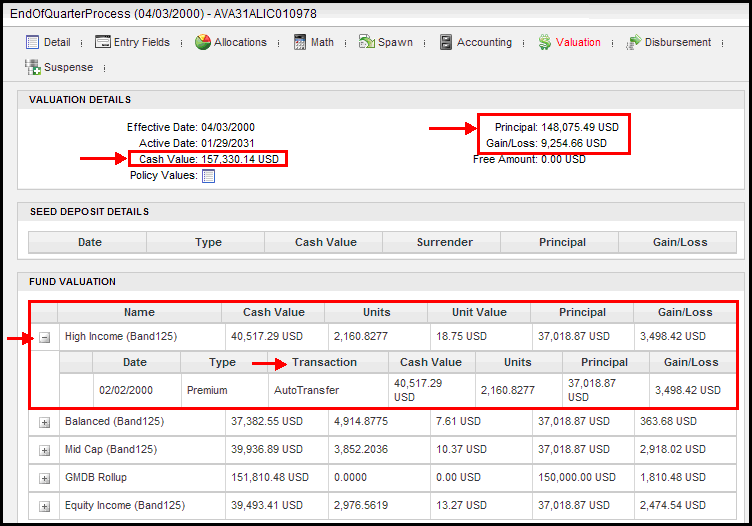
Valuation Details in ActivityDetails Window in OIPA
Copyright © 2009, 2012, Oracle and/or its affiliates. All rights reserved. Legal Notices