ECC Software Development Kit
Introduction
The Enterprise Command Center Software Development Kit (ECC SDK) provides a set of APIs that you can use to access Oracle Enterprise Command Center Framework functionality for custom development. The SDK is the primary tool for developers who need to leverage Enterprise Command Center data and analytical capabilities outside of the standard Oracle E-Business Suite interface.
The ECC SDK REST Server is a Node.js service built on top of the ECC SDK that allows access to the SDK APIs over HTTP.
The REST server exposes ECC SDK capabilities as REST APIs so that your custom applications can integrate and call ECC services through standard HTTP. Clients can discover contracts from /api/methods and execute workflows. You should use /api/methods as the runtime source of truth for method contracts. The ECC SDK Rest Server is the API gateway, or wrapper, for ECC SDK functionality.
Highlights of the ECC SDK
Key features of the ECC SDK are:
-
The SDK enables secure direct access to ECC core engine and engine capabilities.
-
It is available as a JavaScript library.
-
The ECC SDK can be used as:
-
A library within a custom parent JS project to build browser-based applications on top of ECC data.
-
A REST service through the provided HTTP REST server.
-
-
The SDK provides access to data from 2000+ pre-built components/queries/services across Oracle E-Business Suite (EBS) Enterprise Command Centers.
Thus, users can access the ECC core engine and data through the standard Oracle E-Business Suite interface, or through a custom UI and the ECC SDK, as shown in the following diagram.
Access to ECC Data from Standard Interface or Custom UI and SDK

Why Use the ECC SDK?
The ECC SDK is a powerful JavaScript library designed to bridge the gap between the Enterprise Command Center (ECC) core engine and custom external applications. It is the primary tool for developers who need to leverage ECC data and analytical capabilities outside of the standard Oracle E-Business Suite interface.
-
Secure direct access: It enables secure, direct communication with the ECC core engine and its underlying analytical capabilities.
-
Large pre-built library: The SDK provides instant access to data from over 2,000+ pre-built components, queries, and services already existing across EBS Enterprise Command Centers.
Recommended Usage Flow
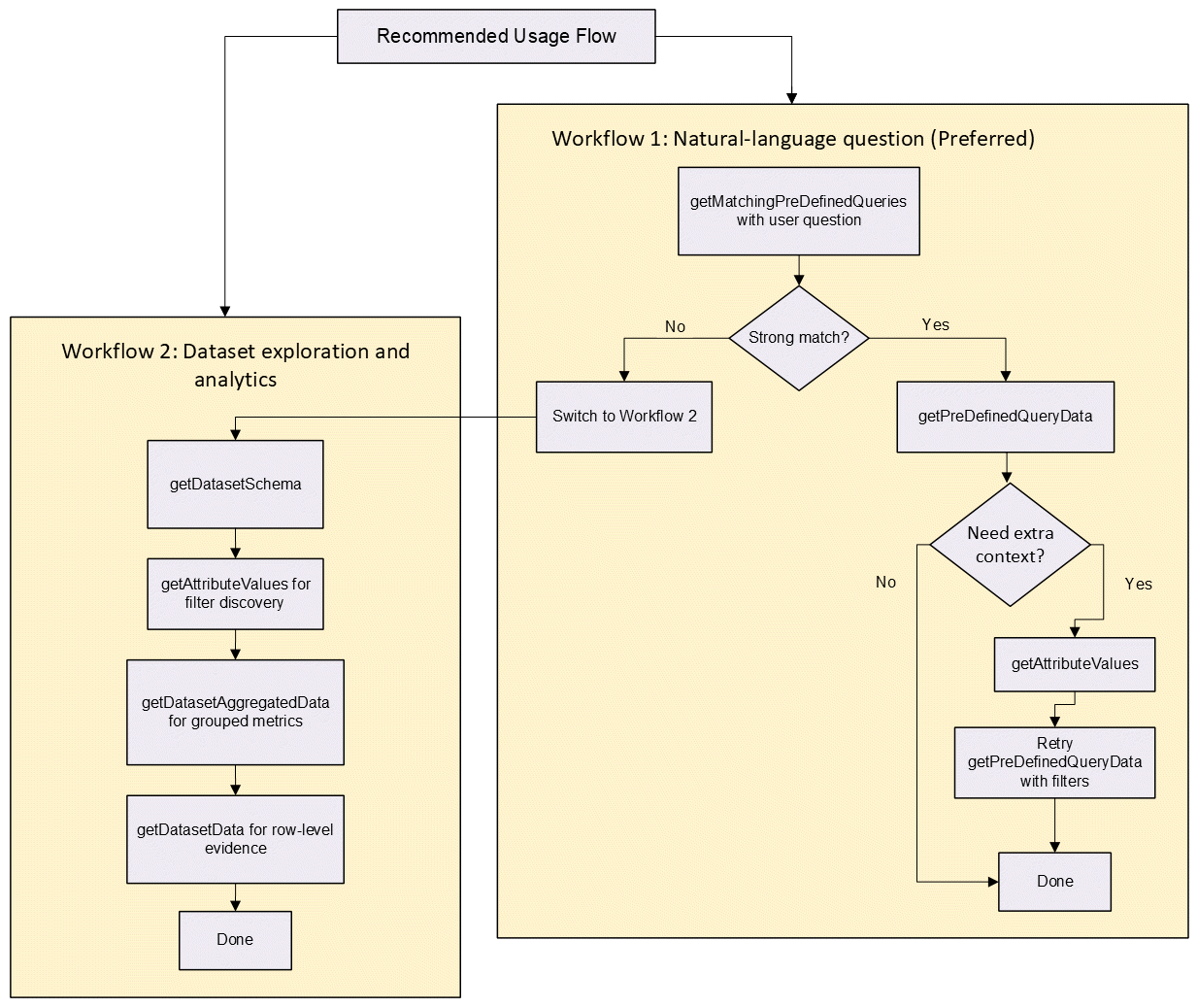
There are two recommended workflows for using the SDK APIs.
Workflow 1 uses a natural-language question and is the preferred workflow:
-
Call
getMatchingPreDefinedQuerieswith the user question. -
If there is a strong match, call
getPreDefinedQueryData. -
If query needs extra context, call
getAttributeValues, then retry the query with filters based on the attribute values. -
If there is no good match after Step 3, switch to Workflow 2 below.
Workflow 2 uses dataset exploration and analytics:
-
Call
getDatasetSchema. -
Call
getAttributeValuesfor filter discovery. -
Call
getDatasetAggregatedDatafor grouped metrics. -
Call
getDatasetDatafor row-level evidence.
The workflows are described in the following illustration:
Recommended Usage Flow of SDK APIs in Workflows 1 and 2
Explanation of ECC SDK Methods
ECC SDK methods can be divided into two tiers: those that have higher-level capabilities and those that have more basic (raw) capabilities.
Method Tiers
Tier 1 (higher-level capability methods):
-
getMatchingPreDefinedQueries -
getPreDefinedQueryData -
getDatasetSchema -
getAttributeValues -
getDatasetData -
getDatasetAggregatedData
Tier 2 (raw SDK methods):
-
getEccDataByTitle, getEccData, getEccDataById, getEccMetadata -
getEccDataSetSchema, getEccDataSetAttributes, getEccAttributeValues -
getEccRecords, getEccAggregatedRecords -
getEccApplications, getEccPageComponents, getEccCollections, getAssignedDataSets -
getTextVector, getImageVector, getEccTools
Tier 1 Methods (Preferred)
Tier 1 methods are the recommended entry point for general use and automated clients. Ideally, Tier 1 methods should be enough for most automated flows to get access to ECC data. The following table describes the Tier 1 methods.
| Method | Minimum Input | When to Use + Key Output |
|---|---|---|
| GETMATCHINGPREDEFINEDQUERIES | INPUTTEXT | Use first for natural-language questions. Returns ranked candidate expert queries with friendly fields: predefinedQueryId, datasetsKeys, requiredContext, and preDefinedQueryFilters. |
| GETPREDEFINEDQUERYDATA | APPSHORTNAME, PAGESHORTNAME, PREDEFINEDQUERYID | Use after selecting a query from the first step. This method returns actual result rows/metrics for that predefined query. Optional controls are: start, count, filters. |
| GETDATASETSCHEMA | DATASETKEY (OR DATASETKEY) | Use when you need to understand a dataset before querying. Returns dataset structure (attributes/fields), and is helpful for planning filters and aggregations. |
| GETATTRIBUTEVALUES | DATASETKEY, ATTRIBUTEKEY (OR ATTRIBUTE) | Use when building valid filters for a user question. Returns allowed/observed values for an attribute (facet-style output). |
| GETDATASETDATA | DATASETKEY | Use when the user needs row-level evidence. Returns records. Optional controls include attribute keys (attributeKeys), filters, sorting, start, and count. |
| GETDATASETAGGREGATEDDATA | DATASETKEY, ATTRIBUTEKEYS[], AGGREGATEDATTRIBUTES[] | Use for KPI or grouped summaries (count/sum/average by dimension). Returns aggregated buckets/metrics. Supports the following: filters, sorting, start, count. |
Simple Tier 1 API Calls
Health:
curl -s http://127.0.0.1:8787/health
Method catalog and schemas:
curl -s http://127.0.0.1:8787/api/methods | jq
Natural-language to predefined query:
curl -s -X POST http://127.0.0.1:8787/api/getMatchingPreDefinedQueries \
  -H 'Content-Type: application/json' \
  -d '{
    "clientObj": {
      "inputText": "assets by based category"
    }
  }'
Execute predefined query:
curl -s -X POST http://127.0.0.1:8787/api/getPreDefinedQueryData \
  -H 'Content-Type: application/json' \
  -d '{
    "clientObj": {
      "appShortName": "fa",
      "pageShortName": "asset-cost",
      "predefinedQueryId": "97ur07urgxm",
      "start": 0,
      "count": 25
    }
  }'
Read dataset schema:
curl -s -X POST http://127.0.0.1:8787/api/getDatasetSchema \
  -H 'Content-Type: application/json' \
  -d '{
    "clientObj": {
      "datasetKey": "fa-asset"
    }
  }'
Read attribute distinct values:
curl -s -X POST http://127.0.0.1:8787/api/getAttributeValues \
  -H 'Content-Type: application/json' \
  -d '{
    "clientObj": {
      "datasetKey": "fa-asset",
      "attributeKey": "BOOK_TYPE_CODE"
    }
  }'