Latitude Studio data sources can have parents and children. A child data source is essentially a subset of its parent data source.
For example, a parent data source contains all of the transaction records for a company. A child data source may contain only transactions from the United States.
Child data sources may themselves have children. For example, the child data source containing United States transactions may have a child data source that contains only transactions for New York, or transactions processed by a specific distributor.
Effect of query state changes on parent and child data sources
The current query state for a child data source is the current query state of the parent data source plus any filters from the child data source. For example, if the parent data source has been refined to only include transactions for 1999, then the child data source only includes transactions for the United States (the child data source filter) from 1999 (the parent data source refinement).
- Changes to the query state
for a child data source are applied to its parent data source.
For example, if an end user selects a refinement from a Guided Navigation component that is bound to a child data source, components bound to the parent data source also are updated with that refinement.
If that parent data source is itself a child data source, the change is then applied to its parent as well.
The operation is applied to each parent in turn until it reaches a data source that does not have a parent.
- Changes to the query state
for a parent data source are applied to all of its children.
If that child data source itself has children, the change is then applied to those children as well.
The operation is applied to each child in turn until it reaches a data source that does not have any children.
For example, for the following data source hierarchy:
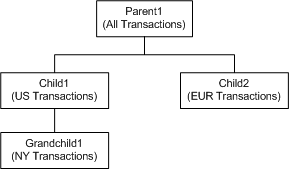
- If an end user refines
Parent1 to only show transactions for 1999:
- Child1 and Child2 are refined to only show transactions for 1999, plus their original base filters.
- The refinement to Child1 causes Grandchild1 to be refined to only show transactions for 1999, plus its original base filters and the filters from Child1.
- If an end user refines
Child1 to only show credit card transactions:
- Parent1 and Grandchild1 are refined to only show credit card transactions, plus their original filters.
- The refinement to Parent1 causes Child2 to be refined to only show credit card transactions, plus its original base filters.
- If an end user refines
Grandchild1 to only show cash transactions:
- Child1 is refined to only show cash transactions, plus its original base filters.
- The refinement to Child1 causes Parent1 to be refined to only show cash transactions, plus any original filters.
- The refinement to Parent1 causes Child2 to be refined to only show cash transactions, plus its original base filters.
Creating a child data source
A child data source has the same server and port settings as its parent data source.
| parentDataSource | The id of the parent data source. |
You then configure baseFunctions setting with the filters for the child data source.
Example of a child data source
In the following example of a child data source, the ID of the parent data source is all-transactions.
This importer-transactions child data source includes data from all-transactions, filtered to only include records for the Importer supplier type.
{
   "server":"server01.lab.acme.com",
   "port":"5555",
   "id":"importer-transactions"
   "name":"Importer Transactions"
   "parentDataSource":"all-transactions",
   "baseFunctions": [
        {"class":"com.endeca.portal.data.functions.RecordFilter",
         "recordFilter":"Supplier_Types:Importer"
        }
   ]
}
The sample data source child-data-source.json.sample provides a template for defining a child data source.
