From the edit view of a Data Explorer component, power users can select the default grouping for the attributes. They also can configure whether to enable pagination, and if pagination is enabled, whether to allow users to select the number of results per page.
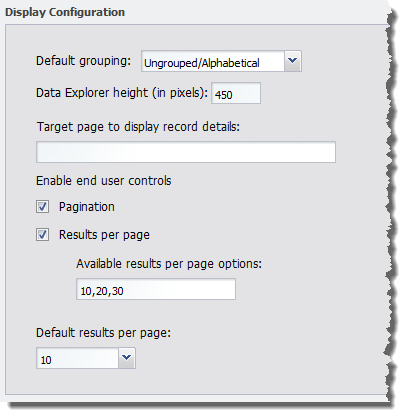
Under Display Configuration, to configure the default grouping, pagination, and navigation options for a Data Explorer component:
-
From the
Default grouping drop-down list, select the
default grouping for the attributes. You can either:
- Display the attributes in alphabetical order
- Group the attributes by data type
- Display the attributes within their attribute groups
- To specify a height for the component, in the Data Explorer height (in pixels) field, type the height value in pixels.
-
In the
Target page to display record details field,
type the name of the page to display when users click the record hyperlink.
The selected page must contain a Record Details component that uses the same data source.
If you do not provide a page name, then the user stays on the current page.
-
To display the pagination bar to allow users to navigate through
the entire list, check the
Pagination checkbox. The box is checked by
default.
If the box is not checked, then users cannot navigate through the list. The component only displays a number of records equal to the value of the Default results per page field. To see other records, the user must further refine the data.
-
If the
Pagination checkbox is checked, then to allow
users to select the number of records to display per page, check the
Results per page checkbox.
The available values for the user to select from are configured in the Available results per page options field.
-
If the
Results per page checkbox is checked:
-
In the
Available results per page options field,
type a comma-separated list of available values for the number of results to
display per page.
These values are used both to populate the Default results per page drop-down list below the field, and the Records per page options for users.
By default, the available options are 10, 20, and 30 records per page.
-
From the
Default results per page drop-down list,
select the default number of records to display per page.
The available options are configured in the Available results per page options field.
-
In the
Available results per page options field,
type a comma-separated list of available values for the number of results to
display per page.
- If the Results per page checkbox is not checked, then in the Default results per page field, type the number of records to display per page.
