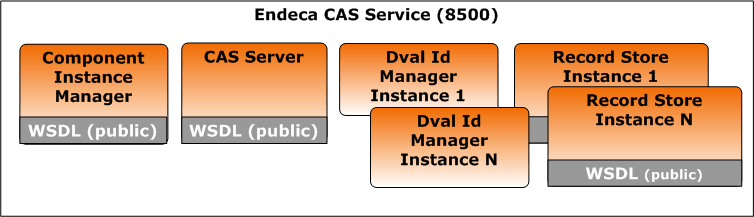
The Endeca CAS Service is a servlet container that runs the CAS Server, the Component Instance Manager, any number of Dimension Value Id Managers (one per application), and any number of Record Store instances (one per data source).
On Windows, the CAS installation program starts the service
automatically and the service is set to restart automatically during system
restarts. If you accept the installation defaults, the service runs on port
8500. The following image shows the components running within the Endeca CAS
Service:
In the Windows Services console, the service displays as Endeca CAS Service. The service is running cas-service-wrapper.exe in <install path>\CAS\version\bin.
On UNIX, you can start Endeca CAS Service using cas-service.sh located in <install path>/CAS/version/bin and stop it using cas-service-shutdown.sh. Or if you set up the service in inittab, you start it there and stop it using Control-C.
