The ability to replicate application definitions across environments helps organizations support a well-structured application life cycle, where applications can be developed, tested, deployed, modified, re-tested and re-deployed with the least effort.
Replicating application definitions also simplifies administrative processes like the backup and recovery of Endeca applications.
This section discusses the planning and procedures that you can use to replicate applications, even the target environments that have very different characteristics.
- A primary development environment, where the application configurations and files are created and maintained.
- A staging and test environment, where applications are tested and tweaked.
- A production environment.
- Secondary development environments, where the application definition can be re-used as the basis for new applications.
- A backup or disaster recovery environment, where the application can be redeployed and restarted in the event of a problem with the main production environment.
These environments may have very different characteristics, including variations in the numbers and types of servers, operating systems, and network architectures. For example, a development environment might be a single Unix workstation, a test environment might be a set of virtual machines running on a Windows server, and a production environment might include a dedicated subnet connecting diverse systems for the ITL server, the MDEX Engine, and multiple application servers and log servers.
Replicating any type of application across diverse environments is challenging. Fortunately, with planning, some scripting, and the use of certain procedures, you can automate most of the process of replicating Endeca application definitions across environments with different characteristics.
Part of the solution is to develop with the Endeca Deployment Template. As described in the previous section, Creating Multiple Server Environments with the Deployment Template, the Deployment Template utilizes the EAC to manage application definitions across servers in each environment. Although each environment may contain multiple machines, including the MDEX Engine Server, the ITL Server, and application servers, the application definition is stored in only one of them: the EAC Central Server. The Deployment Template generates application control scripts that keep the other servers updated with the definition stored on the EAC Central Server.
But other procedures are necessary to successfully replicate application definitions between environments.
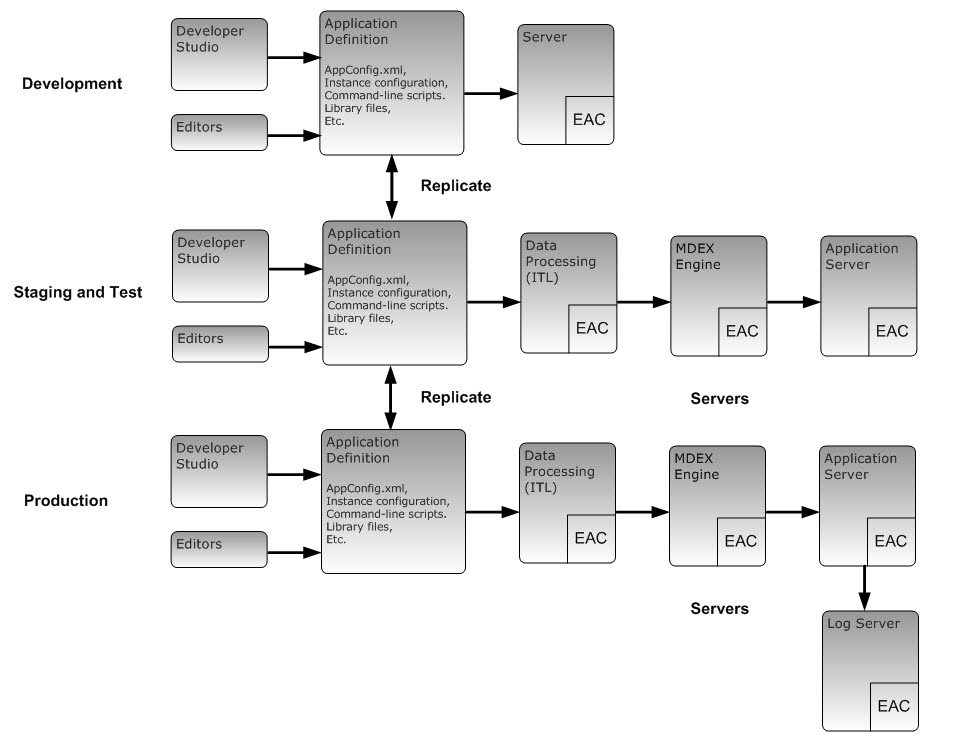
A typical situation is illustrated in the following diagram. In this example, an administrator maintains three environments, one for development, a second for staging, testing and adjusting applications, and a third for running the application in production.
The administrator wants to synchronize the application across the three environments, so that changes made in the development environment can be moved quickly to the staging environment, and so that adjustments made in the staging environment can be deployed easily both to the production environment, and back to the development environment (where they can be reflected in new versions of the application under development).
The administrator is developing with the Deployment Template, so when a new or modified application definition is moved to the EAC Central Server in each environment, the EAC takes care of propagating the necessary parts of the application definition across the servers in that environment.
- Create application definitions that can operate with little or no modifications in all environments.
- Automate the process of replicating the elements of the application definition between environments.
- Replicate the application definition to a secondary development environment and use it as a basis of a new application.
- Create a copy of the application that can be stored in a safe location, and then quickly replicated to a backup environment or disaster recovery site, even if the characteristics of that site differ from the original environment.
- Identify the artifacts that make up your application definition.
- Create custom files for environment-specific settings.
- Control paths to ensure interoperability across environments.
- Automate file collection.
- Replicate application definitions across environments.
- Select an approach to avoiding synchronization conflicts.
