It is typical to establish a development environment (as well as staging and production environments) with multiple servers. The diagram in this topic illustrates which Endeca components must be installed in a multiple server environment.
- The MDEX Engine, the Platform Services package (which includes the EAC Central Server and Agent), the data for your application, and the Deployment Template on one server. This is the Data Processing (ITL) server.
- The MDEX Engine and the EAC Agent on one or more additional servers. These are the MDEX Engine servers.
- Endeca Workbench and the EAC Agent on a separate server. This is the Tools server.
You can also have a dedicated Application server to host the front-end application, or use one of the existing servers for this purpose. While you may or may not have an Application server in your development environment, in staging and production environments it is typical to set up one or more dedicated Application servers.
The following diagram illustrates which Endeca packages or their parts must be installed on the servers dedicated to the Endeca deployment:
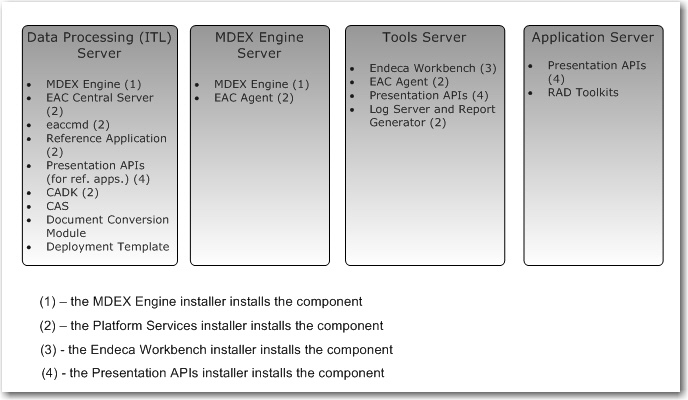
- Each server plays a role in your Endeca environment and is represented as a single physical machine. However, you can configure more than one server for data processing (ITL), the MDEX Engine, and the front-end application.
- A Data Processing (ITL) server typically hosts the EAC Central Server, which is part of the Platform Services package.
- A Data Processing (ITL) server that runs on Windows also typically hosts Developer Studio.
- A Data Processing (ITL) server must host the Dgidx component that is part of the MDEX Engine installation package.
- An MDEX Engine server hosts the Dgraph component that is part of the MDEX Engine installation package.
- An MDEX Engine server and a Tools server must each host the EAC Agent, which is part of the Platform Services package.
- An Application server does not require the EAC Agent.
