You can set constraints for the spelling dictionaries in Developer Studio.
By default, Dgidx adds all words contained in dimensions or properties enabled for search to the dictionary (limiting the Aspell dictionary to only contain ASCII/alphabetic terms). However, because performance of spelling correction in the MDEX Engine depends heavily on the size of the dictionary, you can set constraints on the contents of the dictionary. These configuration settings are useful for improving the performance of spell-corrected search operations at runtime.
These configuration options can be used to tune and improve the types of spelling corrections produced by the MDEX Engine. For example, setting the minimum number of word occurrences can direct the attention of the spelling correction algorithm away from infrequent terms and towards more popular (frequently occurring) terms, which might be deemed more likely to correspond to intended user search terms.
To configure spelling dictionary entries:
- In the Project Explorer, expand Search Configuration.
- Double-click Spelling to display the Spelling editor.
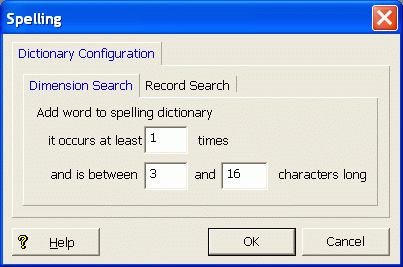
- You can separately configure entries in the dictionary based for dimension search and record search. Therefore, select either the Dimension Search tab or the Record Search tab. In this example, the Dimension Search tab is selected.
- Set the constraints for adding words to the spelling dictionary:
Field Description it occurs at least n times Sets the minimum number of times the word must appear in your source data before the word should be included in the spelling dictionary. and is between n1 and n2 characters long Sets the minimum (n1) and maximum (n2) lengths of a word for inclusion in the dictionary. - If desired, select the other tab and set the contraints for that type of search.
- Click OK.
- Choose Save from the File menu to save the project changes.
