Because Developer Studio exposes crawling and text extraction functionality in the context of a pipeline, it is important to understand how this functionality fits into the Forge processing framework. The following figure shows a diagram of a full crawling pipeline.
There are two kinds of flow in the pipeline:
- URLs flow from the spider to the record adapter (a record adapter that uses the Document format)
- Documents flow into the indexer adapter and are transformed into Endeca records.
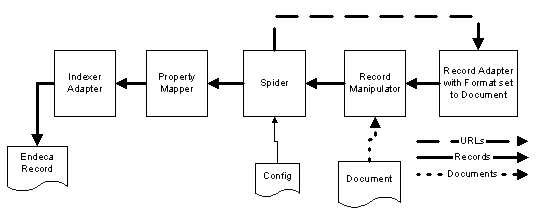
When Forge executes this pipeline, the flow of URLs and records is as follows:
- The terminating component (indexer adapter) requests the next record from its record source (property mapper).
- At this point, the property mapper has no record, so the property mapper asks its record source (spider) for the next record.
- The spider has no record, so the spider asks its record source (record manipulator) for the next record.
- The record manipulator also has no record, so it passes the request for the next record upstream to the record adapter (with format type Document).
- The record adapter asks the spider for the next URL it is to retrieve (the first iteration through, this is the root URL configured on the Root URL tab of the Spider editor).
- Based on the URL that the spider provides, the record adapter creates a record containing the URL and a limited set of metadata.
- The created record flows down to the record manipulator where the following takes place:
- The document associated with the URL is fetched (using the RETRIEVE_URL expression).
- Content (searchable text) is extracted from the document (using the CONVERTTOTEXT or PARSE_DOC expression).
- Any URLs in the text are also extracted for additional crawling.
- The record moves to the spider where additional URLs (those extracted in the record manipulator) are queued for crawling.
- The property mapper performs property to dimension and source property to Endeca property mapping.
- The indexer adapter receives the record and writes it out to disk.
The process repeats until there are no URLs in the URL queue maintained by the spider.
