 Workforce Planning Overview
This chapter provides an overview of Workforce Planning and discusses:
Workforce Planning business processes.
Workforce Planning implementation.
Workforce Planning OverviewPeopleSoft Workforce Planning is an analytical application that you use to review the skills that your workforce has, which skills it needs, and what needs to be done to obtain those skills. With Workforce Planning you:
Create a central repository of all of your organization's competencies and accomplishments, from PeopleSoft HRMS and other sources, in the Operational Warehouse - Enriched (OWE).
Compile and review an inventory of your current workforce's competencies and accomplishments.
Define your organization's current competency strategy, or other alternate, and forward-looking competency strategies.
Analyze the match, and gap, between the current workforce competency inventory and the competency strategy requirements to determine what competencies you require.
Conduct in-depth analysis of competency requirements.
Link strategic goals and competencies directly to individual employees.
Determine knowledge capital needs for mid- to long-term business planning.
Reduce hiring time and expense, lower training costs, and increase productivity across the organization.
Process Flow
To set up and use Workforce Planning, you:
Set up EPM Foundation and the Operational Warehouse - Enriched (OWE).
Import, by ETL, data from HRMS source tables into the OWE.
Create a centralized repository of all your internal and external workforce and competency data, in the OWE.
Perform setup tasks specific to Workforce Planning for trees, workforce groups, mapping proficiency, tasks, and roles.
Review the inventory of workforce competencies.
Define competency strategies and set up competency models.
(Optional) Run the Value Allocation process.
Run the Match process.
Assess the match between the workforce competency inventory and the competency strategies.
See PeopleSoft Enterprise Performance Management Fundamentals 9.1 PeopleBook
See PeopleSoft Workforce Analytic Applications 9.1 PeopleBook
Workforce Planning Business ProcessesThis application is part of the Development and Deployment business processes.
The following process flow illustrates the Workforce Planning processes:
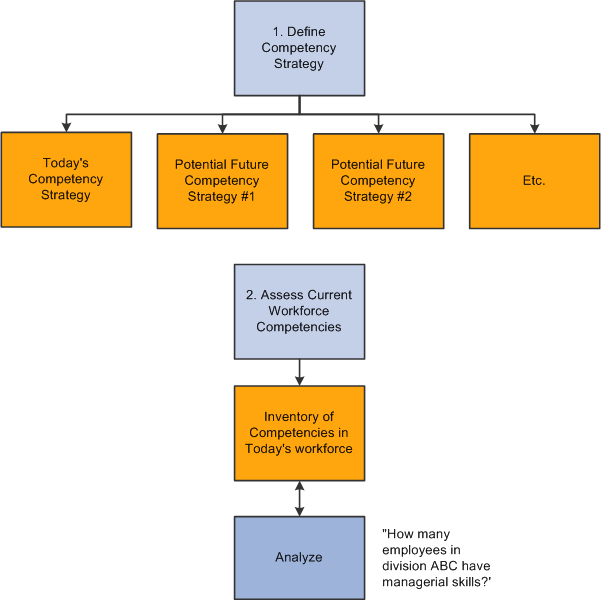
High-level business process diagram for Workforce Planning — part 1
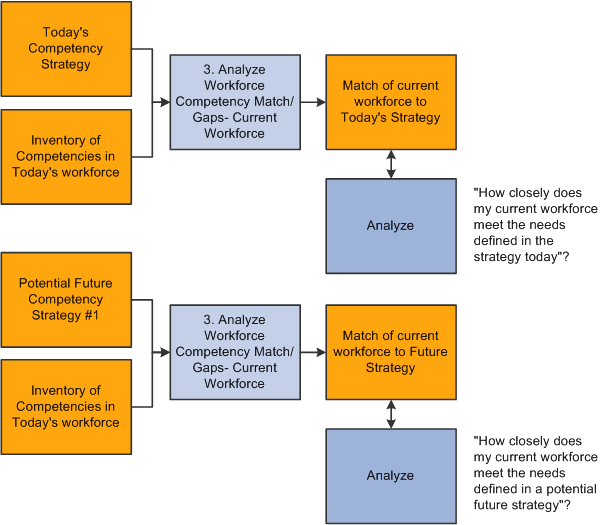
High-level business process diagram for Workforce Planning — part 2
Workforce Planning ImplementationPeopleSoft Setup Manager enables you to generate a list of setup tasks for your organization based on the features that you are implementing. The setup tasks include the components that you must set up, listed in the order in which you must enter data into the component tables, and links to the corresponding PeopleBook documentation.
Other Sources of Information
In the planning phase of your implementation, take advantage of all PeopleSoft sources of information, including the installation guides, ETL job reports, and data models. A complete list of these resources is in the preface, with information about where to find the most current version of each.
See Also
PeopleSoft PeopleTools PeopleBook: Setup Manager
PeopleBooks and the Online Library