The DDR input file defines the Endeca managed attributes, with the specific settings of some DDR properties.
The TaxonomyMetadata.csv sample input file used for the managed attributes looks like this:
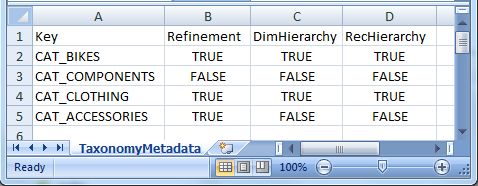
Key,Refinement,DimSearch,RecHierarchy
The actual names of the header properties can be different from the names used here. The properties are delimited (for example, by the comma in the sample CSV file). After the header row, the second and following rows in the input file contain the values for the configuration properties.
| Input Header Property | Maps to PDR Property |
|---|---|
| Key | mdex-dimension_Key |
| Refinement | mdex-dimension_EnableRefinements |
| DimHierarchy | mdex-dimension_IsDimensionSearchHierarchical |
| RecHierarchy | mdex-dimension_IsRecordSearchHierarchical |
The Reformat component will take these header properties and values and construct DDRs for the managed attributes.
updateDimensions operation
The Configuration Service's updateDimensions operation can load the DDR files into the Endeca data store. The operation creates the standard attributes or updates them if they already exist. The default DDR properties are listed in the topic Managed attribute default values.
<config-service:configTransaction
  xmlns:config-service="http://www.endeca.com/MDEX/config/services/types/1/0">
  <config-service:OuterTransactionId>${OUTER_TRANSACTION_ID}</config-service:OuterTransactionID>
<config-service:updateDimensions
      xmlns:mdex="http://www.endeca.com/MDEX/XQuery/2009/09">
        $xmlString
    </config-service:updateDimensions>
</config-service:configTransaction>
- The OUTER_TRANSACTION_ID variable specifies the outer transaction ID for the request. The variable and its value is stored in the workspace.prm file of the Integrator Designer project.
- The $xmlString variable contains the various DDRs that have been constructed by a Reformat component in the graph.
The operation would be specified in the request structure of a WebServiceClient connector, which will then send the request to the Configuration Web Service.
