The Edge component must be configured with a Metadata definition.
The prerequisite for this task is that an Edge component must exist in the graph.
To configure the Metadata definition for the data delete Edge:
- Right-click on the Edge and select . The Flat File dialog is displayed.
- In the Flat File dialog, click the Browse button, which brings up the URL Dialog.
-
For the
File URL property:
- Click inside its Value field, which displays a ... browse button.
- Click the browse button.
- Click the Workspace view tab and then double-click the data-in folder.
- Select the data delete input file and click OK.
- In the Flat File dialog, make sure that the Record type field is set to Delimited and then click Next.
-
In the middle pane of the Metadata Editor:
- Check the Extract names box.
- Click Reparse.
- Click Yes in the Warning message.
-
In the upper pane of the Metadata Editor:
- Click the Record:recordName1 Name field and change the recordName1 default value to a name such as DeleteRecs.
- Make sure that the Type field of all properties is set to type string. For example if the specKey property is set to integer, change it to string.
-
Verify that all properties have the correct delimiter
character set (which is the pipe character in our example).
At this point, the pane should look like this example:
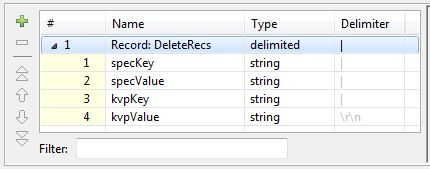
- When you have input all your changes, click Finish.
- Save the graph.
The Metadata definition for the Edge component is now set.
