Oracle® Insurance Policy Administration 9.6.0.0 E35883-01
Disbursement records are created when a disbursement activity is processed. Search for disbursement records from the Disbursement | Search option on the Main menu. When the results are returned from the search, click the disbursement record and scroll down to see the record details.
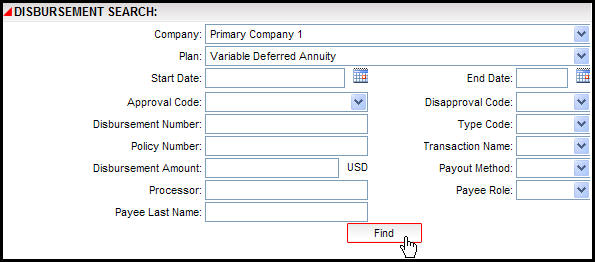
Disbursement Search Screen with Plan Group Functionality Turned Off
The following search fields are supported in this release of OIPA.
Company: Select a company from the drop down box.
Plan Group: Select a plan group from the drop down box. The Plan Group field will only be visible if Plan Group functionality is turned on in OIPA.
Start Date: Enter a beginning search date.
End Date: Enter an ending search date.
Enter both a start and end date when searching for disbursement records.
Disbursement Number: Enter a disbursement number.
Policy Number: Enter the policy number associated with the disbursement record.
Processor: Enter the name of the processor who created the activity that spawned the disbursement. The processor name must be entered exactly as it appears in OIPA. The wild card (% percent sign) does not work in this field.
Typecode: Select an option from the Type Code box.
Payout Method: Select an option from the Payout Method box.
Payee Role: Select a role from the Payee Role box.
Copyright © 2009, 2013, Oracle and/or its affiliates. All rights reserved. Legal Notices