 PeopleSoft Online Marketing Overview
This chapter provides an overview of PeopleSoft Online Marketing and discusses:
PeopleSoft Online Marketing business processes.
PeopleSoft Online Marketing integrations.
PeopleSoft Online Marketing implementation.
PeopleSoft Online Marketing OverviewPeopleSoft Online Marketing provides the flexibility to reach customers through a variety of outbound channels and then manage responses across any channel. Marketing departments are beginning to go beyond traditional one-way marketing—they need the ability to create a relevant, ongoing, automated dialog with customers.
Any dialog has three key parts: reach, response, and interact.
Reach enables you to reach out to customers through email, web links, and banner ads, as well as traditional channels, such as direct mail. These channels can involve uninitiated interactions or automated event-driven interactions (such as a change in marital status or the purchase of a particular product). Regardless of the channel, customers can then respond.
Response: When customers respond online, PeopleSoft Online Marketing lets you create targeted web landing pages or splash pages that provide additional information or contain forms or surveys. When customers submit a form, you can design any sequence of follow-up or confirmation pages. Each customer can follow a different path that is based on her or his individual profile information. For example, based on whether a respondent is qualified, you can change the next steps. Similarly, if customers respond via phone, branch scripts let you personalize the interaction for each customer.
Interact: Once customers respond, you can automate follow-up with simple confirmations, targeted offers, and more sophisticated sequences of interactions.
PeopleSoft Online Marketing enables you to handle the entire online marketing dialog using electronic channels. You can create a dialog by designing email messages to be sent to your target audience and web pages where interested recipients can respond. You can also create advertisements that include web links generated by Online Marketing that direct people to your dialog web pages. The respondents to your dialog go to the web page specified in the email or advertisement and respond to the surveys and offers. The data that the respondents provide on the web pages can be added to your database immediately, and a series of follow-up interactions, such as follow-up email messages, can be sent automatically so that a relevant, ongoing, automated dialog is created. Once a dialog is launched, you can obtain the results of the dialog and any associated marketing campaigns using the graphical analysis tools in CRM Analytics (Marketing Insight sample template).
PeopleSoft Online Marketing Business ProcessesUsing Online Marketing to create and run marketing dialogs requires that you perform a number of tasks. This section guides you in creating a dialog and provides a brief overview of the specific tasks involved. They include:
Accessing and setting up
Preparing Online Marketing for dialogs (the tasks in this step are performed through the PeopleSoft CRM Marketing application)
Designing the dialog
Deploying the dialog
Analyzing dialog results (performed through PeopleSoft CRM Active Analytics Framework)
The following process flow illustrates the PeopleSoft Online Marketing business processes, from the initial access and setup through dialog design, launch, and analysis:
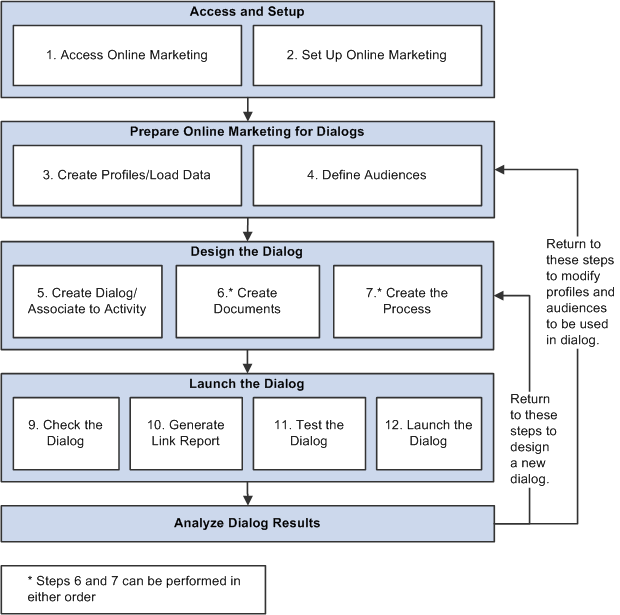
Online Marketing dialog flow
We discuss these business processes in the business process chapters of this PeopleBook.
PeopleSoft Online Marketing IntegrationsPeopleSoft Online Marketing integrates with PeopleSoft Marketing.
We discuss integration considerations in the implementation chapters of this PeopleBook.
Supplemental information about third-party application integrations is located on the My Oracle Support website.
PeopleSoft Marketing
You can create PeopleSoft Online Marketing dialogs using PeopleSoft Marketing, and you can share audience and profile information between Marketing and Online Marketing. Also, if both Marketing and Online Marketing are purchased, you can create Marketing programs that track costs and establish teams and tasks. Costs from traditional campaigns and dialogs can be rolled up into a single Marketing program.
See PeopleSoft CRM 9.1 Marketing Applications PeopleBook.
PeopleSoft Workforce Communications
You can create survey dialogs for use with PeopleSoft Workforce Communications. Using Online Marketing, initiatives that require automated, one-way or two-way online communications between HR and the workforce can be implemented using dialogs.
See Oracle's PeopleSoft CRM Workforce Communications Preface.
PeopleSoft Event Management
PeopleSoft Online Marketing enables the email and web communications required for inviting attendees to events, as well as event reminder and follow-up communications and actions, and the online registration capabilities. Online Marketing is recommended to enable the full business process for Event Management.
See Oracle's PeopleSoft CRM Event Management Preface.
PeopleSoft CRM for Higher Education
PeopleSoft Online Marketing adds custom actions in the Dialog Designer that allow you to further automate dialogs and convert dialog response to actions, delivering a personalized follow-up experience for each dialog recipient. New actions include the ability to send an SMS message, create a lead, add a person to a PeopleSoft TeleSales campaign, and send print correspondence.
You can also design online dialogs that allow you to target particular audiences. You can pre-fill information such as the constituent’s name and email address, saving the constituent time when filling out the survey. Based on how the constituent responds, you can include different associated actions. For example, if the student checked off that they were not satisfied with the level of advising and mentoring they are receiving, that can trigger an action like an alert to the head of advising. Other actions can display dynamic content based on their response. For example, if the student indicates that he would like some help with study skills, you can then display info about a study skill seminar on the next web page or send an email with an invitation to the seminar. You can also capture text responses.
See Oracle's PeopleSoft CRM for Higher Education Preface.
PeopleSoft Online Marketing ImplementationPeopleSoft Setup Manager enables you to generate a list of setup tasks for your organization based on the features that you are implementing. The setup tasks include the components that you must set up, listed in the order in which you must enter data into the component tables, and links to the corresponding PeopleBook documentation.
PeopleSoft Online Marketing also provides component interfaces for loading data from an existing system into PeopleSoft Online Marketing tables. Use the Excel to Component Interface utility with the component interfaces to populate the tables.
This table lists all of the components that have component interfaces:
|
Component |
Component Interface |
Reference |
|
SMS Setup RB_SMS_SETUP |
RB_SMS_SETUP_CI |
|
|
SMS Template RB_SMS_TMPL |
RB_SMS_TMPL_CI |
Other Sources of Information
In the planning phase of your implementation, take advantage of all PeopleSoft sources of information, including the installation guides, data models, business process maps, and troubleshooting guidelines. A complete list of these resources appears in the preface in the PeopleSoft CRM 9.1 Application Fundamentals PeopleBook, PeopleSoft CRM 9.1 Business Object Management PeopleBook, and PeopleSoft CRM 9.1 Product and Item Management PeopleBook with information on where to find the most up-to-date version of each.
See Also
PeopleTools 8.52: PeopleSoft Setup Manager PeopleBook