TheControl Panel, available from the Studio menu, contains several tools for system administrators and power users.
The left menu is grouped into sections, each containing a number of user and administrator functions. Each section can be expanded or collapsed.
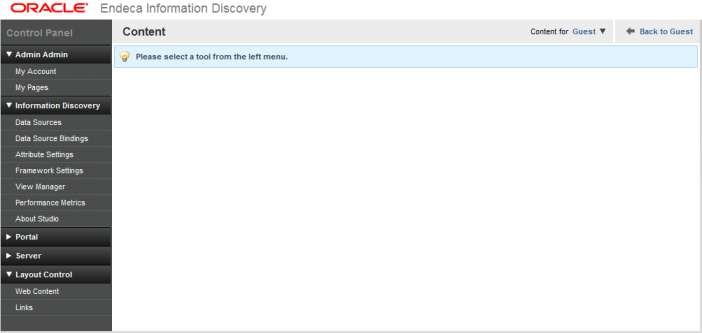
User name section
This is the logged-in user's personal space, which contains the
following functions:
| My Account | Allows you to edit your user information, including changing your password. |
Information Discovery section
Power users most commonly use the
Control Panel to get access to these
administrative tools:
| Data Sources | Used to view and reload data sources. |
| Data Source Bindings | Used to associate data sources with components. |
| Attribute Settings | Used to create and modify attribute groups, and configure attributes. |
| Framework Settings | Provides access to state, security, and other settings. |
| View Manager | Used to configure views for data sources. |
| Performance Metrics | Displays information about component and Oracle Endeca Server query performance. |
| About Studio | Provides build and version information for Studio. |
Portal section
The
Portal section is intended for portal
administrators to manage the user community. The administrative tools in this
section are:
| Users | Used to add and modify user accounts. |
| Communities | Used to create and edit Communities, which are collections of users who have a common interest. |
| User Groups | Used to create and edit User Groups, which are simple, arbitrary collections of users. |
| Roles | Used to manage user roles. Administrators can use these roles to control permissions in the application. |
| Password Policies | Sets the password rules, such as the password strength and the password expiration. |
| Settings | Contains most of the global portal settings, including authentication, e-mail configuration, and the default landing page. |
| Monitoring | If monitoring is enabled, monitors all the live sessions in the portal. |
| Plugins Configuration | Used to configure which portal roles have access to the plugins. |
Server section
| Server Administration | Allows you to perform administrative tasks,
including:
|
| Portal Instances | Allows you to add and configure multiple portal instances on a single server. |
| Plugins Installation | Allows you to view the installed plugins and add new ones. |
Layout Control section
| Web Content | Allows you to add Web-based content to display on Web Content Display components. |
| Links | Allows you to add folder links. |
