The Map component can include both text and range filter search tools to allow you to find specific locations.
The text search allows you to display locations based on their proximity to a specified place name. For example, you can display locations within 10 miles of Boston, Massachusetts.
The range search allows you to only display locations in a selected area of the map.
To do text and range searches on the Map component:
-
To do a text search:
-
Click the text search icon.
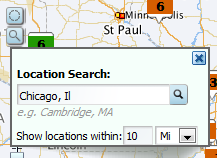
The Location Search pop-up is displayed.
- In the field, type the search text.
-
In the
Show locations within field, specify the
number of miles or kilometers, then select the unit of measurement.
-
Click the search icon.
The map is updated to only show pins for locations within the specified area.
If the Auto Pan checkbox is checked, the map shifts automatically to display all of the pins for the first page of results.
A Range Filter entry also is added to the Breadcrumbs component.
-
Click the text search icon.
-
To do a range search:
- Click the range search icon.
-
On the map, click and drag the mouse from the middle to the
edge of the area to select.
As you drag the mouse, the distance from the point you started at is displayed.

-
When you have selected the area you want, release the mouse.
The map is updated to only display pins for locations within that selected area.
A Range Filter entry also is added to the Breadcrumbs component.
If the Auto Pan checkbox is checked, the map shifts automatically to display all of the pins for the first page of results.
