Sharing members allows alternate hierarchical structures within the Dimension Library. Base members must exist before creating shared members. You can create multiple shared members for a member.
The second instance of any member is tagged as a shared member, with “Shared” in parentheses.
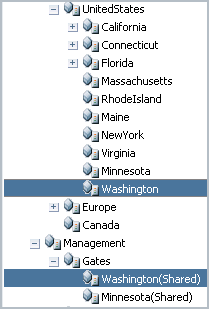
In the following example, the entity Washington is a member of the UnitedStates hierarchy and a member of the Management-Gates hierarchy.
You can create shared members in two ways:
Copy and paste the shared member as a child or sibling. See Creating Shared Members by Copying and Pasting.
Insert the shared member using the member selector, which enables you to select members from a different portion of the dimension without losing your position in the Shared Library tree view. See Creating Shared Members Using the Member Selector.
Note: | You can modify global properties for shared instances of members. For information on global and relationship properties, see Modifying Properties. |