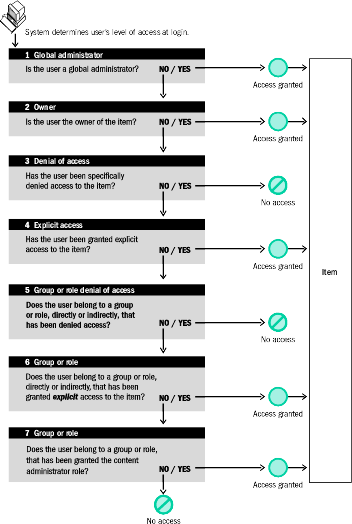
A user gets access privileges to an item through the set of groups of which the user is a member, or through the set of roles assigned to that user. Access privilege checking for items is implemented in the following order:
User has the global administrator role? If the answer is yes, access is granted and checking stops.
User is the owner of the item? If the answer is yes, access is granted and checking stops.
User is denied access to the item? If the answer is yes, access is denied and checking stops.
User is granted specific access to the item? If the answer is yes, access is granted and checking stops.
User belongs to a group or role that has been denied access? If the answer is yes, access is denied and checking stops.
User belongs to a group or role that has been granted access to the item? If the answer is yes, access is granted and checking stops.
User belongs to a group or role that has been granted the content administrator role? If the answer is yes, access is granted and checking stops.
For steps 4 and 6, if the access privilege granted is at the same level or higher than required, then access is granted.