Connecting to the Getting Started data domain

Next, you update the default Studio data source to connect to the Getting Started data domain that you created when you ran the baseline graph in Integrator.

To connect to the Getting Started data domain:

  1. From the Studio menu, choose Control Panel.
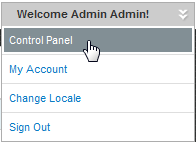
    Studio menu with Control Panel option highlighted
  2. In the Control Panel menu, in the Information Discovery section, click Data Sources.
  3. For the default data source, click Edit.
  4. On the Data Source Definition dialog, edit the JSON string as follows:
    {
      "dataDomainName": "GettingStarted",
      "name": "GettingStarted",
      "port": "7001",
      "server": "localhost"
    }
  5. Click Save.
  6. To return to the Discovery Applications page, click Back to Home.