After you configure the LDAP connection for your SSO integration, you configure the Oracle Access Manager SSO settings.
The settings are on the Oracle Access Manager SSO tab on the Authentication page.
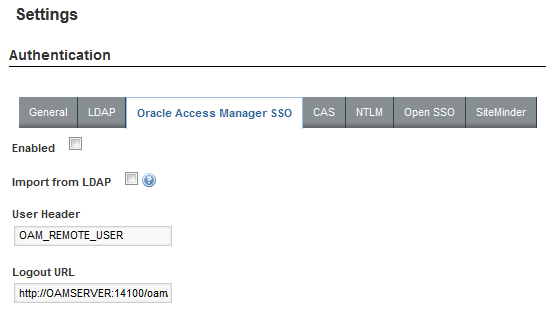
To configure the SSO settings:
- From the Studio menu, select Control Panel.
- In the Control Panel menu, under Portal, click Settings.
- In the Settings page menu to the right, click Authentication.
- On the Authentication page, click the Oracle Access Manager SSO tab.
- Check the Enabled checkbox.
- Check the Import from LDAP checkbox.
- Leave the default user header OAM_REMOTE_USER.
-
In the
Logout URL field, provide the URL to navigate
to when users log out.
Make sure it is the same logout redirect URL you have configured for the Webgate:
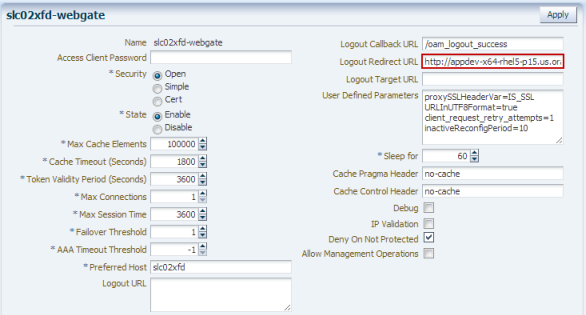
For the logout URL, you can add an optional end_url parameter to redirect the browser to a final location after users sign out. To redirect back to Studio, configure end_url to point to the OHS host and port.
For example:
http://oamserver.us.mycompany.com:14100/oam/server/logout?end_url=http://studiohost.us.company.com:7777/
- To save the configuration, click Save.
