If you want to consider ancestor managed attribute values when matching a record search query, you can enable hierarchical record search.
By default, a record search that uses a managed attribute as the search key returns only those records that are assigned an attribute value whose text matches the search terms. In other words, when a managed attribute is used as the record search key, the text strings considered by record search for matching are the individual names of the attribute values within the attribute. The managed attribute name is automatically added as a searchable string.
(Additionally, if you added synonyms when creating managed attribute value records, end users can search for other text strings and still obtain the same records as they would get while searching for the original attribute value name.)
As part of creating searchable strings, record search does not consider implicit ancestor attribute values.
For example, consider the following managed attributes hierarchy:
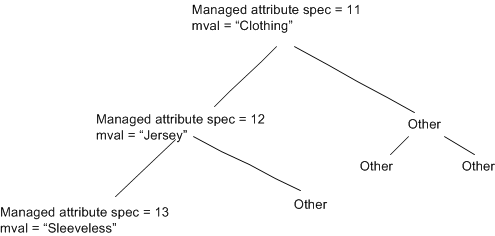
In this hierarchy, the Jersey attribute (with an ID of 12) is an ancestor of the Sleeveless attribute (ID of 13). A search against the Clothing attribute for the keyword sleeveless matches any records assigned the attribute value 13. But a search in Clothing for sleeveless jersey does not match these records, because record search does not normally consider implicit ancestor attribute value assignments.
In such cases, you may want record search to consider ancestor attribute values when matching a record search query. You can enable this sort of hierarchical record search by setting the mdex-dimension_IsRecordSearchHierarchical attribute to true in the managed attribute's DDR (Dimension Description Record), using the operations in the Configuration Web Service.
